Last Updated on July 24, 2026
An AI sentence rewriter uses natural language processing to transform existing text while preserving original meaning. These tools help writers improve clarity, adjust tone, and repurpose content across different platforms. The best AI sentence rewriter tools offer multiple rewrite modes like Standard, Creative, and Formal. When used correctly, an AI paraphrasing tool saves time without sacrificing your unique voice. Always review AI-generated text for meaning drift and add your personal insights. The most effective approach combines AI efficiency with human creativity.
Why Your Writing Needs an AI Sentence Rewrite
That blinking cursor has stared you down more times than you care to count. You know what you want to say. The ideas are clear in your head. But translating those thoughts into polished, engaging sentences feels like pulling teeth.
Enter the AI sentence rewriter.
This technology has evolved far beyond simple synonym swapping. Modern AI sentence rewriting tools understand context, preserve meaning, and even adjust tone. They’re not here to replace your voice. They’re here to amplify it.
Let’s explore how these tools work, why they matter, and how you can use them without sounding like a robot wrote your content.
What Exactly Is an AI Sentence Rewrite?
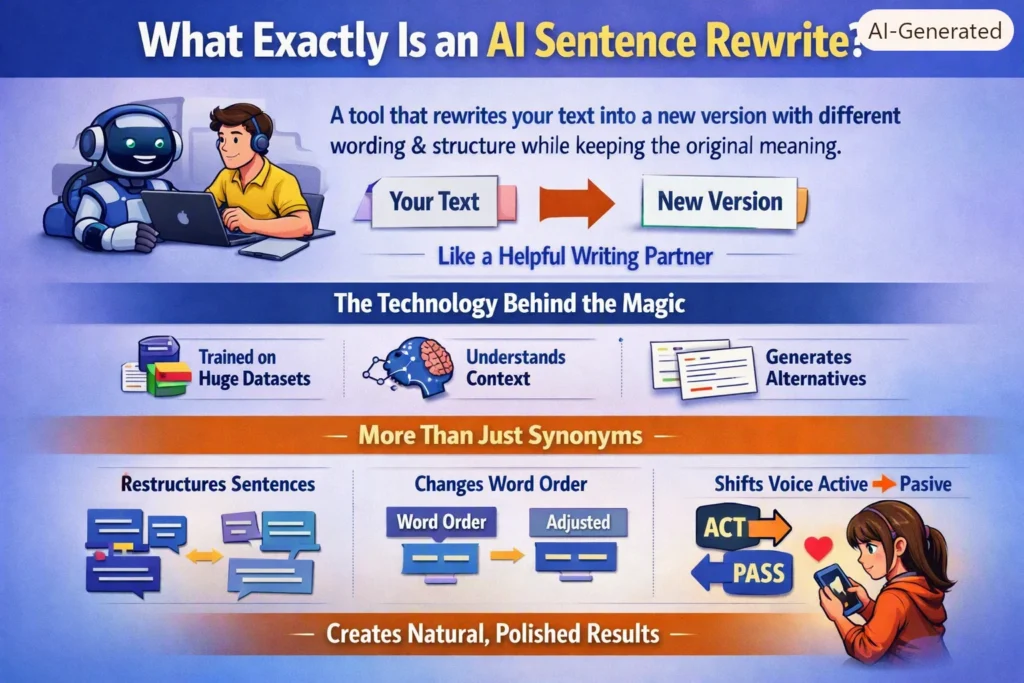
An AI sentence rewriter is a software tool that takes your existing text and generates a new version with different wording and structure. The original meaning stays intact but the presentation changes.
Think of it like having a writing partner who suggests fresh ways to express your thoughts. You still decide what to say. The AI simply helps you say it better.
The Technology Behind the Magic
These tools rely on large language models trained on massive datasets of human writing. They learn patterns, understand context, and predict which words naturally follow others. When you feed text into an AI text rewriter, it analyzes the input and generates multiple alternative versions.
The best AI paraphrasing tools don’t just swap synonyms. They restructure entire sentences, adjust word order, and even change the grammatical voice when appropriate. This deeper processing produces more natural-sounding results.
Rewriting vs Paraphrasing vs Rephrasing
People often use these terms interchangeably but they have distinct meanings:
| Term | Definition | Best Use Case |
|---|---|---|
| Rewriting | Broad transformation that can involve significant restructuring | Complete content refresh for new audiences |
| Paraphrasing | Restating information in your own words at similar detail level | Academic writing and source integration |
| Rephrasing | Changing phrasing of short passages to improve flow | Polishing awkward or unclear sentences |
Most modern AI sentence rewriter tools handle all three tasks well. The line between them has blurred considerably.
Why Use an AI Sentence Rewriter Tool?
Let’s address the elephant in the room. Many people associate AI rewriters with students trying to cheat plagiarism checkers. That narrow view misses the real value these tools provide.
Boost Clarity and Readability
Technical documentation often reads like it was written by engineers for engineers. An AI rewrite text tool can transform dense jargon into clear instructions that anyone can follow. This isn’t oversimplifying. It’s effective communication.
Adjust Tone for Different Audiences
That formal business report doesn’t work well as a LinkedIn post. An AI sentence rewriter can loosen up the language, add conversational touches, and make your content feel more approachable. Conversely, it can make casual blog posts sound more professional when needed.
Repurpose Content Efficiently
You’ve written a comprehensive 2000-word article. Now you need social media snippets, email newsletters, and a LinkedIn version. An AI paragraph rewriter can generate these variations in minutes rather than hours.
Save Time on Repetitive Edits
Some writing tasks are simply tedious. Rewriting the same information for different formats, updating old content, or expanding brief bullet points into full paragraphs. An AI content rewriter handles these repetitive tasks quickly.
Improve Vocabulary and Sentence Structure
Even experienced writers fall into patterns. We reuse favorite phrases. Our sentences start to sound samey. An AI writing assistant suggests alternatives you might not consider, expanding your linguistic toolkit.
How to Choose the Right AI Sentence Rewriter Tool
Not all AI rewriters are created equal. Some excel at creative writing while others shine in academic contexts. Here’s what to look for.
Key Features to Evaluate
Rewrite Depth Options – Does the tool offer light polishing or heavy restructuring? Good AI sentence rewriter tools provide multiple modes. Standard mode for minor tweaks. Creative mode for bold transformations. Formal mode for professional contexts.
Use Case Fit – Multi-purpose assistants like Jasper work well for marketing content. Academic-focused tools like Paper Digest prioritize precision and citation handling. Match the tool to your primary need.
Meaning Preservation – This is non-negotiable. The tool must preserve facts, intent, and nuance. Test with sentences containing names, numbers, and specific claims. If the AI changes key details, keep looking.
Workflow Integration – Does it work where you write? Browser extensions, Google Docs integration, and API access matter for seamless workflows.
Privacy Policies – Review what the vendor logs. How long do they retain your data? Do they use your inputs for model training? These questions matter more than most users realize.
Top AI Sentence Rewriter Tools Comparison
| Tool | Best For | Key Features | Starting Price |
|---|---|---|---|
| QuillBot | Precision rewriting and meaning preservation | Multiple rewrite modes, grammar checker, citation tools, Chrome and Docs integration | Free; Premium at $4.17/month |
| Wordtune | Real-time sentence-level improvements | Rewrite, shorten, expand, tone shifts, contextual suggestions | Free; Advanced at $6.99/month |
| Jasper | Brand-consistent marketing content | Templates, tone controls, brand voice settings, collaboration features | Pro at $69/month per seat |
| Grammarly | Tone-aware document refinement | Rewrite suggestions, tone improvements, grammar checking | Free; Pro at $11.09/month |
| Originality.ai | Originality scoring and plagiarism prevention | AI detection scoring, plagiarism checks, readability insights | Pay-as-you-go or $12.95/month |
| Smodin | Multilingual content creation | OCR-based text input, image-to-text paraphrasing, AI detection | Starts at $8.10/month |
Free vs Premium AI Sentence Rewriter Tools
Free tools work well for occasional use. They typically offer fewer modes, lower character limits, and slower processing. Premium versions provide more features, higher limits, and better output quality.
The question isn’t whether free or paid is better. The question is what fits your workflow. Casual bloggers might find free options sufficient. Professional content teams benefit from the advanced features and higher limits of paid tools.
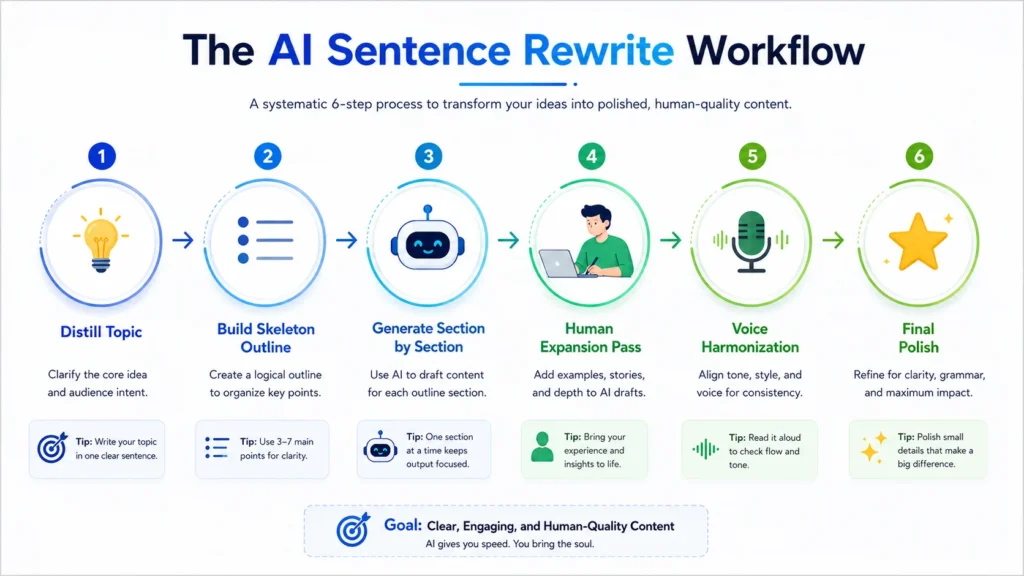
The Step-by-Step AI Sentence Rewrite Workflow
Using an AI sentence rewriter effectively isn’t about pressing a single button. It requires a deliberate process that combines AI efficiency with human judgment.
Step 1: Distill Your Topic
Before you type anything into an AI tool, get crystal clear on what you’re writing. Write down three things:
- Your working title
- Two key takeaways readers should remember
- Three questions your audience wants answered
A tight prompt forces clarity on both sides of the keyboard. Instead of “write about content marketing,” try “explain how small ecommerce brands can use zero-party data to personalize email campaigns.”
Step 2: Build a Skeleton Outline
Turn your distilled topic into a rough outline with no more than eight bullet points. This structure guides the AI and prevents scope creep.
Mark where you plan to insert personal anecdotes, proprietary data, or original research. By separating AI-generated sections from human-only sections, you avoid the cut-and-paste chaos that ruins voice consistency.
Step 3: Generate Section by Section
Now bring in the AI. Feed one bullet point at a time along with a style cue. Examples include:
- “Conversational but expert”
- “B2B SaaS tone”
- “Academic but accessible”
Review each output immediately. Ask yourself: “Does this move the argument forward?” If not, refine the cue and regenerate before moving on. Don’t wait until the end to review. That’s when problems compound.
Step 4: The Human Expansion Pass
Even the most coherent AI paragraph can feel thin on detail. This is where you add fresh research, quotes, screenshots, or original metaphors.
Treat the AI’s text as scaffolding. Walk through it sentence by sentence and ask: “What proof can I attach here?” This is where your expertise shines. The AI provides the structure. You provide the substance.
Step 5: Voice Harmonization
Mixing human and machine prose leaves tonal seams. Read the entire draft aloud. Awkward transitions, mismatched idioms, or sudden shifts from “we” to “I” jump out instantly.
Adjust for rhythm. Cut any sentence that feels generic. Inject signature phrases your regular readers expect. The goal is a seamless blend where readers can’t tell which parts came from AI and which came from you.
Understanding Risk Levels and Rewrite Modes
Risk Levels Explained
Narrativa’s Navigator introduced the concept of risk levels. This refers to how much variation the AI model introduces into your text.
Low Risk – The content is only slightly rephrased. The original structure and tone remain intact. Best for technical documents, formal messages, or texts that require precision.
Moderate Risk – The text is rephrased with more flexibility. Tone adjusts and ideas reorganize. Best for blogs, articles, or presentations intended for different audiences.
High Risk – The content is creatively rephrased. This may alter the original message. Best for marketing campaigns, promotional content, or anything requiring emotional impact. Always supervise high-risk outputs.
Decoding QuillBot Modes
QuillBot offers several modes that serve different purposes:
Standard – Balances rewriting with maintaining meaning. Produces natural, clear text for most purposes.
Fluency – Fixes grammar errors and makes text sound natural. Minimizes synonym changes. Great for rough drafts.
Formal – Rewrites text to sound professional. Good for academic or workplace writing.
Academic – Adjusts text for a scholarly tone. Great for essays and research papers.
Creative – Makes bold changes for a unique rewrite. May slightly change the meaning. Use when you want fresh perspectives.
Expand – Increases word count by adding more details. Good for expanding brief notes into full paragraphs.
Shorten – Reduces word count while keeping the meaning. Great for meeting word limits or creating summaries.
Common Pitfalls and How to Avoid Them
AI sentence rewriter tools are powerful but they have specific failure modes. Understanding these helps you catch problems before they reach your audience.
Meaning Drift
Names, numbers, or claims change subtly during rewriting. This happens when the AI prioritizes fluency over accuracy.
Fix: Compare entities and figures after rewriting. Use the original as a reference. If a specific number or name changed, correct it.
Hallucinations
Unfounded details appear in the output. The AI generates plausible-sounding but completely false information.
Fix: Re-check outputs against a source of truth. Any claim that seems new or surprising deserves verification.
Detectable AI Patterns
Some tools rely heavily on synonym swapping or predictable restructuring. This introduces detectable AI patterns that reduce perceived originality and authenticity.
Fix: Read your output critically. If it sounds generic or formulaic, add specific details, personal observations, and concrete examples.
Voice Dilution
Overusing AI rewriting can smooth out unique stylistic choices. The final output sounds competent but completely forgettable.
Fix: Reserve AI rewriting for rough drafts and editing suggestions. Never publish AI-generated content without substantial human revision.
AI Patterns to Kill on Sight
Certain words and phrases signal AI generation. Remove these from your writing:
Vocabulary to Avoid:
- Delve, crucial, pivotal, foster, leverage, tapestry, testament, underscore, vibrant, landscape
- Additionally, seamless, robust, cutting-edge
Structural Tells to Fix:
- Rule of three: Forced triads like “streamline, optimize, and enhance.” This sounds robotic.
- Negative parallelism: “It’s not just X — it’s Y.” Just state Y directly.
- Wh- sentence openers: Sentences starting with What/When/Where/Which/Who/Why/How as filler. Restructure to lead with the subject or verb.
- False agency: “The data tells us.” Name who read it and what they concluded.
Banned Phrases:
- “In today’s rapidly evolving landscape”
- “Game-changer,” “revolutionary,” “transformative”
- “Moreover,” “Furthermore,” “Additionally” (as sentence starters)
- “It’s worth noting that”
- “Here’s the thing:” / “It turns out”
Advanced Techniques for Better Results
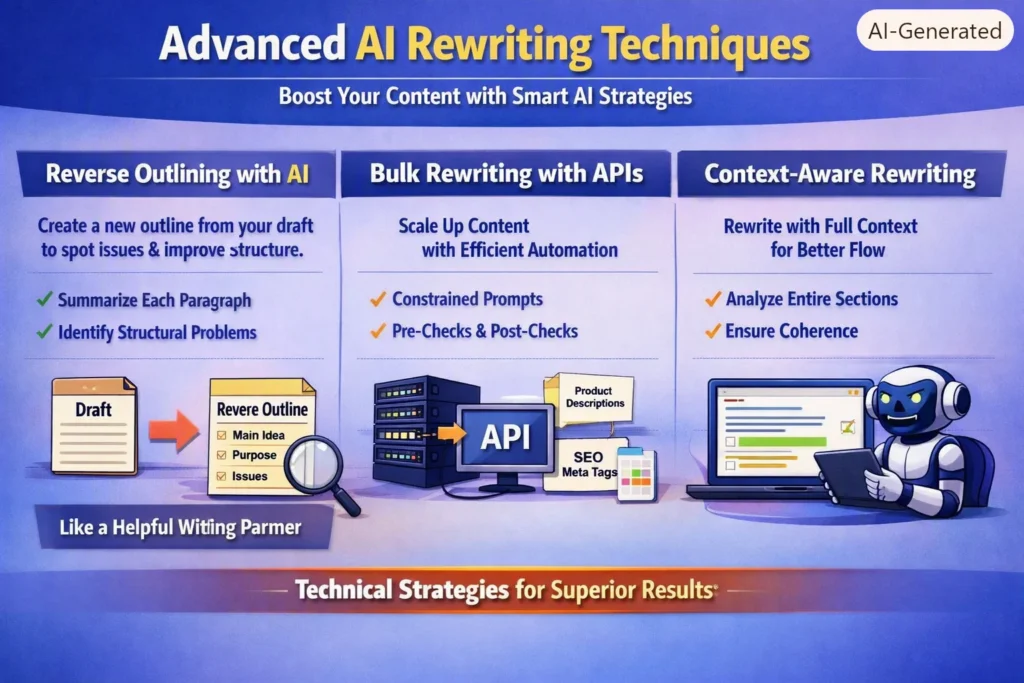
Reverse Outlining with AI
This technique works backward from your draft to reveal what you actually wrote versus what you intended.
Traditional outlining happens before writing. Reverse outlining happens after. You take your completed draft and create an outline from it. This exposes structural problems, repetition, and gaps in your argument.
Try this prompt: “Create a reverse outline for this blog post draft. For each paragraph, provide a one-sentence summary of the main point, the function this paragraph serves, and any structural issues you notice.”
Bulk Rewriting with APIs
For high-volume content teams, prefer APIs with constrained prompts and lower temperature settings to reduce drift. Build pipelines with pre-checks like entity extraction and post-checks like originality scans to protect quality at scale.
This approach works well for product descriptions, SEO meta tags, and other formulaic content types. It requires technical setup but delivers consistent results.
Context-Aware Rewriting
The best AI sentence rewriter tools understand surrounding content. They don’t just rewrite isolated sentences. They consider the paragraph, section, and overall document.
Use this to your advantage. Feed the AI entire paragraphs or sections rather than individual sentences. This produces more coherent outputs with better flow.
Ethics and Plagiarism Considerations
Proper Attribution Matters
AI paraphrasing doesn’t eliminate the need to credit original sources. If you’re rewriting someone else’s ideas, you still need to cite them. For distinctive wording, quote directly and include citations.
In academic settings, improper paraphrasing constitutes plagiarism regardless of how the text was produced. The rules don’t change just because AI did the rewriting.
Google’s Stance on AI Content
Google emphasizes that usefulness, originality, and accountability matter regardless of how content is produced. Their focus is on content quality, not content origin.
What does this mean for you? AI rewriting that simply rearranges existing content without adding value won’t rank well. AI rewriting that helps you create more original, useful, and engaging content is perfectly fine.
Maintaining Originality
The goal of an AI sentence rewriter should be to help you express your ideas better, not to obscure their origin. When in doubt:
- Keep quotations intact
- Attribute ideas properly
- Verify facts after rewriting
- Add your unique perspective
- Include original examples and anecdotes
The Future of AI Sentence Rewriting
This technology evolves rapidly. Here’s what’s coming.
Better Context Understanding
Current tools struggle with long-range context. Future AI sentence rewriters will understand entire documents, not just paragraphs. This means more consistent tone, better argument flow, and fewer contradictions.
Improved Style Transfer
Style transfer allows tools to mimic specific writing styles. Imagine feeding an AI a few examples of your writing and having it rewrite content in your exact voice. This technology exists but still needs refinement.
Integrated Workflows
AI rewriting will become deeply integrated into writing tools. Think of real-time suggestions, automatic tone adjustments, and seamless collaboration. The line between writing and rewriting will blur.
Enhanced Human-AI Collaboration
The future isn’t AI replacing writers. It’s AI empowering writers. Tools will handle more of the mechanical work while humans focus on creativity, strategy, and emotional connection.
Practical Tips for Better Results
Start with Human Writing
AI rewriting works best when you start with human-written text. Why? Because human writing contains the unique perspectives, experiences, and voice that AI can’t generate from scratch.
Write your rough draft without AI. Then use an AI sentence rewriter to polish and improve it. This preserves your voice while leveraging AI efficiency.
Use AI for Specific Tasks
Don’t ask AI to rewrite everything. Use it for specific, targeted improvements:
- Fix awkward sentences
- Adjust tone for different audiences
- Create multiple variations of key messages
- Expand brief notes into full paragraphs
- Shorten wordy passages
Review Every Output
Never publish AI-rewritten content without review. Read it aloud. Check for accuracy. Verify that the meaning stayed intact. Add your personal touches.
The best AI sentence rewriter tools produce outputs that still require human judgment. They’re assistants, not replacements.
Learn the Tool’s Limitations
Every AI tool has strengths and weaknesses. Learn where yours excels and where it struggles. Some tools handle creative writing well but fail at technical accuracy. Others preserve meaning perfectly but produce boring outputs.
Match the tool to the task. Use the right tool for the right job.
FAQs
1. Is using an AI sentence rewriter considered cheating?
Not at all. Think of it like using a calculator for math. The tool handles the mechanical work while you focus on the strategy and meaning. The ethical line gets crossed when you use AI to generate content that you claim as entirely your own original work without any human input.
The key is transparency and effort. Use an AI sentence rewriter to polish your ideas, not to generate them from scratch. Add your insights, verify facts, and make the final version distinctly yours. Most professional writers and content teams now treat AI writing assistants as essential tools in their workflow.
2. Will an AI sentence rewriter tool trigger plagiarism detectors?
That depends on how you use it. Most AI paraphrasing tools produce outputs with sufficiently different wording to avoid plagiarism matches. However, the underlying ideas and structure might still be similar to the source.
The real concern isn’t plagiarism detection. It’s meaning preservation. Some AI text rewriter tools change specific details, numbers, or claims during rewriting. Always review the output against your original to catch these errors. For academic or professional writing, properly cite your sources regardless of whether you used AI assistance.
3. How much does a good AI sentence rewriter cost?
Pricing varies widely based on features and usage limits:
| Tool | Price Range | Best For |
|---|---|---|
| QuillBot | Free; Premium $4.17/month | Budget-conscious users needing quality rewrites |
| Wordtune | Free; Advanced $6.99/month | Real-time writing assistance |
| Grammarly | Free; Pro $11.09/month | Comprehensive writing improvement |
| Jasper | $69/month per seat | Professional marketing teams |
| Smodin | Starts at $8.10/month | Multilingual and academic needs |
Free versions typically offer basic rewriting with character limits. Premium versions unlock additional modes, higher limits, and better integration with your existing tools.
4. Can an AI sentence rewriter keep my original meaning intact?
The best tools do, but you must guide them. Choose an AI paraphrasing tool with multiple rewrite modes and test it thoroughly. Different modes prioritize different outcomes. Standard mode balances fluency with meaning preservation. Creative mode makes bold changes that might shift meaning slightly.
Always compare the AI-generated text against your original. Check for changed names, numbers, and specific claims. This simple step catches most meaning drift issues before they reach your audience.
5. What’s the difference between rewriting and paraphrasing?
Rewriting is the broader term. It includes any process that changes wording while preserving meaning. This can involve significant restructuring, tone changes, or even adding new details.
Paraphrasing is a specific type of rewriting. It means restating information in your own words at a similar level of detail. Paraphrasing typically follows the original structure more closely than full rewriting.
| Term | Scope | Structure Change | Best Use |
|---|---|---|---|
| Rewriting | Broad | Significant | Content refresh, repurposing |
| Paraphrasing | Narrow | Minimal | Academic writing, source integration |
| Rephrasing | Specific | Minor | Polishing awkward sentences |
6. Which AI sentence rewriter tool works best for academic writing?
QuillBot with its Academic and Formal modes handles most academic needs well. Paper Digest and Smodin also offer strong academic-focused features. Look for tools that preserve technical vocabulary, maintain citation formats, and offer precise rewriting without changing meaning.
Avoid tools with overly creative modes for academic work. Stick to Standard, Fluency, or Academic modes. Always verify that citations and references remain intact after rewriting. Academic integrity requires proper attribution regardless of tool usage.
7. How can I make AI-rewritten text sound more human?
Human writing has rhythm. It mixes long sentences with short punchy ones. It uses contractions, idioms, and occasional humor. AI outputs tend toward uniform sentence lengths and formal phrasing.
Here’s how to humanize AI text:
- Add personal anecdotes and examples
- Use contractions like “don’t” and “I’ll”
- Vary sentence length dramatically
- Include rhetorical questions
- Cut overused AI words like “delve” and “crucial”
- Read it aloud and adjust awkward spots
- Add your unique perspective and opinions
The best AI sentence rewriter tools produce clean text. The best writers transform that text into something distinctly human. That transformation process is where your value lies.
8. Will AI sentence rewriters replace human writers entirely?
No. Here’s why.
AI rewriters rearrange existing text. They don’t generate original ideas, conduct research, or understand emotional nuance. They excel at the mechanical aspects of writing but fail at the creative and strategic elements.
What AI handles well:
- Grammar and punctuation correction
- Sentence restructuring
- Tone adjustment
- Vocabulary variation
- Basic paraphrasing
What humans handle better:
- Original research and insights
- Emotional connection with readers
- Strategic messaging
- Industry expertise
- Creative storytelling
- Ethical judgment
Conclusion
An AI sentence rewriter is a powerful addition to any writer’s toolkit. Used correctly, it saves time, improves clarity, and helps you communicate more effectively.
But it’s not magic. It’s a tool. The quality of your output still depends on your expertise, judgment, and creativity. AI handles the mechanics. You handle the meaning.
Remember these key principles:
- Start with your own ideas and rough drafts
- Use AI for polishing and improvement
- Review every output carefully
- Add your unique perspective
- Always verify facts and accuracy
The writers who succeed in 2026 won’t be those who avoid AI. They’ll be those who master the art of human-AI collaboration. They’ll use AI sentence rewriter tools to handle the repetitive work while investing their creative energy in what matters most: connecting with readers through authentic, valuable content.
Ready to try it yourself? Start small. Take a paragraph you’ve already written and run it through an AI sentence rewriter. Compare the outputs. See what works and what doesn’t. Develop your own workflow that combines the best of both worlds.

Kevin Brooks is a grammar specialist at GramBrix.com, dedicated to helping readers understand language rules with clarity and confidence. He simplifies complex grammar concepts through practical examples and easy explanations.