Last Updated on July 25, 2026
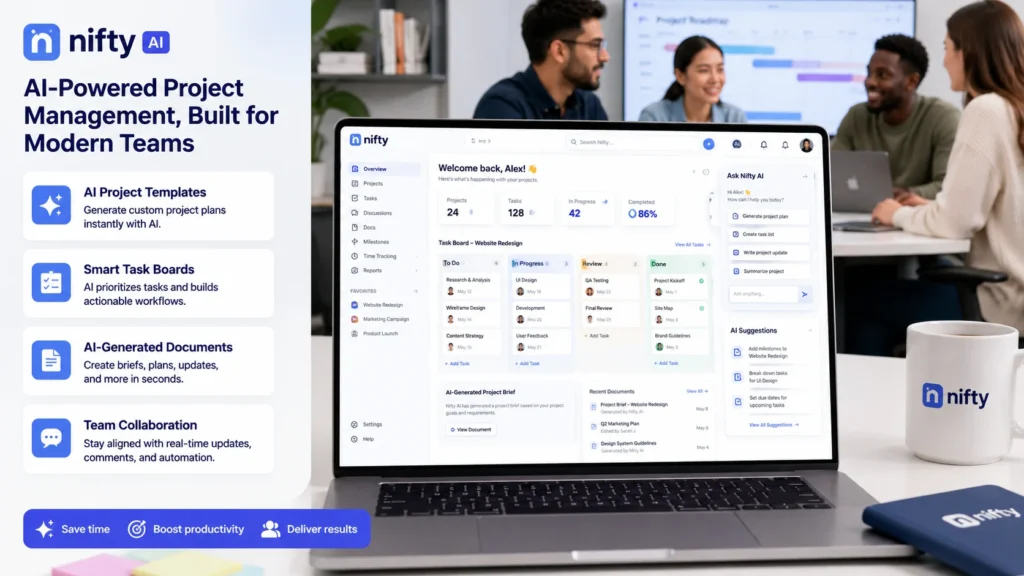
Nifty AI is a generative AI tool integrated into Nifty’s project management platform. It automates project creation, document generation, and task management through simple prompts. Key features include the AI Project Builder that generates complete workflows with Lists, Statuses, and Tasks; a Document Generator for contracts and project outlines; and a Task Generator that converts conversations into actionable tasks. Nifty also supports MCP integration with AI assistants like Claude and ChatGPT. Pricing starts with a free plan including AI features.
What Is Nifty AI and Why Should You Care?
Let’s cut through the noise. You’ve probably seen “Nifty AI” pop up in your searches and wondered what it actually does. Is it a stock market tool? A trading bot? A random AI product with a catchy name?
None of the above.
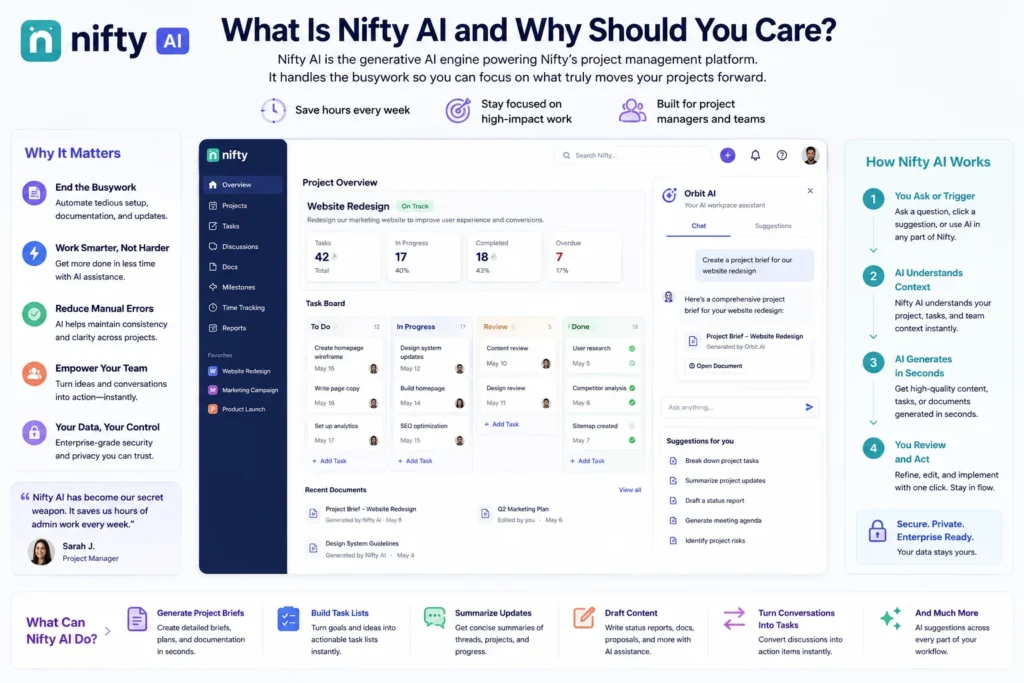
Nifty AI is the generative AI engine powering Nifty’s project management platform. Think of it as your productivity sidekick that handles all the boring setup work so you can focus on actual project execution .
Here’s the honest truth: Project managers spend way too much time on administrative busywork. Setting up project structures. Writing task descriptions. Drafting documents. Converting chat conversations into actionable items. It’s necessary work, but it’s not the work that moves the needle.
Nifty AI tackles exactly this problem. It’s not about replacing you. It’s about making you faster.
The platform uses what they call Orbit AI—generative capabilities baked directly into the workspace . You don’t switch apps or learn new interfaces. The AI lives right where you work, ready to jump in whenever you need it.
How Nifty AI Works: The Three Core Features
Nifty AI comes with three main weapons in its arsenal. Each tackles a different project management headache.
AI Project Builder: From Prompt to Project in Seconds
This is the headline act. The AI Project Builder lets you describe what you want in plain English—or even paste a full specification document—and watch as Nifty generates a complete project structure .
Here’s what it actually creates:
- Lists (the high-level phases or categories)
- Statuses (task stages like “To Do” or “In Progress”)
- Tasks and Subtasks (individual action items)
- Custom Fields (extra data points you need to track)
How it works in practice:
You start by creating a project in your workspace. Then you select the AI Template option and enter a prompt. Something like “Website creation for eCommerce” or “Email marketing drip campaign” .
Hit generate, and Nifty spits out a preview showing your entire project structure. But here’s the clever part: everything is editable before you commit. See a status you don’t need? Delete it. Need an extra list? Add it. The AI gives you a starting point, not a final draft .
Once you’re happy, Nifty automatically saves the project as a reusable template in your control center . Next time, you can use that template without the AI or run a new prompt to get something different.
Real example:
Say you’re managing a product launch. You prompt Nifty with “Product launch for a SaaS mobile app.” The AI might generate lists like:
- Market Research
- Product Development
- Marketing Campaign
- Launch Execution
Statuses like:
- Not Started
- In Progress
- Review
- Completed
And tasks like “Conduct competitor analysis” or “Create landing page copy.” You tweak a few things, add your team members, and you’re ready to roll in minutes instead of hours .
AI Document Generator: Draft Documents Without the Blank Page Stare
Project plans are great, but what about the documents that go with them? Project outlines, contracts, briefs, meeting notes—they all take time to write.
The Document Generator tackles this by creating content based on a simple description . You describe the type of document you need. Nifty shows you relevant fields specific to that document type. Fill them out, hit generate, and you have a draft.
It’s not about replacing your thinking. It’s about getting a solid first draft so you can spend your time refining, not staring at a blank page.
AI Task Generator: Turn Conversations into Action
This one is deceptively powerful. The Task Generator lets you create tasks directly from conversations . You can convert messages from Project Discussions or Direct Chats into full-fledged tasks.
The AI will automatically:
- Assign a due date based on context
- Mention the right team members
- Populate custom fields based on message details
Imagine a client says in a chat: “We need the new landing page copy by Friday.” You click a button, and Nifty creates a task assigned to the copywriter, due Friday, with the client’s comment as the description. No copy-pasting. No manual data entry.
MCP Integration: Connect Nifty AI to Your Favorite Assistants
Nifty supports the Model Context Protocol (MCP) , an open standard that connects AI assistants like Claude, Cursor, and ChatGPT directly to your Nifty data .
What does this mean for you?
You can plan, search, and update work using plain language—all from within your preferred AI assistant. Ask Claude to “show me all the open tasks in the Q3 marketing campaign,” and it pulls that data from Nifty. Tell ChatGPT to “create a new project for the upcoming conference,” and it creates one.
Supported assistants include: Claude Desktop, Cursor, ChatGPT, Continue, Cline, Windsurf, and Zed .
Security: You Stay in Control
Here’s the important part: you control everything.
- Opt-in only. Nothing is shared until you actively create a token.
- Scoped access. You choose exactly what the assistant can see and do (Read-only, Full access, or Custom) .
- Set expiries. Tokens can expire after a set time. Shorter is safer.
- Revoke anytime. Stop the connection with one click .
Nifty doesn’t store your data in a recoverable form. It only saves a one-way hash of your token (HMAC-SHA-256), never the token itself . When your assistant requests data, that data is shared with the AI provider and subject to their terms. Choose assistants you trust.
Nifty AI Pricing: What Does It Cost?
Nifty AI features run on Smart Credits .
What uses credits:
| Action | Cost |
|---|---|
| AI Project generation | 1 credit per generation |
| AI Document generation | 1 credit per generation |
| AI Task generation | Based on usage (after free tier) |
Monthly allocations:
| Plan | Credits per month |
|---|---|
| Free plan | 50 credits (trial period) |
| Personal ($12/month per member) | 500 |
| Pro ($16/month per member) | 1,000 |
| Business ($25/month per member) | 1,000 |
| Enterprise (Custom) | Custom |
Credits reset on your billing date. Unused credits don’t roll over. If you run out, you can buy more in packs of 200 for $5. Purchased credits expire after 90 days .
Key detail: Basic project management features like task tracking, discussions, and file sharing don’t use any credits. Only the generative AI features consume them .
Nifty AI Pros and Cons: The Honest Assessment
Let’s be real. No tool is perfect. Here’s what works and what doesn’t.
What Nifty AI Does Well
Intuitive Interface – Nifty’s design is clean and modern. Teams can jump in and get organized in minutes without a complex setup .
Affordable Pricing – Compared to alternatives, Nifty offers a lot for less. You get time tracking, milestones, and team chat even on mid-tier plans .
AI Features That Actually Help – The Project Builder, Document Generator, and Task Generator aren’t gimmicks. They solve real problems .
Built-in Collaboration – Discussions, docs, and file sharing live in one workspace .
MCP Support – Connecting with Claude and ChatGPT is a genuine differentiator .
Generous Free Plan – Supports unlimited team members with AI features included .
Where Nifty Falls Short
Limited Integrations – Fewer native integrations than ClickUp or Asana .
Setup Takes Time – Getting everything configured initially requires effort .
No Dedicated Copilot – Unlike Microsoft’s Copilot, Nifty lacks an assistant that can search your docs and surface information contextually .
Gantt Charts Could Be Deeper – Complex timeline management might feel limited .
Customer Support Gaps – Some users report frustration with support responsiveness .
Nifty AI vs. The Competition: Where Does It Fit?
The project management market is crowded. Here’s how Nifty stacks up against the big players.
| Feature | Nifty AI | ClickUp | Asana | Monday.com |
|---|---|---|---|---|
| AI Project Builder | Yes | Yes (ClickUp Brain) | Limited | Limited |
| AI Document Gen | Yes | Yes | No | No |
| MCP Integration | Yes | No | No | No |
| Free Plan | Yes (2 projects) | Yes (generous) | Yes (15 members) | Yes (3 boards) |
| Time Tracking | Yes | Yes | Paid only | Paid only |
| Ease of Use | High | Medium | High | High |
| Pricing (per member) | $12–$25 | $5–$12 | $10–$25 | $9–$16 |
The verdict: Nifty is ideal for teams that want simplicity without sacrificing AI capabilities. ClickUp offers more customization but comes with a steeper learning curve . Asana is more polished but gets expensive quickly as you add features .
How to Use Nifty AI in Real Life
Let’s get concrete. Here are real scenarios where Nifty AI shines.
Marketing Campaign Manager
You need to set up a multi-channel campaign. Instead of building the project from scratch, you prompt: “Multi-channel marketing campaign for Q4 product launch—social media, email, and paid ads.”
Nifty generates lists for each channel. Statuses for each execution stage. Tasks with descriptions. You tweak deadlines, assign team members, and add custom fields for budget tracking. The entire setup takes less than 10 minutes .
Event Planner
You’re coordinating a corporate conference. You paste your vendor list, speaker schedule, and venue details into the AI Template option. Nifty turns that messy document into a structured project with lists for logistics, speakers, sponsors, and attendee management. Each list has tasks with due dates based on your timeline .
Software Development Team
Use Nifty to manage agile sprints. Prompt “Agile sprint management” and get a project with standard backlog, sprint planning, in-progress, and review lists. The AI suggests statuses like “To Do,” “In Progress,” “Code Review,” and “Done.” You adjust custom fields to include story points and sprint number, and you’re ready for stand-up .
Remote Team Collaboration
Teams can collaborate directly in Nifty with file sharing and chat capabilities. The “Discussions” feature gives you a social-media-style experience where you can send direct messages to any team member with attached files and images .
Limitations and Honest Considerations
Nifty AI is powerful, but it’s not magic. Here’s what to keep in mind.
The learning curve is real. Nifty is packed with features. For students or individuals with simple needs, it might feel overwhelming. If you just need a basic to-do list, this might be too much tool .
The AI is a starter, not a finisher. The AI generates a solid structure, but you’ll always need to tweak. Deadlines won’t be perfect. Task assignments won’t account for team dynamics. The AI gives you a head start, not a finish line .
Credits add up. If you’re generating projects and documents constantly, you’ll burn through credits quickly. Factor this into your budget.
It’s designed for team collaboration. Nifty’s sweet spot is team environments. If you’re a solo freelancer, some features might feel unnecessary.
MCP integration requires trust. When you connect an assistant, your Nifty data goes to that AI provider. Choose assistants you trust and keep access scoped to read-only wherever possible .
Who Benefits Most from Nifty AI?
Nifty AI is for teams that spend too much time on project setup and not enough time on execution. If you’re constantly building the same project structures, rewriting the same tasks, or struggling to convert conversations into actionable work, this is a serious time-saver.
Best for:
- Marketing teams running multiple campaigns
- Event planners managing complex logistics
- Development teams using agile sprints
- Agencies that onboard new clients frequently
- Small to mid-sized businesses seeking affordability without sacrificing features
Not ideal for:
- Individuals needing simple task management
- Teams with very fixed, unchanging workflows (templates already cover you)
- Budget-conscious teams that rarely use generative AI features
- Large enterprises needing deep financial and billing tools
Is Nifty AI Worth It?
The beauty of Nifty AI is that it doesn’t force you to change your workflow. It just makes your existing workflow faster. You describe what you need, and the AI handles the scaffolding. Then you step in and build the real structure .
Project managers using AI are already pulling ahead. As one industry observer put it: “AI won’t replace Project Managers. Project Managers who use AI will replace those who don’t” .
Nifty AI offers a pragmatic entry point. It’s not the flashiest tool on the market, but it solves real problems—project setup, document creation, and task generation—without overwhelming you with complexity .
The free plan is generous enough to test thoroughly. If you find yourself burning through credits because you’re constantly generating projects, the paid plans offer solid value .
For teams that value simplicity, affordability, and AI capabilities that actually help, Nifty AI is a strong contender. It won’t replace your thinking, but it’ll handle the grunt work so you can focus on the strategic stuff that moves the needle.
Frequently Asked Questions About Nifty AI
What exactly is Nifty AI?
Nifty AI is the generative AI engine built into Nifty’s project management platform. It automates project creation, document drafting, and task generation using simple text prompts. Think of it as your productivity assistant that handles the administrative setup work so you can focus on execution.
Is Nifty AI free?
Yes and no. Nifty offers a free plan that includes 50 Smart Credits for AI features. You can test the Project Builder, Document Generator, and Task Generator without spending a dime. Once you burn through those credits, you’ll need a paid plan starting at $12 per member per month, which gives you 500 credits monthly.
How does the AI Project Builder work?
You type a prompt describing what you want, like “Website redesign project” or “Product launch campaign.” Nifty AI generates a complete project structure with Lists, Statuses, Tasks, and Custom Fields. You can edit everything before saving, and the system automatically saves your project as a reusable template for future use.
Can I use Nifty AI with ChatGPT or Claude?
Absolutely. Nifty supports the Model Context Protocol (MCP) , which connects AI assistants like Claude Desktop, Cursor, and ChatGPT directly to your workspace. You can ask these assistants to pull project data, create tasks, or generate reports without leaving your preferred AI tool.
Is my data safe with Nifty AI?
Nifty takes security seriously. All MCP connections are opt-in and fully scoped. You control exactly what assistants can see and do. Nifty never stores your data in recoverable form—it only saves a one-way hash of your token. You can revoke access anytime with one click.
What’s the difference between Nifty AI and ClickUp AI?
Both offer AI capabilities, but they take different approaches. ClickUp Brain is more expensive and focuses on answering questions about your data. Nifty AI excels at building project structures and generating documents from prompts. Nifty also offers MCP integration, which ClickUp doesn’t support.
Does Nifty AI replace project managers?
Not a chance. Nifty AI handles the grunt work—setting up projects, drafting documents, creating tasks. It doesn’t make strategic decisions, manage stakeholders, or navigate team dynamics. It makes you faster, not obsolete.
What happens if I run out of credits?
You have two options: wait for your monthly reset or buy more credits. Basic project management features like task tracking, discussions, and file sharing don’t use credits at all, so your work never stops.
Does Nifty AI work for solo freelancers?
It can, but it’s designed for team collaboration. Solo users might find the feature set overwhelming. If you just need simple task management, there are lighter tools available. But if you’re managing multiple client projects and want AI assistance, Nifty can be valuable.
What are the best alternatives to Nifty AI?
- ClickUp – More customization, steeper learning curve
- Asana – Polished interface, expensive feature upgrades
- Monday.com – Visual and intuitive, AI features are limited
- Notion – Flexible but requires more manual setup
How do I get started with Nifty AI?
Sign up for the free plan, which gives you 50 Smart Credits. Open a new project, select the AI Template option, and start prompting. Generate a project, tweak it, save it as a template, and you’re off and running.
Does Nifty AI support non-English languages?
Yes. Nifty supports multiple languages, and the AI features work with prompts in various languages. The platform interface itself is available in several languages to accommodate global teams.
What’s Nifty’s refund policy?
Nifty offers a 14-day money-back guarantee for paid plans. If you’re not satisfied within the first two weeks, you can request a full refund. The free plan gives you unlimited time to test before committing.
Conclusion
Let’s cut to the chase. You came here wondering if Nifty AI is worth your time and money. Here’s the straight answer.
Nifty AI solves a specific problem: the endless hours spent setting up projects, writing task descriptions, and drafting documents. If that sounds like your daily grind, this tool will save you significant time.
The sweet spot: Small to mid-sized teams running multiple projects. Marketing agencies. Event planners. Development teams using agile. Anyone who constantly creates new projects from scratch.
The pricing reality: $12–$25 per member per month puts Nifty in the mid-range. It’s cheaper than Asana’s feature-rich tiers but pricier than ClickUp’s base plans. The free plan gives you enough credits to truly evaluate whether the AI features deliver value for your workflow.
The trade-offs: Fewer native integrations than competitors. Setup takes initial effort. Gantt charts could be deeper. But the core experience is clean, intuitive, and genuinely helpful.
The bottom line: Nifty AI isn’t a revolutionary product that will transform how you work overnight. It’s a pragmatic tool that handles the boring stuff so you can focus on the interesting stuff. For teams that value simplicity and AI assistance without the bloat, it’s a strong choice.
Try the free plan. Run 10 prompts. Generate 10 projects. See if the AI saves you enough time to justify the cost. Chances are, once you experience the speed of building a complete project structure in under a minute, you won’t want to go back to manual setup.
Project managers who embrace AI are already gaining an edge. Nifty AI offers an accessible entry point. The question isn’t whether AI will transform project management—it already is. The question is whether you’ll be among those who leverage it or those who get left behind.
Ready to test it? Sign up for the free plan, grab your 50 credits, and start prompting. The worst that happens is you confirm it’s not for you. The best that happens is you reclaim hours of your week for actual strategic work. Either way, you win.

Victoria Lane is a grammar-focused writer at GramBrix.com, passionate about helping readers master the rules of language. She provides clear explanations and practical examples that make writing more accurate, polished and confident.