Last Updated on July 25, 2026
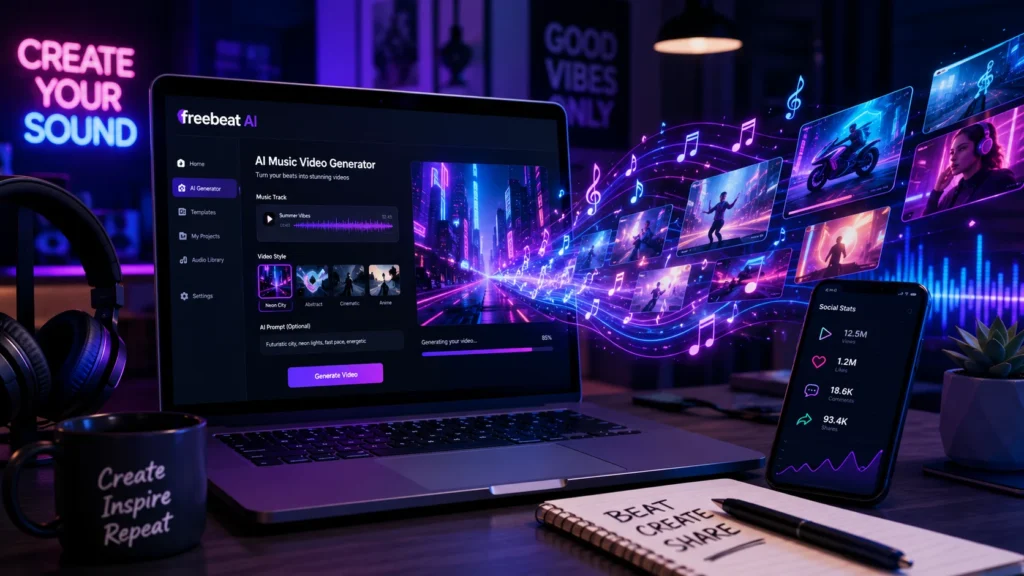
Freebeat AI is a Stanford-founded platform that turns any song into a fully synced music video in real time. It analyzes BPM, beat drops, and emotional structure to generate visuals that match your track’s energy. With over 1 million creators across 150+ countries and a 5.9% paid conversion rate, it’s the leading AI music video generator for independent artists and content creators . It offers a free tier, supports multiple aspect ratios, and integrates with leading AI video engines .
The Beat Making Dilemma
It feels like you need an engineering degree just to lay down a basic drum pattern. Traditional music production takes years to master. Loops are stale and overused. Hiring a professional producer is expensive. So what do you do?
Freebeat AI positions itself as the middle ground. It’s not a DAW replacement but a creative catalyst that promises to generate original, royalty-free beats in seconds using text prompts or sample references. But does it actually deliver?
This freebeat AI review cuts through the hype. We’ll explore what works, what doesn’t, and who actually benefits from this AI music generator.
What Exactly Is Freebeat AI?
Let’s cut the fluff. Freebeat AI is an AI-powered platform that transforms audio into professional-grade, shareable videos. It started as a music generator but has evolved into something much bigger: a real-time music video creation tool .
The Stanford-founded San Francisco startup has quietly built what is now the No. 1 result on Google for “music video generator” . Operating in more than 100 countries, it has amassed hundreds of unprompted YouTuber reviews and a customer acquisition cost of around twenty cents per U.S. user .
Core Capabilities
Here’s what the freebeat AI tool actually does:
- AI Music Video Agent: The world’s first AI music video agent that creates professional music videos from any song using a link and a simple text prompt .
- Song Link Integration: Supports input from Spotify, YouTube, TikTok, Udio, or local file uploads for seamless music input .
- One-Click Video Generation: Renders the final music video in minutes based on user input and AI-generated storyboard .
- Genre Versatility: Supports K-pop, hip-hop, synthwave, folk, and many other genres .
- Character Lock: Maintains character consistency across the full video .
- Video-to-Music: Upload a video and generate a soundtrack tuned to its rhythm and style .
- AI Music Cover Generator: One-click animated covers synced to your music .
The Real-Time Breakthrough
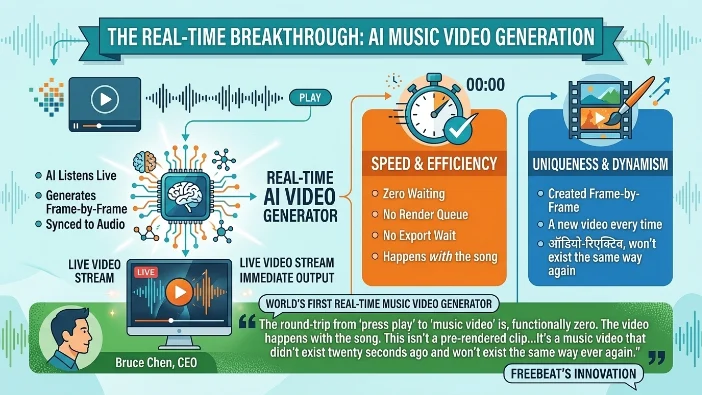
Here’s where it gets interesting. In May 2026, freebeat launched what it calls the world’s first real-time music video generator . This isn’t a pre-rendered clip uploaded earlier. It’s a music video that didn’t exist twenty seconds ago and won’t exist the same way ever again. The AI generates it frame-by-frame while listening to your song in real time .
The round-trip from “press play” to “music video” is, in CEO Bruce Chen’s words, “functionally zero.” No render queue. No waiting for an export. The video happens with the song .
The Technology Behind It
Freebeat’s music-vision foundation model was trained specifically to map musical structure onto continuous visual narrative. The company has roots going back to 2021 when Chen first began experimenting with audio-driven visuals .
The key insight? Text just isn’t enough information to drive video in real time. Music is. The structure is already in the audio, so you don’t have to invent it .
“Music is a dream trapped in the beat. We give it a vision and make the story complete.” — Bruce Chen, CEO and Co-Founder of freebeat
The Workflow: From Prompt to Master
Getting started with freebeat AI is straightforward. Here’s how the process actually works.
Step 1: Input Your Audio
You can upload an audio file directly or paste a link from platforms like YouTube, SoundCloud, Suno, or Udio . The freebeat AI song generator accepts multiple formats and sources.
Step 2: Choose Your Creative Mode
Freebeat offers three main creative modes :
| Mode | Best For | What It Does |
|---|---|---|
| Singing Mode | Performance-driven tracks | Prioritizes human expression, on-camera presence, and accurate lip sync |
| Storytelling Mode | Narrative songs | Builds visual sequences that evolve with verses, choruses, and instrumental sections |
| Automatic Mode | Hands-off workflow | Analyzes song structure, energy changes, and emotional tone to balance all elements |
Step 3: Add Your Prompt
Write a short, plain-language description of your vision. For example: “Night drive, neon city, fast cuts, energetic” or “David Bowie meets Blade Runner fever dream” .
Step 4: Generate and Review
The AI analyzes your track’s BPM, beat grid, and song sections. It then generates a video where cuts land on beats and section transitions reflect the track’s structure .
In testing, freebeat produced coherent videos where cuts followed the double-time chorus and verses received noticeably different visual pacing from higher-energy sections .
The Reality Check
The first generation rarely sounds or looks radio-ready. It often resembles a solid demo. You’ll likely need to do some heavy lifting in your DAW or editing software to polish it.
One user reported: “The video was generated with a 30 minute rendering time for 1 minute 30 seconds… I had to do a lot of processing and editing to make it look good.”
Who Is This Actually For?
Freebeat AI isn’t for everyone. Here’s the honest audience breakdown.
Content Creators & YouTubers
You need background music that doesn’t get you a copyright strike. Freebeat is a goldmine for intros, outros, and vlog scores. The freebeat AI video maker produces platform-ready content optimized for YouTube, TikTok, and Instagram .
Rappers & Vocalists
You want to write over something unique but don’t want to spend $200 on a beat lease. Generate a rough draft, write your hook, and then commission a producer to remake it properly.
Bedroom Producers
Use it for idea generation. Stuck on a drop? Let the AI spit out five variations. Steal the one you like and reverse-engineer it to learn new techniques.
Music Teachers
Show students how arrangement and structure work by letting the AI build a track in front of them.
Who Should Skip It
Professional mixing engineers or purists who hate AI-generated artifacts. You won’t find the nuance of a live drummer or the subtlety of a human performance here.
The Pros (What Actually Slaps)
Here’s where freebeat AI genuinely delivers value.
Speed
You get a full arrangement in under 30 seconds. That’s wild for brainstorming. According to the company, the platform is scaling toward 1 billion seconds of generated content .
Royalty-Free Licensing
You own the commercial rights. No splitting publishing with the AI. This is huge for independent artists.
Stem Quality
The separation algorithms are surprisingly clean. Not perfect, but better than most free web tools.
Multiple Aspect Ratios
The freebeat AI online tool supports 16:9 (widescreen), 9:16 (vertical for TikTok/Reels), and 1:1 (square for Instagram) formats .
Integration with Leading AI Engines
Freebeat integrates multiple AI video models including Pika, Runway, and Google Veo 2 within a single interface .
High-Precision Lip Sync
The Stage Performance and Storytelling Video modes boast over 90% lip-sync precision . This creates believable, high-fidelity illusions that look like they cost a fortune.
Beat-Aware Editing
The AI recognizes the intro, verse, chorus, bridge, and outro. When the heavy bass drops, the visuals follow BPM, beat drops, and energy changes in real time .
The Cons (The Gritty Reality)
No tool is perfect. Here’s where freebeat AI falls short.
Caption Accuracy Issues
In testing, captions weren’t always perfect. A few words looked off, especially around names and odd phrasing . Always proofread before posting.
Photos-to-Scenes Inconsistency
The “photos to scenes” feature works, but consistency isn’t perfect. Some scenes look great, others drift slightly. Faces and background details don’t always stay faithful .
Repetitive Visual Patterns
Some scenes reuse similar motion patterns across different runs. If you’re picky about variety, you’ll want to regenerate several times .
Limited Manual Control
You’re steering generation, not doing detailed timeline edits after the fact. You can’t fine-tune in the same way you would in Premiere or CapCut .
Dance Avatar Repetition
The AI choreographed dance avatars can repeat patterns. Movement “beats” look similar across different runs .
User-Generated Content Quality
One user reported generating many videos with inconsistencies and having to discard over 80% of them . They spent about 20 euros for barely 1 minute of usable footage.
Strategic Use Cases: How to Cheat the System
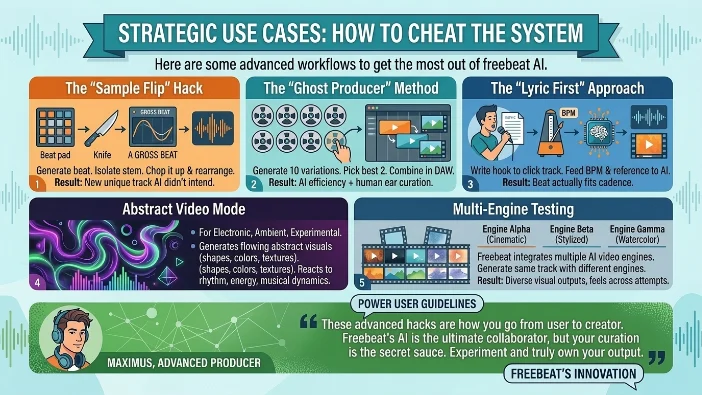
Here are some advanced workflows to get the most out of freebeat AI.
The “Sample Flip” Hack
Generate a beat. Isolate the melody stem. Chop it up and rearrange it with Gross Beat or Serato Sample. You get a completely new track that the AI didn’t intend.
The “Ghost Producer” Method
Use freebeat to create 10 variations. Pick the best two. Combine them in your DAW. Now you have a track with AI efficiency and human ear curation.
The “Lyric First” Approach
Don’t generate the beat first. Write your hook over a click track. Then feed the AI your BPM and a reference track. The beat will actually fit your cadence better.
Abstract Video Mode
For electronic, ambient, or experimental genres, the platform includes an Abstract Video mode that generates flowing, evolving abstract visuals including shapes, colors, motion, and textures that react to rhythm, energy, and musical dynamics .
Multi-Engine Testing
Since freebeat integrates multiple AI video engines, generate the same track with different engine options. The outputs feel different across attempts, some more cinematic, others more stylized .
Freebeat AI Pricing Breakdown
Freebeat AI offers flexible pricing plans to suit different needs .
| Plan | Price | Key Features |
|---|---|---|
| Free | $0 | Basic features, 50 credits, no credit card required |
| Standard (Annual) | $6.99/month | 300 monthly credits, advanced models, up to 720p resolution |
| Pro (Annual) | $17.49/month | Unlimited video generation, up to 1080p resolution, more realistic visuals |
| Pro Annual | $225/year | All Pro features, annual billing |
What to Check Before Subscribing
- Whether the free plan has generation limits and how often they reset
- If exports include watermarks on free outputs
- Resolution limits (free renders may cap at lower quality)
- What export formats are available (MP4 is common)
- Whether using certain engine options changes your cost
Freebeat AI vs Competitors
Here’s how freebeat stacks up against other AI music video generators .
| Platform | Beat Sync | Lip-Sync Accuracy | Max Length | Best For |
|---|---|---|---|---|
| Freebeat | Full song structure | >90% precision | Up to 6 minutes | Full indie music releases |
| Runway Gen-3 | None | None | Short clips | Cinematic B-roll |
| Pika | None | None | Short clips | General AI video |
| Kaiber | Energy-based only | Poor | Short clips | Spotify Canvas loops |
| Neural Frames | Stem-level analysis | None | Short clips | IDM & electronic producers |
Freebeat is the only tool in this comparison built specifically for music video production . It’s the platform that actually reads the music rather than just overlaying visuals.
The Technical Verdict: Is the Sound Quality Legit?
Freebeat’s approach is fundamentally different from generic AI video generators. Rather than reacting to the beat, it interprets the song .
What It Gets Right
- Structure Awareness: The AI knows when your heavy bridge drops or your synth crescendo peaks
- Section Mapping: It recognizes intro, verse, chorus, bridge, and outro
- Emotional Pacing: The visual narrative breathes alongside the audio
What It Gets Wrong
- Visuals from Style Library: The visuals are drawn from a style and effects library rather than producing bespoke AI-generated footage from scratch
- Not Fully Generative: Musicians who want hyper-specific visual scenes generated from text or image prompts may need to pair it with a clip generator like Runway
Final Verdict: Should You Buy It?
Yes, if:
- You’re a content creator who needs royalty-free background music
- You’re a beginner who wants to understand music arrangement
- You’re a producer suffering from writer’s block
- You want to create social media content quickly
No, if:
- You’re a professional looking for master-quality final products
- You need precise, frame-by-frame manual control
- You want bespoke AI-generated footage from scratch
- You’re unwilling to do additional editing and polishing
The Bottom Line
Freebeat is a sketchpad. You draw the initial lines, but you still have to color in the masterpiece. It democratizes the starting line, but it doesn’t win the race for you.
For $17.49/month, it’s a steal for the speed alone. The platform has a 5.9% paid conversion rate and has spent essentially nothing on paid marketing since launch . Over 1 million creators across 150+ countries are using it .
But remember: it’s a tool, not a miracle worker. Use it strategically, pair it with your own creative input, and you’ll get impressive results. Expect it to do all the work, and you’ll be disappointed.
“AI shouldn’t just generate visuals, it should understand how a song works.” — Bruce Chen, CEO of freebeat
FAQs
Can I monetize YouTube videos with freebeat beats? Yes, with the Pro license, you own the commercial rights.
Does freebeat clone existing copyrighted songs? No. It generates original compositions, but it can mimic styles.
Can I use my own samples to train the AI? Not currently. You can upload reference tracks, but the AI isn’t retrained on your samples.
Is the mobile app as good as the web version? The web version is significantly faster and more stable.
How many creators use freebeat? Over 1 million creators across 150+ countries .
How much content has been generated? The platform is scaling toward 1 billion seconds of generated content .
What’s the company’s background? Freebeat was founded by Stanford-educated former bankers and engineers .
How many employees does freebeat have? The company has 11 employees .
What’s the customer acquisition cost? Around twenty cents per U.S. user .
Does freebeat offer a free trial? Yes, there’s a free tier with 50 credits and no credit card required .
Conclusion
Freebeat AI isn’t some magical music making fairy that waves a wand and produces chart topping hits. It’s a tool. A damn good one for certain use cases, but a tool nonetheless. Think of it like a really talented session musician who works widely fast. You give them a vibe, they spit out a solid draft, and then you take that draft and make it your own. The AI handles the heavy lifting of structure, arrangement, and basic sound design. Your job is to bring the soul, the nuance, and the final polish. The speed is unmatched. Thirty seconds from prompt to full arrangement? That’s not just convenient; it’s a creative superpower. When inspiration strikes, you can capture it immediately without losing momentum. No more fumbling with complicated software while your idea fades away. The royalty free licensing is a game changer. For content creators, this eliminates the constant anxiety of copyright strikes. You own what you make. Period. The integration of music and video in one platform solves a massive problem. Before freebeat, you’d generate a beat in one tool, export it, import it into a video editor, struggle with syncing, and pray it looked decent. Now it’s one seamless workflow.

Victoria Lane is a grammar-focused writer at GramBrix.com, passionate about helping readers master the rules of language. She provides clear explanations and practical examples that make writing more accurate, polished and confident.