
Last Updated on July 25, 2026
EasyComment AI is a free Chrome and Edge extension that automates YouTube comment management using ChatGPT technology. It offers four core tools: AI comment generation, sentiment analysis, random giveaway selection, and bulk comment export. Available completely free of charge with no login required, it serves over 50 languages and has earned 4.6+ star ratings across browser stores. The tool works directly in your browser for instant comment automation.
The Comment Management Nightmare
Let’s be real for a second. Managing YouTube comments is a soul-crushing grind.
You post a video. The notifications flood in. Some are genuine engagement worth replying to. Most are noise. Some are spam. And if you’re running a giveaway, manually picking a winner from hundreds of entries makes you want to pull your hair out.
You can’t ignore comments. Engagement drives the algorithm. YouTube rewards channels that reply and keep conversations alive. But who has the time to craft thoughtful responses to every single comment?
This is the gap EasyComment AI claims to fill. But does it actually work? Let’s dig into the real capabilities of this AI comment tool and separate the useful features from the fluff.
What Exactly Is EasyComment AI?
Here’s the honest breakdown. EasyComment AI is a free browser extension for Chrome and Microsoft Edge that uses ChatGPT to handle your YouTube comment management.
The extension operates in over 100 countries and doesn’t require any login or account creation. You install it, navigate to any YouTube video, and the tools appear directly in the comment section. No complicated setup. No steep learning curve. Just instant functionality.
Core Capabilities
The free YouTube comment generator offers four main features that cover the entire comment management workflow.
AI Comment Generator
This tool creates context-aware comments for your own videos or other channels. You choose the emotional direction positive, neutral, or negative and the AI generates an appropriate reply that automatically fills into the comment box. The goal is 10x growth in engagement through ChatGPT-powered responses.
AI Comment Analysis
Want to know what your audience really thinks? This feature scrapes all comments from any YouTube video and runs sentiment analysis. You get instant insight into positive versus negative sentiment, helping you adjust content strategy based on real data.
YouTube Comment Picker
Running a giveaway? This tool randomly selects a winner from all comments on your video. It ensures fairness with a transparent algorithm. Every participant has an equal shot. You can even customize selection rules to filter for specific keywords or criteria.
YouTube Comment Exporter
One-click export all comments from any video or Short into CSV or Excel format. This lets you organize, filter, and analyze comment data offline. Perfect for competitive research or audience analysis.
Platform Support
The tool works across YouTube and YouTube Shorts. Some sources suggest it also supports Instagram, TikTok, and Facebook for certain features like giveaway pickers and comment exporters. This multi-platform capability makes EasyComment AI a versatile solution for creators operating across multiple channels.
The Workflow: How EasyComment Actually Works
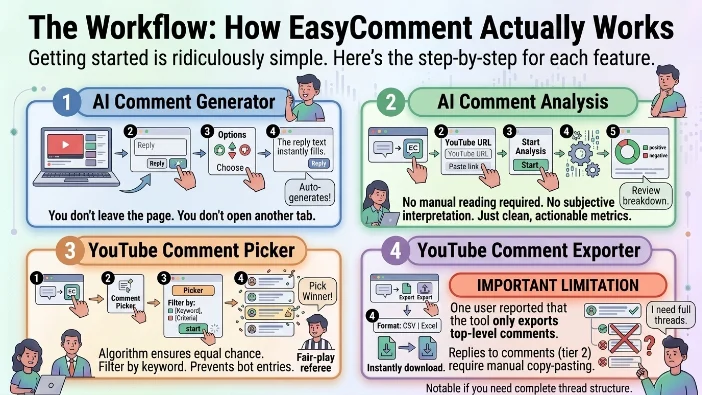
Getting started is ridiculously simple. Here’s the step-by-step for each feature.
AI Comment Generator
Go to any YouTube video page. Scroll to the comments section and click the reply button. Spot the AI generator button that appears. Choose your desired sentiment direction. The AI auto generates a comment and fills it directly into the reply box. Post or edit as needed.
The entire process takes seconds. You don’t leave the page. You don’t open another tab. The AI comment generator works exactly where you need it.
AI Comment Analysis
Click the extension icon in your browser toolbar. Paste any YouTube video URL into the input page. Click the start analysis button. The extension fetches all comments and runs sentiment analysis. Review the positive and negative sentiment breakdown for your video.
This feature gives you instant data about audience reception. No manual reading required. No subjective interpretation. Just clean, actionable metrics.
YouTube Comment Picker
Click the extension icon. Paste the YouTube or Shorts video link. Select the Comment Picker function. Click start to fetch all comments. Choose your picker options and click the “Picker” button to select your winner.
The algorithm ensures every participant gets an equal chance. You can filter by keyword or criteria. This prevents bot entries from winning and ensures genuine engagement gets rewarded.
YouTube Comment Exporter
Click the extension icon. Paste your YouTube or Shorts link. Select the export function. Click start to fetch all comments. Choose your file format (CSV or Excel) and download everything instantly.
Important Limitation
One user reported that the tool only exports top level comments. Replies to comments (tier 2 comments) require manual copy pasting. This is a notable limitation if you need a complete thread structure for analysis or reporting.
Who Is This Actually For?
YouTube Creators
You need to engage with your audience without spending hours in the comments section. EasyComment AI generates thoughtful replies instantly and handles giveaway selections for subscriber milestones. The AI comment generator turns hours of work into minutes.
Social Media Managers
Managing multiple channels drains your time. The export and analysis tools help you track engagement metrics across videos without manual counting or copying. You get data driven insights without the tedious work.
Influencers Running Giveaways
The random comment picker with customizable filters ensures you choose a legitimate winner, not a bot. The algorithm is transparent and fair. No accusations of favoritism or rigged contests.
Community Managers
Sentiment analysis helps you gauge audience reaction to campaigns or controversial topics. Data driven insights guide your engagement strategy. You respond based on real data, not guesses.
Marketers and Brands
Exporting competitor comment data helps analyze audience sentiment, identify opportunities, and benchmark engagement strategies. You understand what works for your competitors and adapt accordingly.
Who Should Skip It
Privacy-Conscious Users
The tool uses ChatGPT API for generation, which means your data is processed externally. It claims not to collect personal data, but the privacy policy states it uses third party AI services.
Users Needing Tier 2 Comments
If you need replies to comments in your exports, you’ll need to manually copy them. The tool currently only exports top-level comments.
The Pros (What Actually Works)
Completely Free
The tool offers substantial value without any cost. The Chrome store listing confirms it’s 100% free with no paid tier mentioned. This is rare for AI-powered tools in 2026.
No Login Required
Zero account creation means no email spam and no password management. Install and use instantly. No friction, no barriers.
User-Friendly Interface
The extension integrates directly into YouTube. No jumping between tabs or tools. Everything happens where you need it.
ChatGPT-Powered Generation
Responses are contextually relevant and intelligently crafted. They don’t sound completely robotic like older generation models. The AI comment generator produces human like engagement.
Multi Language Support
Works in 53 languages across the Chrome extension and 55 languages in the Edge version. Global creators can use it regardless of their primary language.
Stable Google Services Foundation
Built on Google’s infrastructure, ensuring reliability and consistent performance.
Guaranteed Fair Giveaways
The random selection algorithm ensures every participant gets an equal chance. No accusations of favoritism or rigged contests.
Data Security Commitment
The developer has disclosed that no personal data is collected or used. Data isn’t sold to third parties or used for credit scoring.
The Cons (The Honest Reality)
Tier 2 Comment Export Limitation
Top-level comments only export. Replies require manual copy-pasting. If you need full thread data, this is a significant workflow bottleneck.
Heavy Reliance on ChatGPT
The tool’s generation quality depends entirely on ChatGPT API. If ChatGPT is down or performance degrades, so does your reply quality.
Potential Repetitive Content
AI-generated responses can sound similar across different videos. Overusing the tool might make your engagement feel inauthentic and robotic.
Automated Responses Lack Personalization
You’re trading authentic voice for efficiency. The AI doesn’t know your inside jokes, channel references, or specific community culture.
Data Privacy Inheritance
The tool uses ChatGPT, meaning data is processed by OpenAI’s infrastructure. Even if the extension doesn’t collect data, third-party processing still introduces privacy considerations.
Limited Platform Nuance
The same generation logic may not work equally well across Instagram, TikTok, and YouTube. Each platform has different comment culture.
No Mention of Data Privacy Inheritance
While the extension claims not to collect data, ChatGPT responses require sending comment context to OpenAI servers. The privacy policy doesn’t fully clarify this chain.
EasyComment AI Pricing Breakdown
Here’s where things get interesting. The official sources overwhelmingly state the tool is completely free.
| Source | Pricing Stated |
|---|---|
| Chrome Web Store | Completely free |
| Microsoft Edge Add-ons | Free |
| AIToolHub | Free, no paid tier |
| toucu.ai | No pricing structure, free |
| Easyflow | Free, open source |
However… one source mentions pricing for Instagram and Facebook comment exporters starting at $9/month. This suggests EasyComment AI may offer both:
- A free YouTube-focused extension with core features
- Paid premium tiers for advanced multi platform tools with higher quotas
One comparative review also mentions a $29.99 monthly subscription. This is likely a competitor’s claim rather than official pricing.
Key takeaway: The Chrome extension is genuinely free. You pay nothing for YouTube comment generation, analysis, exporting, and giveaway picking. Any premium tiers likely apply to expanded platform coverage or higher export quotas.
EasyComment AI vs Competitors
| Feature | EasyComment AI | Traditional Tools |
|---|---|---|
| Price | Free for YouTube extension | Varies, typically $9-$30/month |
| AI Generation | ChatGPT-powered | Often manual or basic templates |
| Sentiment Analysis | Built-in | Rarely included |
| Giveaway Picker | Yes, with custom filters | Usually manual selection |
| Comment Export | One-click CSV/Excel | Often requires copy-paste |
| Multi-Platform | YouTube focused, extends to others | Platform-specific usually |
| Login Required | No | Almost always |
| Data Privacy | No data collection | Varies widely |
Strategic Use Cases: How to Maximize Value
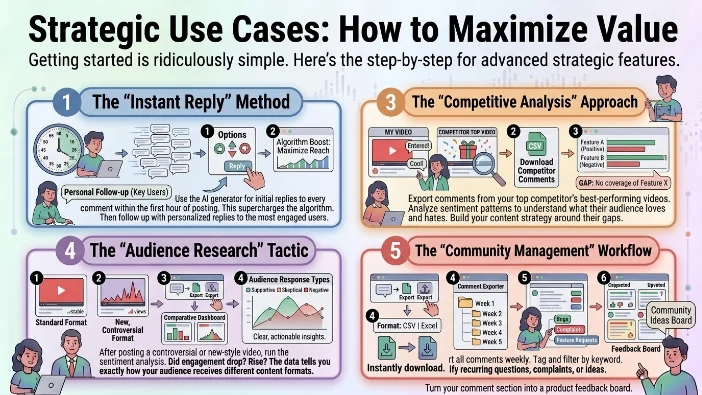
The “Instant Reply” Method
Use the AI generator for initial replies to every comment within the first hour of posting. This supercharges the algorithm. Then follow up with personalized replies to the most engaged users.
The “Giveaway Growth” Hack
Run a comment-to-win giveaway. Use the comment picker to select winners. Then follow up with each winner, asking them to share the video on their socials. Free promotion, zero effort.
The “Competitive Analysis” Approach
Export comments from your top competitor’s best-performing videos. Analyze sentiment patterns to understand what their audience loves and hates. Build your content strategy around their gaps.
The “Audience Research” Tactic
After posting a controversial or new-style video, run the sentiment analysis. Did engagement drop? Rise? The data tells you exactly how your audience receives different content formats.
The “Community Management” Workflow
Export all comments weekly. Tag and filter by keyword. Identify recurring questions, complaints, or ideas. Turn your comment section into a product feedback board.
The Technical Verdict: Does It Actually Work?
The tool delivers on its core promises. The AI generator produces contextually relevant, grammatically correct responses. The analysis tool accurately gauges sentiment across comments. The picker selects winners fairly and transparently. The exporter works as advertised for top-level comments.
But don’t expect miracles.
The AI-generated replies aren’t as clever as your own personal voice. They’re polite, relevant, and functional. They’re not hilarious, insightful, or deeply personal. They solve the “I need to reply to 200 comments” problem. They don’t solve the “I want to build a genuine community” problem.
The sentiment analysis gives you percentages but not nuance. It flags positive and negative but doesn’t explain why. You still need to read the comments to understand context.
The export tool saves hours of manual copy-pasting. But you’ll need to manually follow up on insights. No built-in visualization or advanced analytics dashboards.
Bottom line: It’s a productivity accelerator, not a community strategist. Use it to handle volume, free up your time, and engage consistently. Don’t use it as a complete replacement for human connection.
The Bigger Picture: AI Comment Management in 2026
EasyComment AI sits at a fascinating intersection of automation and community building. The tool doesn’t try to replace human engagement. It tries to expand your capacity for engagement.
The math works like this:
- Without AI: You reply to 10 comments. 200 go unanswered.
- With AI: You AI-reply to 200 comments. Then you personally reply to the 10 most important ones.
You’ve gone from 10 engagements to 210. The algorithm notices. The community feels acknowledged. And you only spent time on the 10 most meaningful interactions.
This is the real value of AI comment tools. They don’t replace you. They multiply you.
The future: Expect deeper integration with social media platforms. Built-in analytics. More nuanced generation with channel-specific learning. But for now, EasyComment AI delivers solid, free, functional value to creators who need to stop drowning in comments.
FAQs
Is EasyComment AI really free?
Yes. The Chrome extension is completely free with no paid tier mentioned in the official store listings. Some platforms may offer premium tiers for expanded multi-platform tools.
Does it require a login?
No. Zero account creation needed. Install and use directly.
Does it use ChatGPT?
Yes. The AI generation and analysis features are powered by ChatGPT technology.
Can I export all comments from any video?
Yes. One-click export of top-level comments to CSV or Excel format for any YouTube video or Short.
Does the giveaway picker ensure fairness?
Yes. The random selection algorithm gives every participant an equal chance. Custom filters allow keyword or criteria-based filtering.
Can I use it for Instagram or TikTok?
Some sources indicate the tool extends to Instagram, TikTok, and Facebook for certain features like comment pickers and exporters.
Is my data secure?
The developer has disclosed no personal data is collected or used. Data isn’t sold to third parties or used for credit scoring.
What languages does it support?
The Chrome extension works in 53 languages. The Edge version supports 55 languages.
Does it export comment replies?
No. Only top-level (tier 1) comments. Replies to comments require manual copy-pasting.
Who is the developer?
EasyComment AI is developed by an individual or team identifiable through the Chrome Web Store. Contact information is available at easycomment.ai.
Can I use it offline?
No. The extension requires an internet connection to access ChatGPT APIs and YouTube comment data.
What platforms are supported?
YouTube and YouTube Shorts are the primary platforms. Instagram, TikTok, and Facebook are mentioned in some sources for extended features.
Conclusion
EasyComment AI isn’t some magical community building fairy that turns your comment section into a thriving ecosystem overnight. It’s a tool. A damn good one for certain use cases, but a tool nonetheless.
Think of it like a really efficient virtual assistant who handles the repetitive, time-draining parts of comment management. You give them direction, they handle the volume, and then you step in for the meaningful conversations that actually build relationships.
Here’s what makes EasyComment genuinely valuable:
The price is unbeatable. Zero dollars for a ChatGPT-powered comment generator, sentiment analyzer, giveaway picker, and bulk exporter? That’s not just affordable; that’s practically unheard of in the AI tool landscape of 2026.
The speed transforms your workflow. Installing a browser extension and instantly having AI comment generation available on every YouTube page? No signups, no paywalls, no friction. Just immediate productivity gains.
The giveaway picker solves a genuine headache. Manually scrolling through hundreds of comments, copy-pasting usernames, and praying you don’t accidentally miss someone? That’s hours of tedious work eliminated with one click.
The export tool turns qualitative data into quantitative insights. You can analyze sentiment patterns, track engagement trends, and benchmark competitors without spending days manually compiling data.
But here’s the hard truth you need to hear:
The AI still sounds like AI. It’s polite, relevant, and grammatically correct. It’s also generic, formulaic, and missing your personal voice. Your audience will notice if every reply sounds identical.
The tier 2 comment limitation is annoying. If you need to export reply threads for analysis or community management, you’ll have to manually copy them. This adds friction to an otherwise seamless workflow.
The platform support is inconsistent. YouTube works great. Other platforms are mentioned but not fully documented. Don’t expect TikTok and Instagram to work as smoothly as YouTube.
The real winners here are:
- YouTube creators drowning in comment volume
- Social media managers handling multiple channels
- Influencers running giveaways without drama
- Community managers seeking sentiment data
- Marketers analyzing competitor engagement
The losers are:
- Privacy purists uncomfortable with ChatGPT data processing
- Creators who need full thread exports including replies
- Anyone expecting AI to replace genuine human connection
So what’s the final call?
For zero dollars, EasyComment AI offers exceptional value. You’re getting a ChatGPT-powered comment generator, sentiment analyzer, giveaway picker, and bulk exporter all in one free Chrome extension. That’s remarkable for a tool with no paid tier.
The Chrome extension has earned 4.6+ star ratings across browser stores. Over 100 countries use it. The engagement metrics speak for themselves.
But here’s my honest advice: treat it as a productivity booster, not a community builder. Use the AI to handle volume and free up your time. Then invest that saved time into genuine, personalized interactions with your most engaged community members.
The AI comment generator handles the 80% that doesn’t matter. You handle the 20% that builds real relationships.
The bigger picture:
EasyComment AI represents something important. It’s part of a shift where AI handles the repetitive, tedious tasks of community management so creators can focus on what truly matters: building genuine connections with their audience.
That’s exciting. But it also means the expectation for engagement rises. When everyone can reply instantly with AI-generated comments, the differentiator becomes your authentic human voice. The AI provides the efficiency; you provide the personality.
So don’t ask whether EasyComment AI can replace your community management. It can’t. Ask whether it can amplify your engagement capacity. The answer to that question is a resounding yes.
Bottom line: If you’re a YouTube creator, social media manager, or influencer drowning in comment volume, install EasyComment AI today. It won’t make your community feel deeply connected overnight. But it might just give you back hours of your week to spend on the conversations that actually matter. And in the creator economy, time is the only resource you can’t buy back.
Install the free extension, test all four features, and decide for yourself. The worst that happens is you generate a few AI replies that need editing. The best that happens? You stop drowning in comment management and start building genuine engagement at scale.

Justin Powell is a writer at GramBrix.com who focuses on grammar, clarity and effective communication, helping readers strengthen their language skills.