Last Updated on August 8, 2026
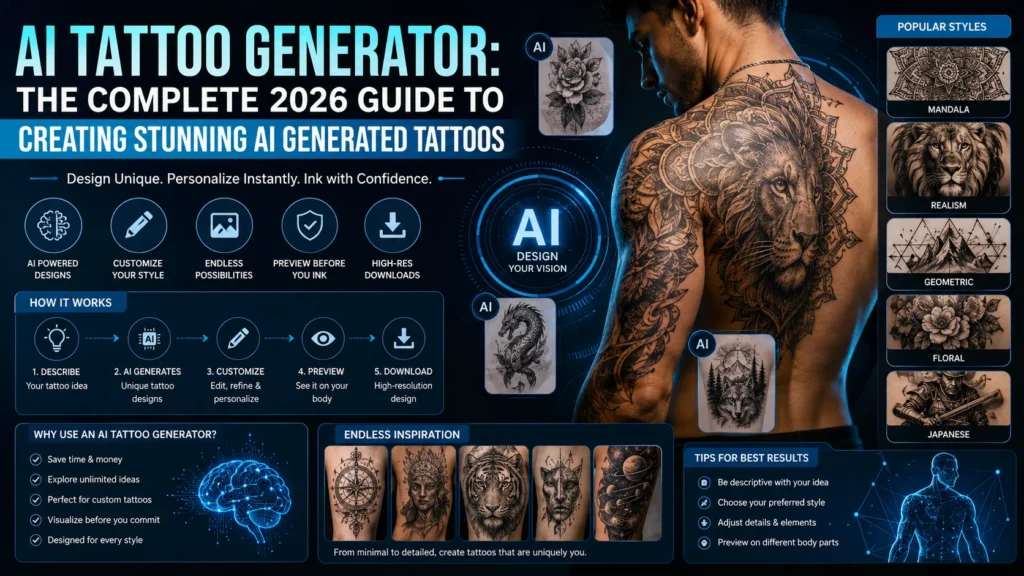
An AI tattoo generator is a tool that uses artificial intelligence to create custom tattoo designs from text prompts or images. You describe your idea style, placement, and details and the AI generates multiple tattoo concepts instantly. These tools help you explore ideas, refine designs, and collaborate with tattoo artists before getting inked.
Why AI Tattoo Generators Are Changing Tattoo Design Forever
You don’t need to stare at Pinterest boards for hours anymore.
You don’t need to struggle to explain your tattoo idea to an artist either.
With an AI tattoo generator, you can turn a simple idea into a detailed design in seconds. Type a few words. Hit generate. Suddenly, you’ve got dozens of tattoo concepts staring back at you.
That shift is huge.
For years, tattoo design depended on imagination, sketches, and back-and-forth conversations. Now, AI tattoo design tools bring speed, precision, and endless creativity into the mix.
But here’s the real question:
Are AI generated tattoos actually good enough to use?
This guide breaks everything down. No fluff. No vague claims. Just real insights you can use.
What Is an AI Tattoo Generator?
An AI tattoo generator is a software tool that creates tattoo designs using Artificial Intelligence and Generative AI models.
Instead of drawing manually, you:
- Describe your idea in words
- Choose a style
- Let the AI generate visual designs
Simple Explanation
Think of it like this:
You describe your dream tattoo. The AI draws it instantly.
How It Differs from Traditional Tattoo Design
| Factor | AI Tattoo Generator | Tattoo Artist |
|---|---|---|
| Speed | Instant | Takes time |
| Cost | Often free or cheap | Expensive |
| Creativity | Unlimited variations | Human creativity |
| Precision | Sometimes flawed | Highly refined |
| Personal touch | Limited | Strong |
AI doesn’t replace artists. It changes how you start the process.
Core Technology Behind AI Tattoo Generators
AI tattoo tools rely on:
- Machine Learning
- Neural Networks
- Text-to-Image Generation
- Deep Learning Models
These systems train on millions of images. Then they learn patterns, styles, and artistic structures.
Types of Tattoo Outputs You Can Generate
- Minimalist line tattoos
- Realistic portraits
- Blackwork and tribal designs
- Full sleeve concepts
- Geometric tattoos
How AI Tattoo Generators Work (Step-by-Step)
Let’s walk through the actual process.
Step 1: You Enter a Prompt
Example:
“Fine line wolf tattoo, forearm, black ink, realistic, detailed fur”
Step 2: AI Interprets Your Input
The system analyzes:
- Subject (wolf)
- Style (fine line, realistic)
- Placement (forearm)
- Details (fur texture)
Step 3: The AI Generates Designs
You’ll usually get:
- 2–10 variations
- Different compositions
- Slight style changes
Step 4: You Refine the Output
You tweak the prompt:
- Add more detail
- Change style
- Adjust size or complexity
Example Workflow
| Input | Output |
|---|---|
| “Minimalist rose wrist tattoo” | Clean, simple line designs |
| Add “fine line, elegant, small” | More refined and delicate results |
| Add “shading, realistic” | More depth and detail |
Key Features That Actually Matter in an AI Tattoo Generator
Not all tools are equal. Some look flashy but fail where it counts.
Here’s what truly matters:
Style Customization
You should be able to generate:
- Traditional tattoos
- Japanese (Irezumi)
- Geometric patterns
- Blackwork designs
Prompt Control
The more control you have, the better your results.
Look for:
- Detailed prompt inputs
- Style modifiers
- Custom keywords
Image-to-Image Editing
Upload a reference image. Let AI improve or transform it.
High-Resolution Export
Low-quality designs won’t work for tattoos.
You need:
- Sharp lines
- Clear edges
- Scalable resolution
Tattoo Placement Preview
Some tools simulate how the tattoo looks on skin.
That’s a game changer.
Best AI Tattoo Generators in 2026
Here are the tools that actually deliver.
Comparison Table
| Tool | Best For | Strength | Limitation |
|---|---|---|---|
| Midjourney | Artistic tattoos | Stunning visuals | Needs prompt skill |
| DALL·E | Beginners | Easy to use | Less tattoo precision |
| Stable Diffusion | Custom control | Highly flexible | Setup required |
| Adobe Firefly | Quick designs | Clean UI | Limited depth |
Top Tools Breakdown
Midjourney
- Best for high-detail tattoo art
- Produces stunning compositions
- Works best with advanced prompts
DALL·E
- Simple and beginner-friendly
- Great for idea generation
- Less accurate for tattoo-ready designs
Stable Diffusion
- Full customization
- Control over style and detail
- Ideal for serious users
Adobe Firefly
- Clean interface
- Fast results
- Limited tattoo-specific features
How to Write Prompts for Better AI Tattoo Designs
This is where most people fail.
Your results depend on your prompt.
The Perfect Prompt Formula
Subject + Style + Placement + Detail + Mood
Example Prompts
- “Japanese dragon sleeve tattoo, full arm, black and grey, intricate scales”
- “Minimalist moon tattoo, wrist, fine line, elegant, soft shading”
Advanced Prompt Tips
- Use artistic terms like:
- Stippling
- Linework
- Etching
- Specify placement:
- Forearm
- Back
- Shoulder
- Add detail:
- “high contrast”
- “detailed shading”
Bad vs Good Prompt
| Bad Prompt | Good Prompt |
|---|---|
| “lion tattoo” | “realistic lion tattoo, forearm, black and grey, detailed mane, high contrast” |
Popular Tattoo Styles You Can Generate with AI
Minimalist Tattoo
- Clean lines
- Small designs
- Subtle look
Traditional Tattoo
- Bold outlines
- Classic symbols
- Strong colors
Japanese (Irezumi)
- Dragons, koi fish
- Flowing designs
- Full body compositions
Geometric Tattoo
- Shapes and symmetry
- Abstract patterns
Realism Tattoo
- Portrait-level detail
- High shading accuracy
Style Comparison Table
| Style | Best For | Complexity | AI Accuracy |
|---|---|---|---|
| Minimalist | Beginners | Low | High |
| Realism | Portraits | High | Medium |
| Geometric | Patterns | Medium | High |
| Japanese | Sleeves | High | Medium |
Real Use Cases of AI Tattoo Generators
People don’t use AI just for fun.
They use it because it solves real problems.
Idea Exploration
You don’t know what you want yet.
AI helps you explore.
Saving Money
Tattoo artists charge for custom designs.
AI gives you drafts for free.
Artist Workflow
Many artists now use AI to:
- Generate base concepts
- Speed up ideation
Personalization
You can create deeply meaningful tattoos.
Pros and Cons of AI Tattoo Generators
Advantages
- Fast design generation
- Unlimited variations
- Low cost
- Easy to use
Limitations
- Not always tattoo-ready
- Poor anatomy flow sometimes
- Lacks human creativity
AI vs Tattoo Artist: What You Should Know
Here’s the truth:
AI generates ideas. Artists create tattoos.
Key Differences
| AI | Artist |
|---|---|
| Fast | Thoughtful |
| Automated | Personalized |
| Experimental | Practical |
Best Approach
Use both.
- AI for concepts
- Artist for execution
Common Mistakes to Avoid
- Using vague prompts
- Ignoring body placement
- Choosing overly complex designs
- Skipping professional advice
Are AI Tattoo Designs Safe and Legal?
This part matters more than most people realize.
Copyright Issues
AI designs may:
- Be unique
- Or resemble existing art
Ownership Questions
Who owns the design?
- You?
- The AI platform?
Practical Advice
- Always modify the design
- Consult your artist
How to Turn an AI Design Into a Real Tattoo
Step-by-Step Process
- Generate multiple designs
- Choose the best concept
- Share with a tattoo artist
- Refine for skin placement
- Finalize stencil
Future of AI Tattoo Generators
This space is evolving fast.
What’s Coming Next
- Real-time AR tattoo previews
- AI skin simulation
- Personalized design learning
- Better anatomy accuracy
FAQs
What is the best AI tattoo generator?
Tools like Midjourney and Stable Diffusion offer the best results due to high detail and flexibility.
Can AI create tattoo-ready designs?
Sometimes. But most designs still need refinement by a tattoo artist.
Are AI tattoo generators free?
Many tools offer free versions, but premium features unlock better quality.
Do tattoo artists accept AI designs?
Yes. Most artists welcome AI concepts as a starting point.
Conclusion
Here’s the honest answer.
Yes but use it smartly.
An AI tattoo generator gives you:
- Speed
- Creativity
- Endless ideas
But it doesn’t replace human skill.
The best tattoos come from combining both worlds.
Use AI to explore. Use artists to perfect.
That’s how you get a tattoo you’ll never regret.

Justin Powell is a writer at GramBrix.com who focuses on grammar, clarity and effective communication, helping readers strengthen their language skills.