Last Updated on July 25, 2026
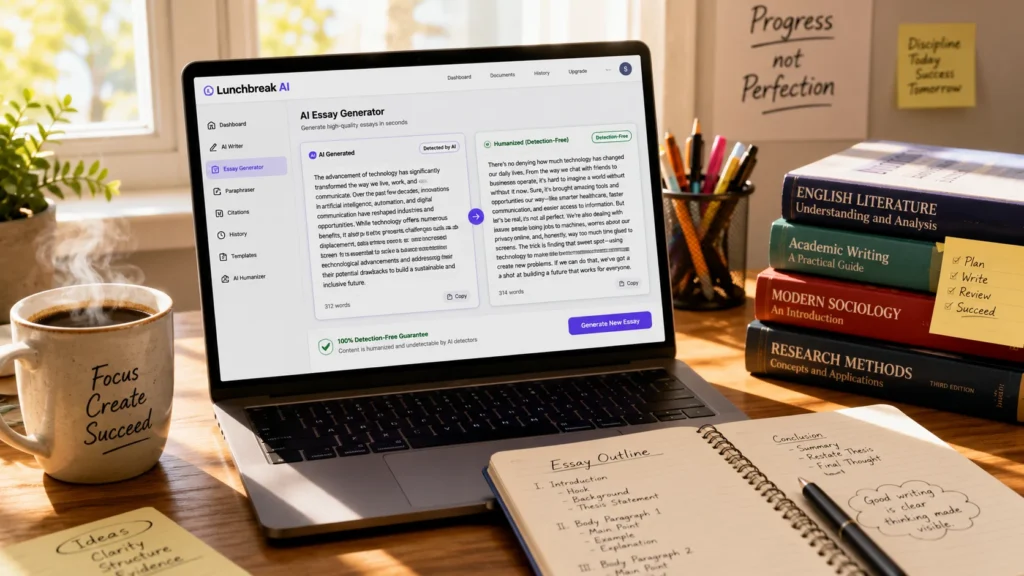
Lunchbreak AI is a specialized essay writing assistant designed for students and academics. It generates topics, finds academic sources, humanizes AI-generated text to bypass detection tools like Turnitin and GPTZero, and provides editing suggestions within a user-friendly interface. With a 4.73/5 user rating, a freemium model starting at $7.50/month, and over 300,000 users, it’s a solid choice for students facing writer’s block or tight deadlines . The platform’s AI model is trained on over 40,000 student essays and research papers, making it uniquely tailored for academic writing .
The Blank Page Problem
Every student knows the feeling. You stare at a blinking cursor on a blank document. Your professor gave you two weeks to write this essay, and somehow it’s now due tomorrow night. Writer’s block has set in, and you’re caught in a spiral of anxiety, procrastination, and self-doubt.
The problem isn’t that you don’t understand the material. The problem is translating your thoughts into a well-structured, academically sound essay. Researching sources, building proper citations, finding the perfect angle, and actually writing coherent paragraphs—it’s a lot to juggle, especially when you’re already overwhelmed with other coursework.
Lunchbreak AI enters the picture as a specialized writing assistant built specifically for this scenario. It’s not a generic content generator like ChatGPT or Jasper. It’s a tool purpose-built for academic writing, designed to help students overcome that initial hurdle and build momentum.
But does it actually deliver? Or is it just another shortcut that produces generic, easily detectable AI slop? This comprehensive Lunchbreak AI review cuts through the marketing noise to give you the real picture.
What Exactly Is Lunchbreak AI?
Let’s skip the fluff and get straight to what this tool actually is.
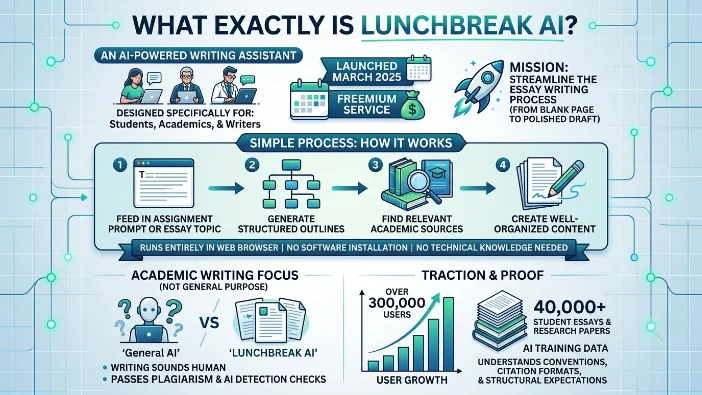
Lunchbreak AI is an AI-powered writing assistant designed specifically for students, academics, and writers who need help crafting essays and research papers. The platform launched in March 2025 as a freemium service with a clear mission: streamline the essay writing process from blank page to polished draft .
The core idea is refreshingly simple. You feed in your assignment prompt or essay topic, and the AI helps you generate structured outlines, relevant academic sources, and well-organized content. The platform runs entirely in your web browser, requires no software installation, and works without any technical knowledge .
What sets Lunchbreak AI apart from general-purpose AI tools like ChatGPT is its laser focus on academic writing. It’s not trying to be everything to everyone. Instead, it’s optimized for one specific use case: writing essays that sound human and pass plagiarism and AI detection checks.
The platform has gained significant traction since its launch. It currently serves over 300,000 users, including students, academics, and content creators . The AI model powering the platform was trained on more than 40,000 student essays and research papers, giving it a deep understanding of academic writing conventions, citation formats, and structural expectations .
Key Statistics at a Glance
| Metric | Data |
|---|---|
| Monthly Traffic | 18.9K to 33.6K visits |
| User Rating | 4.73/5 based on 11 reviews |
| Top Market | United States (90.3% of traffic) |
| Pricing Model | Freemium, starting at $7.50/month |
| Launch Date | March 2025 |
| Total Users | Over 300,000 |
| Primary Audience | Students and academics |
| Key Differentiator | AI Humanization + Source Generation |
One thing to note: Lunchbreak AI has experienced a traffic decline of about 34.6%, dropping from 33.6K to 18.9K monthly visits . While this signals increased competition in the AI writing space, the platform still maintains a strong user rating of 4.73 out of 5, suggesting that those who do use it are genuinely satisfied .
Core Features Breakdown
Lunchbreak AI packs several distinct features into its platform. Here’s what you actually get and what each feature does.
1. Topic and Source Generation
This is arguably the platform’s standout feature. Instead of spending hours brainstorming topic angles and hunting for academic sources, Lunchbreak AI generates well-researched topic ideas and provides relevant citations to support your arguments .
The feature pulls from the platform’s extensive training data of over 40,000 academic essays and research papers, meaning the suggestions are grounded in actual academic work rather than generic web content . This matters because academic writing demands authoritative, peer-reviewed sources, not random blog posts or Wikipedia entries.
Users consistently praise this feature. One reviewer noted, “The ability to generate sources that are relevant to my topic is a huge plus. It makes my research process so much easier” . Another added, “The topic generation feature is quite impressive. I’ve found unique angles that I wouldn’t have considered otherwise” .
The reality check: The sources aren’t always perfect. Multiple users mentioned inconsistencies in citation quality, requiring manual verification. “I’ve noticed some inconsistencies in the quality of citations provided, which require me to double-check them,” one reviewer explained . You should always verify the sources yourself.
2. AI Humanization
Here’s where Lunchbreak AI truly differentiates itself from basic AI writers. The AI Humanization feature rephrases content to make it sound natural and personalized, helping it bypass AI detection tools like Turnitin, GPTZero, and Originality.ai .
This is crucial for students. Getting flagged for AI-generated content can have serious academic consequences, including grade penalties, academic probation, or even expulsion at some institutions.
The platform positions itself as a tool for creating “detection-free essays” that retain your authentic voice . The AI model has been fine-tuned specifically to produce text that mimics human writing patterns, sentence structures, and stylistic variations.
One user praised this feature: “The AI’s ability to humanize the content is impressive. The essays sound natural and reflect my academic voice, which is crucial for my assignments” .
The reality check: Humanization isn’t magic. Several users reported that the generated content can feel “a bit too generic” and requires “heavy editing to fit my style” . The AI sometimes misinterprets assignment prompts, leading to topics that aren’t perfectly aligned with what your professor asked for .
3. Essay Outline Generator
Structured outlines guide your writing and ensure you cover all necessary points. Lunchbreak AI generates these outlines based on your topic or prompt, providing a clear roadmap for your essay .
One reviewer called the outlines “incredibly helpful. They guide my writing and ensure I cover all necessary points in my essays” . The outlines break down your essay into logical sections, helping you visualize the flow of arguments before you start writing.
4. Paraphraser and Editing Tools
Beyond generation, the platform offers paraphrasing and editing assistance. You can rephrase sections of your draft to improve clarity, flow, and originality . This is helpful when a specific paragraph feels clunky or doesn’t quite convey your intended meaning.
5. Plagiarism-Free Guarantee
The platform ensures that all rewritten content is 100% unique and will not be flagged for plagiarism . This protects your academic integrity and gives you peace of mind when submitting assignments.
6. Broad Platform Compatibility
Lunchbreak AI can humanize text generated from any AI platform, including ChatGPT, Claude, Google Bard, and others . This means you’re not locked into using just one AI writing tool.
Feature Comparison Table
| Feature | What It Does | Best For |
|---|---|---|
| Topic Generation | Suggests unique angles for your essay | Overcoming writer’s block, finding fresh perspectives |
| Source Generation | Provides academic citations and references | Research, proper sourcing, building bibliography |
| AI Humanization | Rewrites AI text to sound natural and personalized | Bypassing detection (Turnitin, GPTZero, Originality.ai) |
| Essay Outline | Creates structured essay frameworks | Planning, organization, logical flow |
| Paraphraser | Rewords existing text for clarity | Improving readability, avoiding repetition |
| Plagiarism Check | Ensures content is original | Academic integrity, peace of mind |
| Voice Preservation | Maintains your authentic writing style | Personalization, consistent academic voice |
What Users Actually Say
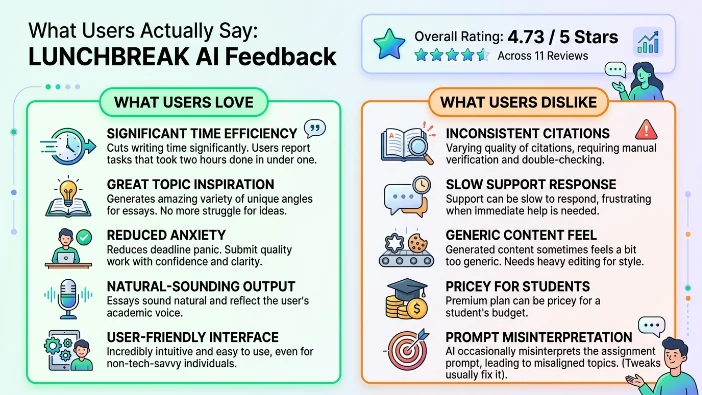
With a 4.73/5 rating across 11 reviews, Lunchbreak AI has generally positive feedback from its user base . Here’s a breakdown of what real users actually like and dislike.
What Users Love
Time efficiency dominates the conversation. Multiple users highlight how the platform cuts their writing time significantly. “What usually takes me two hours was done in under one,” one user reported . Another said, “By speeding up my writing process, I can submit quality work on time without last-minute panic” .
Topic inspiration consistently impresses users. “The variety of topics it generates is amazing! I’ve never struggled to find an angle for my essays since I started using it,” one reviewer shared . Another noted, “I’ve found unique angles that I wouldn’t have considered otherwise” .
Reduced anxiety around deadlines is a recurring theme. “It reduces my anxiety around writing assignments, allowing me to approach them with confidence and clarity” . The structure and guidance seem to help students who normally freeze under pressure.
Natural-sounding output gets frequent praise. “The essays sound natural and reflect my academic voice, which is crucial for my assignments” .
User-friendly interface is mentioned by multiple reviewers. “The tool is incredibly user-friendly and intuitive, making it easy to use even for someone who isn’t tech-savvy” .
What Users Dislike
Inconsistent citations are the most common complaint. “I’ve noticed some inconsistencies in the quality of citations provided, which require me to double-check them” . You should always manually verify sources.
Slow support response times frustrate some users. “The chat support can sometimes be slow to respond, which is frustrating when I need immediate assistance” .
Generic content feel appears in multiple reviews. “There are times when the generated content feels a bit too generic, and I need to heavily edit it to fit my style” .
Price for students is a concern for some. “The premium plan can be a bit pricey for students, but I think it’s worth it for the features it provides” .
Occasional prompt misinterpretation happens. “Occasionally, the AI misinterprets the assignment prompt, leading to topics that aren’t perfectly aligned. However, I can usually tweak them easily” .
Pricing Breakdown
Lunchbreak AI operates on a freemium model, meaning you can try core features without spending a dime. Here’s what the pricing looks like.
| Plan | Price | Key Features |
|---|---|---|
| Free | $0 | Basic features, limited generations per day, access to core tools |
| Basic | $19.98/month | Enhanced features, more usage, additional generations |
| Pro | $25.00/month | Premium features, unlimited generations, advanced editing |
| Annual | $7.50/month (billed yearly) | Full access at discounted rate, best value for regular users |
Important caveats: The free plan has usage limits and feature restrictions . If you’re using the tool heavily for multiple assignments, expect to pay for premium access. The annual plan at $7.50/month offers the best value if you’re committed to using the platform regularly.
Lunchbreak AI vs Competitors
The AI writing space is getting crowded. Here’s how Lunchbreak AI stacks up against the competition based on traffic and positioning.
| Platform | Monthly Visits | Primary Focus | Key Differentiator |
|---|---|---|---|
| Lunchbreak AI | 18.9K – 33.6K | Academic essay writing | Topic + Source Generation |
| Walter Writes AI | 1.8M | AI text humanization | Detection bypass, content rewrites |
| WriteHuman | 685.9K | AI humanizer | Bypassing detection, natural output |
| Humbot | 586.7K | AI text humanizer | Fast rewriting, user-friendly |
| Phrasly | 1.9M | AI content humanization | Student-focused, detection bypass |
| AI Humanize | 3.3M | AI text humanization | SEO and general content optimization |
Key insight: Lunchbreak AI is more specialized than most alternatives. It’s not trying to be a general writing assistant. It’s trying to be the best essay-writing assistant for students. However, competitors like Walter Writes AI (1.8M visits) and WriteHuman (685.9K visits) dwarf Lunchbreak AI’s traffic numbers .
The traffic decline suggests Lunchbreak AI may be losing ground in an increasingly crowded market, but its strong user rating of 4.73/5 indicates those who use it find genuine value .
How to Use Lunchbreak AI Effectively
Getting the most out of Lunchbreak AI requires a strategic approach. Here’s a step-by-step guide based on real user experiences.
Step 1: Set Up Your Free Account
Visit the Lunchbreak AI website and create an account. No credit card is required for the free tier .
Step 2: Input Your Assignment Prompt
Enter your essay topic or upload your assignment instructions. Be as specific as possible. Vague inputs produce vague outputs. Include the word count, required citation style (APA, MLA, Chicago), and any specific questions your professor wants answered .
Step 3: Generate Topics and Sources
Let the AI suggest unique angles and provide academic sources. Review these carefully. Not all sources are equally relevant or recent. Verify each citation manually .
Step 4: Generate an Outline
The AI creates a structured framework for your essay. This will be your roadmap. Use it to visualize the flow of your arguments and identify any gaps in your approach .
Step 5: Generate a Draft
Allow the AI to write the initial version. You’ll get an organized draft with citations. This is your starting point, not your finished product .
Step 6: Humanize and Edit
Use the AI Humanization feature to improve flow and naturalness. Then heavily edit the result. The initial draft is a sketchpad, not a masterpiece .
Step 7: Verify Every Source
Double-check every citation for accuracy. Inconsistent sourcing is one of the platform’s known weaknesses. Don’t trust the AI’s sources blindly .
Step 8: Polish Manually
Add your own insights, adjust the tone, and refine the argument. This is where you make it your own. The AI gives you the structure and basic content; you provide the depth and authenticity.
The Traffic Decline: What’s Happening?
Lunchbreak AI has experienced a significant drop in visitors—about 34.6% to 44% decline, dropping to around 18.9K to 33.6K monthly visits . This is a red flag worth examining.
What’s causing this?
- Intense competition: AI writing tools are everywhere. Walter Writes AI pulls 1.8M visits monthly. WriteHuman pulls 685.9K. Phrasly pulls 1.9M. Lunchbreak AI is getting drowned out .
- Changing user behavior: Students may be using ChatGPT, Claude, or other free alternatives instead of specialized essay tools. General-purpose AIs are becoming sophisticated enough to handle basic essay generation.
- Quality concerns: Users report inconsistent results, generic content, and unreliable citations. This may lead to churn .
- Price sensitivity: Students are notoriously budget-conscious. Cheaper or entirely free alternatives exist. The $19.98/month basic plan may be too steep for the target audience .
What this means for you: The traffic decline suggests Lunchbreak AI may be struggling to maintain relevance in an increasingly crowded market. That doesn’t mean it’s a bad tool. But it means you should evaluate it carefully against current alternatives .
The Academic Integrity Question
Let’s address the elephant in the room directly.
Lunchbreak AI promotes itself as a tool that helps students bypass AI detection. The AI Humanization feature is specifically marketed to help “bypass AI detectors like Turnitin and GPTZero” .
This raises serious academic integrity questions.
If you’re using the tool to fully generate an essay that you then submit as your own work, you’re cheating. Plain and simple. Most universities have explicit policies against AI-generated submissions that aren’t properly disclosed.
However, if you’re using Lunchbreak AI as a research, brainstorming, and outlining tool—generating ideas, finding sources, structuring arguments—you’re using it responsibly. The difference between the two approaches is significant.
The ethical approach to using Lunchbreak AI:
- Use it to overcome writer’s block, not to write the entire essay
- Verify every source the AI generates
- Heavily edit the output to match your own voice and insights
- Properly cite all external sources, including AI-generated content if your institution requires it
- Use the outline and structure as guidance, not as a final product
- Add your own analysis, examples, and critical thinking
Think of it like using a calculator in math class. Calculators are helpful tools for speeding up calculations, but if you use one to solve every problem without understanding the underlying math, you’re not learning anything. Same principle applies here.
Should You Use Lunchbreak AI?
Yes, if:
- You’re a student facing tight deadlines and need a structured starting point
- You struggle with writer’s block and need topic inspiration
- You want help finding academic sources quickly
- You’re willing to heavily edit and verify the output
- You understand the tool is for research and outlining, not full automation
No, if:
- You expect finished, submission-ready essays
- You refuse to manually verify sources and citations
- You’re in a field requiring truly original, advanced analysis
- You want something more versatile than essay-specific tools
- You’re looking for a long-term solution rather than occasional help
The bottom line: Lunchbreak AI is a solid niche tool for academic writing. It’s not a miracle worker. The first draft will be generic. The citations may need verification. You’ll still need to put in significant effort to polish the final product.
But if you’re stuck on a blank page and need momentum, it’s genuinely helpful. It saves time on the mundane parts of writing—outlining, basic research, organizing structure—so you can focus on the higher-value work: adding your own analysis, perspectives, and critical thinking .
The warning sign: The traffic decline is real and concerning . Competitors are growing rapidly while Lunchbreak AI shrinks. Try the free tier before committing any money. Test it with a low-stakes assignment. See if the workflow clicks.
If it does, great. If it doesn’t, there are dozens of alternatives available. The AI writing space moves fast, and the right tool for you depends on your specific needs, budget, and academic context.
Start with the free tier, push its limits, and decide for yourself. The worst that happens is you waste an afternoon experimenting. The best that happens? You discover a new way to bring your academic writing to life without the usual stress and anxiety.
FAQs
Is Lunchbreak AI free to use?
Yes, Lunchbreak AI offers a free tier with basic features and limited generations per day. You can access core tools like topic generation and basic outlining without paying anything. No credit card is required to sign up for the free plan . For heavy usage, you’ll need to upgrade to a paid plan starting at $7.50/month on the annual billing cycle .
Can Lunchbreak AI really bypass Turnitin and GPTZero?
The AI Humanization feature is specifically designed to rephrase content and make it sound more natural, which can help reduce detection flags. Users have reported success with this feature, but it’s not foolproof . Detection tools are constantly evolving, so you shouldn’t rely on any tool to guarantee undetectable content. The best approach is to use the AI as a starting point and heavily edit the final product yourself.
How accurate are the citations generated by Lunchbreak AI?
This is a mixed bag. While the source generation feature is helpful, multiple users have reported inconsistencies in citation quality . You should always manually verify every source the AI provides. Think of it as a starting point for your research, not a finished bibliography. Double-check the author names, publication dates, journal names, and page numbers before submitting.
What citation styles does Lunchbreak AI support?
The platform supports multiple academic citation formats including APA, MLA, Chicago, and Harvard referencing styles . You can specify your preferred style when generating content, and the AI will format citations accordingly. Always double-check the formatting against official style guides, as the AI occasionally makes errors.
Is Lunchbreak AI safe to use for academic work?
The platform generates original content and includes a plagiarism checker to help you verify uniqueness . However, you should check your institution’s policy on AI-generated content before using any AI writing tool. Some universities explicitly prohibit AI-generated submissions, while others allow it with proper disclosure. When in doubt, ask your professor directly.
How does Lunchbreak AI compare to ChatGPT for essay writing?
Lunchbreak AI is specialized for academic writing, while ChatGPT is a general-purpose AI. Lunchbreak AI includes features ChatGPT lacks: topic generation with academic sources, citation formatting in multiple styles, and AI humanization to make content sound more natural . However, ChatGPT is free (with limits) and more versatile across different types of writing. Many students use both tools in combination.
What happens if the AI misinterprets my assignment prompt?
Occasional misinterpretation happens, as multiple users have reported . When this occurs, you can usually tweak the prompt or regenerate the content. Being as specific as possible in your initial instructions helps minimize this issue. Include the word count, required citation style, and any specific questions your professor wants answered.
Can I use Lunchbreak AI for subjects other than essays?
While essays are the primary focus, the platform can assist with research papers, case studies, literature reviews, and other academic writing formats . It’s less suitable for creative writing, fiction, or non-academic content. The AI model was trained specifically on academic writing, so its outputs are optimized for that context.
Does Lunchbreak AI offer a money-back guarantee?
The platform’s refund policy isn’t clearly documented on their website. Given the freemium model, the safest approach is to thoroughly test the free tier before committing to any paid plan. This gives you a risk-free way to evaluate whether the tool meets your needs.
How do I cancel my Lunchbreak AI subscription?
Cancellation can typically be done through your account settings on the platform. If you encounter any issues, you may need to contact their support team directly. Some users have reported slow response times from chat support, so plan accordingly if you need to cancel .
Conclusion
Lunchbreak AI isn’t some magical essay machine that produces A-grade work with zero effort. It’s a tool. A decent one for certain academic scenarios, but a tool nonetheless.
Think of it like having a knowledgeable writing tutor sitting next to you at 2 AM. The platform does three things genuinely well. First, it kills writer’s block dead. Generating topics and outlines gets you over that terrifying blank page moment. Second, it saves serious time on the mundane parts of writing—finding sources, organizing arguments, formatting citations. Third, the AI Humanization feature legitimately improves how natural AI-generated text sounds.
But here’s the honest truth you need to hear: the initial draft sounds generic. The citations aren’t always reliable. The AI sometimes misses the nuance of your specific assignment. And the platform is losing traffic while competitors like Walter Writes AI, WriteHuman, and Phrasly are growing fast .
The traffic decline is a yellow flag. It suggests Lunchbreak AI may be struggling to keep up in a crowded market. But the 4.73/5 user rating tells a different story—those who use it genuinely appreciate what it offers.
Who actually benefits from Lunchbreak AI?
- Students drowning in multiple assignments who need a structured starting point
- ESL writers who struggle with academic English flow and phrasing
- Anyone facing writer’s block who needs topic inspiration and momentum
- Students who want to verify their AI-generated drafts sound sufficiently human
Who should probably skip it?
- Students expecting a finished, submission-ready essay without further work
- Anyone unwilling to manually verify every source and citation
- Those in advanced fields requiring truly original, cutting-edge analysis
- Students on extremely tight budgets who can’t justify the premium price
Here’s my honest recommendation:
Start with the free tier. Generate your daily credits worth of content. Test the humanization feature with your own writing. See if the workflow fits your creative process. If it clicks and saves you time, upgrade to the annual plan at $7.50/month—that’s the best value by far.
If it doesn’t click, you’ve lost nothing but a few hours of experimentation. There are dozens of alternatives out there. ChatGPT is free. Grammarly is widely used. Claude handles academic writing surprisingly well. You have options.
The bigger picture thing to remember:
Lunchbreak AI represents a broader shift in how students approach academic writing. These tools aren’t going away. The genie is out of the bottle. The question isn’t whether to use AI for academic work—it’s how to use it responsibly.
When used ethically, Lunchbreak AI is a productivity accelerator. It handles the grunt work so you can focus on what actually matters: your ideas, your analysis, your unique perspective. The AI provides the scaffolding; you provide the building.
But the moment you submit AI-generated work as your own without substantial editing and personal input, you’re crossing an ethical line. Don’t do that. It’s not worth the academic integrity violations, the stress, or the hollow feeling of having cheated yourself out of genuine learning.

Justin Powell is a writer at GramBrix.com who focuses on grammar, clarity and effective communication, helping readers strengthen their language skills.