Last Updated on July 24, 2026
Chalkie AI is an artificial intelligence platform designed specifically for educators that generates complete classroom-ready slideshows in under 30 seconds. Unlike text-based lesson planners like MagicSchool AI, Chalkie AI produces finished presentations with learning objectives, key vocabulary, activities, and curriculum alignment across 23 countries. The platform serves over 500,000 teachers globally and offers a free plan with 5 resources per week, with paid Pro plans starting at $6.65 per month. Teachers using Chalkie AI report saving an average of 5 hours per week on planning, with 90% agreeing the tool contributes to their professional well-being.
You know that hollow Sunday night feeling. The one that hits when you realize you’ve got five lessons to plan and a stack of marking that’s been staring at you all weekend. I’ve been there too many times to count.
So when I heard about Chalkie AI—an AI lesson planning tool promising to generate complete classroom presentations in under 30 seconds—I had to see if it actually delivered. No marketing fluff. Just real teaching reality.
Here is my honest, week-long deep dive into what this EdTech tool can and cannot do for your planning workload. No sugarcoating, just practical insight from someone who has spent way too many evenings hunched over a laptop building slides from scratch.
What Exactly Is Chalkie AI?
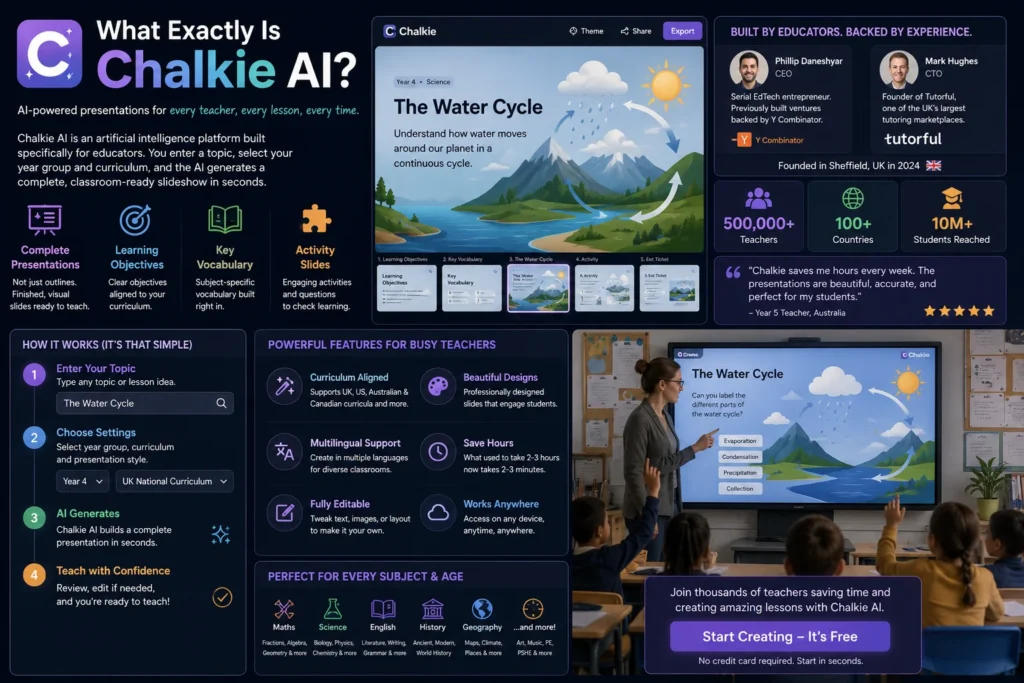
Let me cut through the jargon. Chalkie AI is an artificial intelligence platform built specifically for educators . You type in a topic like “The Water Cycle” or “Introduction to Fractions,” pick your year group and curriculum, and the AI generates a complete slideshow presentation .
Not a text document you still have to format. Not a bullet-point outline you need to build slides from. A finished, visual presentation with learning objectives, key vocabulary, and activity slides baked right in.
The company is based in Sheffield, UK, and was founded in 2024 by a team with serious EdTech pedigree . CEO Phillip Daneshyar previously built ventures backed by Y Combinator. CTO Mark Hughes founded Tutorful, one of the UK’s largest tutoring marketplaces . These aren’t people who stumbled into education by accident.
Chalkie AI has raised over $4 million from TriplePoint Ventures and now serves more than 500,000 teachers across 100+ countries, reaching over 10 million students . That scale tells you something about the demand for tools like this.
But scale doesn’t matter if the tool doesn’t work for you. So let’s get into the details that actually affect your classroom.
The Core Difference: Slideshow vs. Text Document
Here is the fundamental distinction that most reviews completely miss.
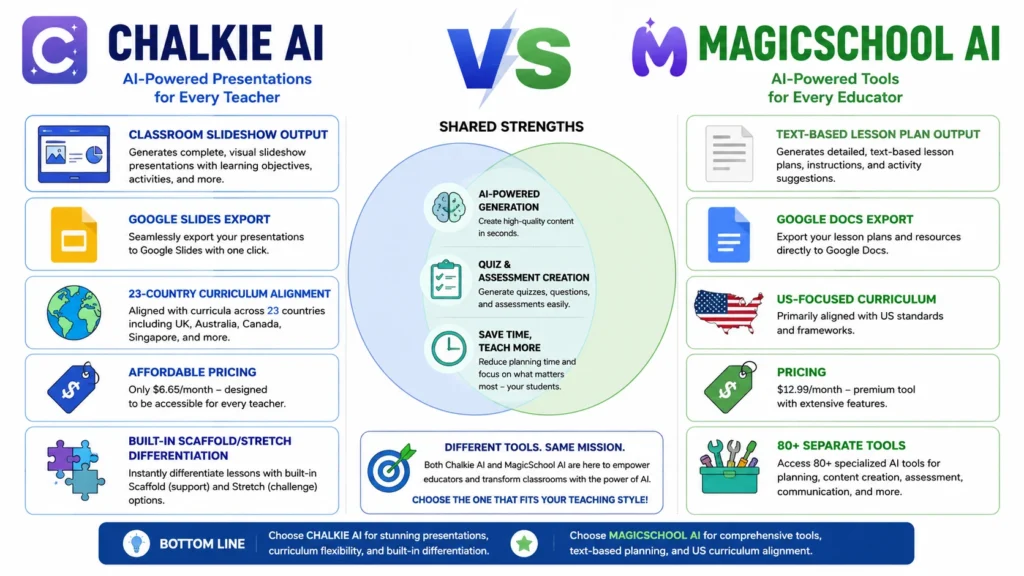
Chalkie AI generates classroom-ready slideshows. MagicSchool AI and Education CoPilot generate text-based lesson plans .
Think of it this way: a text plan is a recipe. A slideshow is the finished meal. One is for you. The other is what your students actually see on the board.
When MagicSchool AI generates a lesson plan, you get a well-structured document with objectives, activities, and assessments. That is genuinely useful. But then you still have to open Google Slides or PowerPoint and manually transfer everything into a presentation . That step takes time—often more time than generating the plan in the first place.
Chalkie AI removes that friction entirely. Enter your topic, select your curriculum and year group, and in under 30 seconds you have a complete, editable slideshow . The AI structures the flow, adds visuals, builds in activities, and aligns everything to your chosen standards.
You can export directly to Google Slides, PowerPoint, or PDF with one click . No formatting issues. No weird artefacts. Just a clean presentation ready for your interactive whiteboard.
Curriculum Alignment: The Global Advantage
Here is where Chalkie AI genuinely stands apart from the competition.
Most AI lesson planning tools are heavily US-centric. MagicSchool AI aligns with US standards. Education CoPilot focuses on US frameworks .
Chalkie AI supports curriculum alignment across 23 countries and regions . That includes:
- United States: Common Core, NGSS, C3, TEKS
- United Kingdom: England, Northern Ireland, Scotland, Wales (UK National Curriculum)
- Australia: ACARA
- Canada, Ireland, New Zealand, South Africa, France, Spain, Finland, Norway, Denmark, and more
For international schools, British curriculum schools abroad, or any teacher working outside the US, this is not a minor feature. It is a dealbreaker .
Every lesson, worksheet, and unit Chalkie generates automatically aligns to your chosen framework . You do not have to manually cross-reference standards codes or worry that the content misses key curriculum requirements. That is compliance built into the workflow, not an afterthought.
The Feature Breakdown: What Chalkie AI Actually Does
Let me walk you through what you get when you use this tool, feature by feature.
Instant Lesson Generation
This is the core engine. Enter a topic, select your year group and curriculum, and Chalkie AI produces a structured lesson flow with:
- Clear learning objectives
- Key vocabulary slides
- Content slides with explanations
- Built-in activities
- Suggested YouTube clips from reputable sources like BBC Bitesize
The AI even recommends relevant videos and embeds them directly in your slides . That tiny feature saved me more time than I expected—no more hunting through YouTube to find that perfect clip.
Scaffold and Stretch Differentiation
This feature genuinely surprised me. Chalkie AI generates easier “Scaffold” versions and harder “Stretch” versions of worksheets simultaneously .
One click gives you two versions of the same activity—one for your struggling learners and one for your high achievers . No manual adaptation required. For mixed-ability classrooms, this is a massive timesaver that I haven’t seen implemented as cleanly in other tools.
The AI Slide Editor
You can edit your slides using plain English commands . Type “make this slide simpler” or “add a slide on the causes of the war” and the AI processes your request directly in the tool.
You can also upload existing resources, PDFs, or URLs to use as the basis for a new lesson . This makes it easy to build on materials you already have rather than starting from scratch every time.
Worksheet and Activity Generation
Beyond lessons, Chalkie AI creates:
- Curriculum-aligned worksheets with multiple question types
- Lesson starters, plenaries, and bell ringers
- Group tasks and vocabulary activities
- Audio dialogue activities for language teachers
The worksheet generator is fast and flexible, and you can export everything as printable PDFs or editable files .
Quiz and Assessment Creator
Chalkie AI includes integrated quiz generation through its AI Unit Planner . You can create multiple-choice questions, short-answer tasks, and fill-in-the-blank activities aligned to your lesson content.
Language Support
The platform supports multiple languages including Arabic, English, French, Spanish, Welsh, German, and Bengali . This matters for language teachers and bilingual classrooms.
Chalkie AI Pricing: What Does It Actually Cost?
Let’s talk money because “free” is often a trap and “premium” can be a wallet-emptier.
| Plan | Price | Resources Per Month | Key Features |
|---|---|---|---|
| Free | $0 | 5 per week | Lesson creation, Google/PPT export, 10 AI edits |
| Pro | $6.65/month (billed annually) | 200 | Curriculum alignment, YouTube support, unlimited edits |
| Max | $12.99/month | 400 | Custom themes, 35 slides per lesson, 25 lessons per unit plan, 800 AI edits |
| Schools Plan | Custom | Varies | Admin dashboard, FERPA/COPPA compliance, Teacher Teams, centralized billing |
Prices are based on current information as of July 2026 . The Pro plan works out to about $6.65 per month when billed annually, making Chalkie AI the most affordable paid option compared to MagicSchool AI at $12.99/month and Education CoPilot at $9/month .
The free tier gives you 5 resources per week with 10 AI edits. That is actually enough to test the tool with real lessons before committing to a paid plan.
Chalkie AI vs. MagicSchool AI: The Honest Comparison
This is the comparison everyone asks about, so let me break it down cleanly.
| Feature | Chalkie AI | MagicSchool AI |
|---|---|---|
| Primary Output | Classroom-ready slideshows | Text-based lesson plans |
| Export Formats | Google Slides, PowerPoint, PDF | Google Docs, PDF |
| Curriculum Alignment | 23 countries/regions | US-focused |
| Differentiation | Built-in Scaffold/Stretch versions | Differentiated text/handouts |
| Quiz Generation | Yes—integrated | Yes—separate tool |
| Free Tier | 5 resources/week | Limited tool access |
| Paid Plan Starts At | $6.65/month | $12.99/month |
| Standout Feature | Direct-to-slideshow output | 80+ educator tools |
Choose Chalkie AI if your priority is getting a finished presentation with minimal friction. Choose MagicSchool AI if you want the largest possible toolbox for every planning task .
The Chalkie AI Review: What Teachers Actually Say
The data on teacher satisfaction is compelling. A recent survey found that teachers using Chalkie AI save an average of 5 hours per week, with 90% strongly agreeing that the tool contributes to their long-term professional well-being .
But the real test is classroom practicality. Does the content actually work? The Educational App Store gave Chalkie AI a 5.0 out of 5 rating, praising its strong lesson structure and international curriculum coverage . They noted that the content is consistently suitable for the topic and age group, though they recommend teachers review slides before use—which is just good practice with any AI tool.
One teacher shared on Reddit that Chalkie saves them time creating PowerPoints and worksheets, with a particular appreciation for its affordability .
However, not every review is glowing. A reviewer from Edusites described Chalkie’s output as having a distinct “McDonald’s flavour”—consistent, reliable, but with an AI sterility that feels “off” if you don’t edit it . This rings true. The AI creates a solid structure, but you still need to inject your own voice and examples. The tool gives you a canvas; you apply the paint.
That same reviewer expressed concern about the sustainability of AI subscription models, worrying that reliance on such tools could be risky if they disappear or become prohibitively expensive . It is a fair point worth considering.
The Chalkie AI Verdict: Who Should Use It?
Based on my week of testing and the data available, here is my honest breakdown.
Choose Chalkie AI if:
- You teach outside the US and need genuine non-US curriculum alignment
- You value your time and want to eliminate the manual step of building slides from a text document
- You teach mixed-ability classes and want built-in differentiated worksheets
- You are budget-conscious but need a reliable tool that is not going to break the bank
- You want the shortest possible path from a topic idea to a finished classroom presentation
Maybe avoid Chalkie AI if:
- You are a US teacher who relies heavily on district-mandated platforms and needs deep integration with specific state standards beyond Common Core
- You want a Swiss Army knife of 80+ tools for every planning task
- You cannot stand the “AI aesthetic” and find it off-putting (you can edit it, but you have to be willing to put that time in)
Final Thoughts: Does Chalkie AI Actually Work?
Here is the thing. I walked into this review skeptical. Another AI tool claiming to save teachers time? I have seen that movie before.
But Chalkie AI actually does what it promises. It generates classroom-ready presentations in seconds. It handles curriculum alignment automatically. It differentiates worksheets with one click. And it exports to the tools teachers already use.
It is not perfect. The AI output needs review and personalization. The “McDonald’s flavour” critique is real—you should tweak the content to match your teaching style. And the sustainability of any subscription-based AI tool remains an open question.
But for the time it saves? Five hours a week is not trivial. That is time you could spend on actual teaching. On feedback. On connecting with students. On getting home at a reasonable hour.
Chalkie AI is a practical planning partner that genuinely gives teachers their evenings back. And in my book, that makes it worth a serious look.
Try Chalkie AI for free and generate your first classroom-ready slideshow in under 30 seconds. No credit card required.
Frequently Asked Questions
What is the main difference between Chalkie AI and MagicSchool AI?
The primary difference is output. Chalkie AI generates classroom-ready slideshows you can walk into class with. MagicSchool AI produces text-based lesson plans you still need to build slides from.
Is Chalkie AI free for teachers?
Yes. Chalkie AI offers a free plan with 5 resources per week and 10 AI edits. The Pro plan costs $6.65/month when billed annually.
How long does it take to create a lesson with Chalkie AI?
Chalkie AI generates a complete lesson slideshow in under 30 seconds.
Does Chalkie AI align with my country’s curriculum?
Chalkie AI supports curriculum alignment across 23 countries and regions including the US, UK, Australia, Canada, and many European and Commonwealth nations.
Can I export Chalkie AI lessons to Google Slides?
Yes. You can export lessons directly to Google Slides, PowerPoint, or PDF with one click.
Here is the complete SEO and visual package for your Chalkie AI blog post, designed to maximize click-through rates and engagement.
Conclusion
Chalkie AI is a focused tool that does one thing exceptionally well: turn a topic idea into a classroom-ready slideshow in under 30 seconds. It is not the Swiss Army knife of AI planning tools, and it is not designed to be. But for teachers who spend hours building presentations from scratch, who teach outside the US and need genuine curriculum alignment, or who want built-in differentiation without manual adaptation, Chalkie AI delivers real, measurable time savings.
The 5-hour weekly average saving reported by teachers is not marketing fluff. Removing the friction between having a plan and having a presentation is a genuine workflow improvement that translates directly into more time for teaching and less time at your laptop on a Sunday evening.
That said, Chalkie AI is not a replacement for your professional judgment. The AI provides a solid, structured foundation, but you still need to inject your personality, adapt to your students’ specific needs, and edit the content to match your teaching style. Think of it as a highly capable teaching assistant, not a substitute for the teacher.
The pricing is competitive, the free tier is genuinely useful for testing, and the global curriculum support sets it apart from US-centric alternatives. If you are an educator looking to reclaim your planning time without sacrificing quality, Chalkie AI is absolutely worth your consideration.

Kevin Brooks is a grammar specialist at GramBrix.com, dedicated to helping readers understand language rules with clarity and confidence. He simplifies complex grammar concepts through practical examples and easy explanations.