Last Updated on July 25, 2026
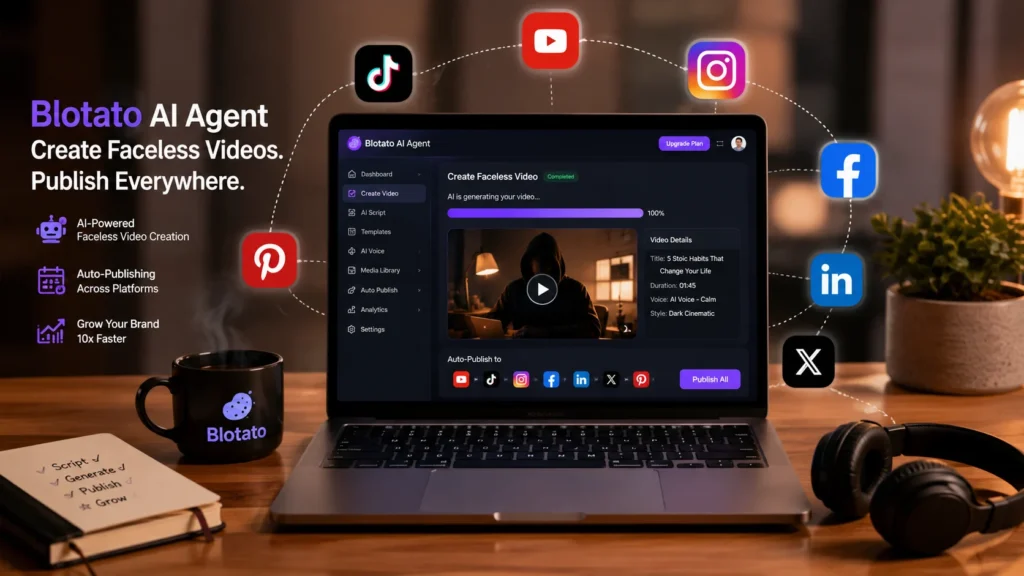
Blotato is an AI content engine that combines AI writing, image generation, video creation, and cross platform publishing in one workspace. It features a conversational AI Agent, REST API, hosted MCP server for Claude integration, and official n8n nodes. Pricing starts at $29/month with 1,250 AI credits and 20 social accounts. However, Trustpilot shows a 2/5 rating with widespread billing complaints, and the free trial excludes API access .
The Content Creation Overload
You know the feeling. You’ve got a YouTube video to edit, Instagram posts to schedule, a TikTok to film, and a newsletter to write. The content treadmill never stops. And somewhere in the middle of it all, you’re supposed to be “creative.”
Social media management is a full-time job disguised as a side hustle. You’re a writer, a video editor, a graphic designer, and a strategist all rolled into one. Tools promise to help, but most just add more complexity.
Blotato AI claims to be different. It positions itself as an “8-apps-in-1” AI content workspace. Bring a topic, pick a template, and get a week’s worth of content scheduled across platforms. That’s the promise.
But does it actually deliver? Or is it just another AI tool with big claims and bigger letdowns?
This Blotato AI review cuts through the hype. We’ll explore the real features, the honest workflow, the pricing gotchas, and who actually benefits from this platform.
What Exactly Is Blotato AI?
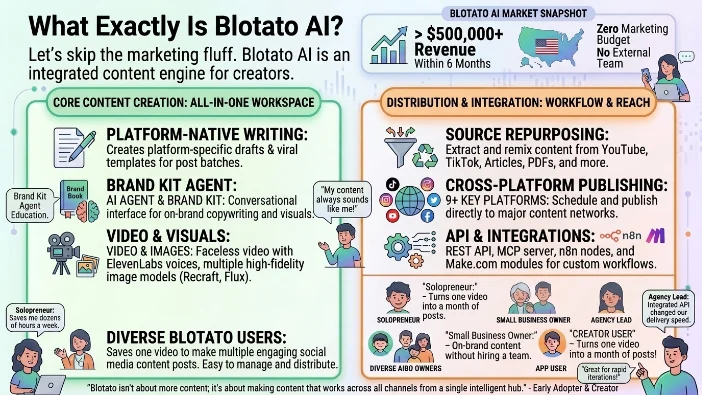
Let’s skip the marketing fluff. Blotato AI is an AI content engine built for solopreneurs, creators, small businesses, and small agencies. It combines eight different content tools into one workspace: AI writing, AI images, AI videos, carousels, source repurposing, a calendar, cross-posting, and automation hooks .
The company is based in the United States and has gained significant traction, hitting over $500,000 in revenue within six months with zero marketing budget and no team . That’s impressive by any standard.
Core Capabilities
Here’s what the Blotato AI platform actually does:
- AI Agent: A conversational interface where you describe what you want, and the AI generates it using your Brand Kit for on-brand copywriting and visuals
- AI Writing: Creates platform-native drafts and viral templates for post batches
- AI Images: Multiple generation models including Recraft (photorealistic), Nano Banana 2 (best text rendering), and Flux (artistic style)
- AI Videos: Faceless video templates with AI voiceover using ElevenLabs voices
- Source Repurposing: Extract and remix content from YouTube, TikTok, articles, PDFs, audio, X/Twitter, raw text, and even Perplexity queries
- Cross-Platform Publishing: Schedule and publish to 9+ platforms including TikTok, Instagram, YouTube, Facebook, and more
- API Access: REST API, hosted MCP server, official n8n nodes, and Make.com modules
The Workflow: How Blotato AI Actually Works
Getting started with Blotato AI is relatively straightforward. Here’s what the process looks like.
Option A: The Blotato AI Agent
The AI Agent is the fastest path to creating content. You simply describe what you want in plain English .
- Open the Blotato AI Agent at my.blotato.com/agent
- Type something like “make a 60-second video about the history of coffee”
- The AI generates your video using your Brand Kit settings
- Chat with the AI to make changes: update text, swap images, change styles, or add voiceover
The AI Agent handles images, infographics, carousels, and videos. Setting up your Brand Kit first gives you the best results .
Option B: Manual Templates
For more control, you can skip the AI Agent and use templates directly .
- Go to Videos > New and select a template
- Pick “AI Video with AI Voice” for voiceover support
- Paste your script into the Prompt field
- Click “Generate Video”
The video opens in the full-screen editor where you can preview and customize. You’ll see cheap AI images populated based on your script. The recommended approach: storyboard with cheap images first, then finalize with high-quality images, then animate them into video clips .
Option C: API and Automation
This is where Blotato AI gets interesting. It’s not just another scheduler .
- REST API: Available at backend.blotato.com/v2
- MCP Server: Hosted MCP server for Claude, Claude Code, Cursor, and Replit Agent
- n8n Nodes: Official community node for n8n workflows
- Make.com Modules: Integration with Make.com for automation
The AI Video Creation Reality Check
Creating AI videos with Blotato AI has some important nuances you need to know.
Static Images by Default
Here’s something the marketing doesn’t emphasize enough: the AI Agent generates static images by default. Why? They cost fewer credits and render faster. To get actual animated video clips, you need to toggle that on manually .
Two ways to animate:
- Before creating: Click “Need more customization?” and turn on the toggle to convert all AI images into video clips
- After creating: Open the video in the editor, click a green image clip, then click “Create Animated Image” in the left panel
The recommended order is to create with static images first, review the result, then animate only the clips you want. This controls how many credits you spend .
AI Video Models Available
Blotato AI supports multiple AI video models, all available to all users :
| Model | Type | Credit Cost |
|---|---|---|
| Framepack | Image-to-Video | 55 credits |
| Kling v1.5/v1.6 | Image-to-Video | 210 credits |
| Luma Dream Machine | Image-to-Video | 170 credits |
| Runway Gen-3 Turbo | Image-to-Video | 85 credits |
| Minimax Video | Image-to-Video | 170 credits |
| Google Veo2 | Image-to-Video | 835 credits |
| Veo3 Fast | Image-to-Video | 400 credits |
| Veo3.1 Fast | Image-to-Video | 50 credits/sec with audio |
Framepack is notably the cheapest option and works great for most use cases .
Voiceover Integration
To add AI voiceover, you need to use the right template. The first template (“Create Everything with AI Agent”) generates visuals and text but does NOT generate AI voiceover automatically .
Fix: Select the second template (“AI Video with AI Voice”) instead. This generates AI voiceover synced to each scene using ElevenLabs voices .
After generation, click the blue caption track and select your voice from the ElevenLabs options .
What Blotato AI Video Does NOT Do
This is crucial context. Blotato AI explicitly does NOT generate :
- Lip syncing
- Talking avatars
- Realistic human avatars
- AI clone generation
For AI avatars, the founder recommends using HeyGen and then using Blotato AI to publish the avatar videos .
AI Image Generation Options
Blotato AI offers multiple AI image models with different strengths .
Available Models
| Model | Best For | Credit Cost |
|---|---|---|
| Realistic Image (Recraft) | Photorealistic style | 15 credits |
| Best for Text Image (Nano Banana 2) | Highest quality, best text rendering, infographics | 30 credits |
| Creative Image (Flux) | Stylized and artistic results | 1-20 credits |
| Ideogram v2 | High quality | 30 credits |
| ChatGPT 4o (gpt-image-1) | General purpose | 25 credits |
Fixing Image Issues
If your AI images have misspellings or low quality, switch models. Nano Banana 2 handles text rendering best .
Tips to reduce text errors :
- Keep text to a short phrase, not a full sentence
- Capitalize the phrase in your prompt like: a sign that says “CHATGPT ROCKS!”
- Regenerate 2-3 times until text is correct
- For infographics, always use Nano Banana 2
- Add “no text” or “no words” to your prompt to prevent AI from rendering text
- Add a Brand Kit rule like “never include text in generated images”
Pricing Breakdown
Blotato AI’s pricing is straightforward but has important gotchas .
| Plan | Price | AI Credits | Social Accounts | Best For |
|---|---|---|---|---|
| Starter | $29/month | 1,250 | 20 | Solopreneurs, beginners |
| Creator | $97/month | 5,000 | 40 | Growing creators |
| Agency | $499/month | 28,000 | Dedicated support | Agencies, high-volume |
Plan Limits
| Limit | Starter | Creator | Agency |
|---|---|---|---|
| Connected social accounts | 20 | 40 | 100 |
| Max media upload size | 400 MB | 1 GB | 1 GB |
| Queued scheduled posts | 200 | 1,000 | 3,000 |
| Scheduling horizon | 9 months | 1 year | 2 years |
Important caveats :
- The 7-day free trial excludes API access
- Generating an API key ends your trial and starts the paid subscription immediately
- No per-post fees and no seat fees
- You can label posts as AI-generated for YouTube and TikTok (Facebook and Instagram on roadmap)
Credit System
Credits are used for:
- Generating AI images
- Generating AI videos
Credits are NOT used for:
- Scheduling or publishing posts
- AI voiceovers (powered by ElevenLabs)
- Turning your content into posts
Estimate: A 30-second video using the cheapest settings costs only 7 credits. The Starter plan with 1,250 credits allows you to make 178 thirty-second videos .
The Trustpilot Reality Check
Here’s where things get uncomfortable. Blotato has a 2/5 rating on Trustpilot with consistent patterns in negative reviews .
Common complaints:
“I was charged $29 for a subscription and realized it almost immediately. I canceled the subscription right away and did not use the service at all. Despite that, when I contacted their support team to request a refund, they either refused or did not provide a reasonable solution.”
“They charged me 3 times in 2 weeks. There is literally ZERO assistance. Only some crazy AI services that doesn’t know how to resolve issues.”
“Biggest scam. Got signed up to a subscription at blotato when buying a $10 json file from gumroad that did not even work.”
“I signed for a free trial and they charged immediately. Thieves, you didn’t even allow me to get in the page and your bot tells me that my trial recently ended.”
“The customer service is nonexistent and this feels like a joke and something that was made by a 13 yr old in a coding bootcamp from his mom’s basement.”
One positive note: Some users report they did eventually receive refunds, but the experience was still “horrifying” .
It’s worth noting that Trustpilot reviews represent one side of the story. Some users report positive experiences with the actual product functionality .
The Pros (What Actually Works)
Here’s where Blotato AI delivers genuine value.
AI Agent Simplicity
The conversational AI Agent is genuinely intuitive. You don’t need to learn complex software. Just describe what you want and the AI handles the heavy lifting .
Cross-Platform Publishing
Starting at $29/month with 20 social accounts is solid value. You can schedule and publish to TikTok, Instagram, YouTube, Facebook, and more from one dashboard .
Automation Surface
The REST API, MCP server, n8n nodes, and Make.com modules make Blotato AI unusually strong for creators who want to build automation stacks. You can connect Claude, n8n, Google Sheets, Airtable, or Notion into your workflow .
Source Repurposing
Extract content from YouTube, TikTok, articles, PDFs, audio, X/Twitter, raw text, and Perplexity queries. This is genuinely useful for repurposing existing content across platforms .
Multiple AI Models
Access to multiple AI image and video models from one interface saves you from subscribing to separate tools .
Founder-Led Education
Sabrina Ramonov provides playbooks, viral hooks, and hands-on creator workflow ideas as part of the product story .
The Cons (The Gritty Reality)
No tool is perfect. Here’s where Blotato AI falls short.
Billing and Subscription Issues
The Trustpilot reviews paint a concerning picture. Multiple users report unexpected charges, difficult refund processes, and unresponsive support .
Key warnings:
- The free trial excludes API access
- Generating an API key immediately starts your paid subscription
- Refund policies appear rigid and customer support is reportedly hard to reach
No AI Avatars or Clones
Blotato AI explicitly does NOT offer AI avatar or clone generation. For these features, you need to combine with a separate tool like HeyGen .
No Lip Sync or Talking Avatars
The platform doesn’t support lip syncing or animating images into talking avatars . This is a significant limitation for certain types of content.
API Limitations During Free Trial
You can’t test the API during the free trial. This is a problem if you’re evaluating the tool for automation purposes .
Limited Multi-User Support
Blotato AI doesn’t support multiple users per account yet. Teams and agencies may find this limiting .
Video Generation Time
Animated video clips take several minutes to generate . You need to plan your workflow around these render times.
Platform Limits
The platform has limits that matter for high-volume users: asynchronous creation flows, API rate limits, TikTok/Pinterest/YouTube posting caps, LinkedIn post-type gaps, and YouTube tags and thumbnails not supported .
Blotato AI vs Competitors
How does Blotato AI stack up against alternatives?
| Feature | Blotato AI | Buffer | Hootsuite | HeyGen |
|---|---|---|---|---|
| Starting Price | $29/month | $5/month | $99/month | Free/$29/month |
| AI Writing | Yes | No | Limited | No |
| AI Images | Yes (multiple models) | No | No | No |
| AI Videos | Yes (faceless) | No | No | Yes (avatars) |
| API Access | Yes (paid) | Yes | Yes | No |
| MCP Server | Yes | No | No | No |
| n8n Nodes | Yes | No | No | No |
| Cross-Posting | 9+ platforms | Yes | Yes | No |
| AI Avatars | No | No | No | Yes |
Key takeaway: Blotato AI is the strongest choice for creators who want an AI content workspace with automation hooks. HeyGen is best when you specifically need AI avatars .
Who Should Use Blotato AI
Best For
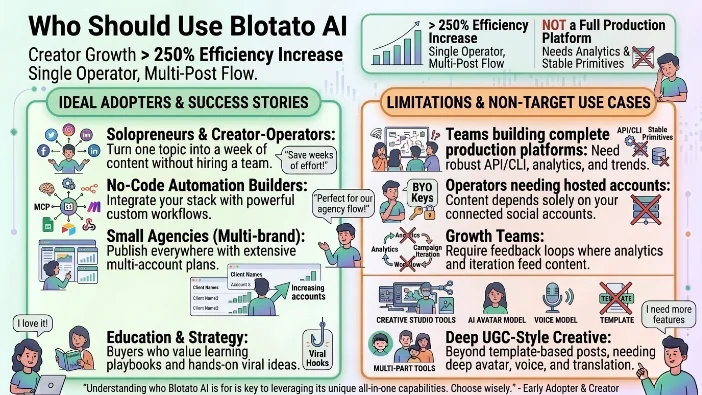
Solopreneurs and creator-operators who want to turn one topic into a week of posts without hiring a content team .
No-code automation builders whose stack includes Claude, MCP, n8n, Make, Google Sheets, Airtable, Notion, or webhooks .
Small agencies that publish everywhere. The 20-account Starter plan and 40-account Creator plan are compelling for multi-brand operations .
Buyers who value creator education with playbooks, viral hooks, and hands-on workflow ideas .
NOT Best For
Teams building a production content platform who need API/CLI workflows, idempotent post creation, analytics, trends, and stable platform primitives .
Operators who need hosted accounts where publishing can’t depend only on BYO connected social accounts .
Growth teams running feedback loops where analytics, trends, and campaign iteration need to feed back into the content workflow .
Brands needing UGC-style creative depth with AI avatars, voice, translation, and campaign assets that go beyond template-based creator posts.
The Honest Verdict: Should You Buy It?
Blotato AI is a legitimate AI content engine with real capabilities. The AI Agent is genuinely useful. The API and MCP integration are ahead of most competitors. The cross-platform publishing works.
But you need to go in with your eyes wide open.
The billing issues reported on Trustpilot are a red flag. Multiple users describe unexpected charges, difficult refunds, and unresponsive support . This doesn’t mean it will happen to you, but it’s a real risk.
The free trial doesn’t let you test the API . That’s a problem if API access is your primary reason for subscribing. And generating an API key immediately starts your paid subscription .
Here’s my advice:
Start with the free trial. Test the AI Agent. Generate some videos. See if the workflow fits your creative process.
But be careful with billing:
- Cancel well before the trial ends
- Document your cancellation
- Monitor your credit card for unexpected charges
- Understand that API access starts your paid subscription
If it clicks, upgrade. The $29/month Starter plan offers solid value for the automation features alone. If it doesn’t, you’ve lost nothing but a few hours of experimentation.
The bigger picture:
Blotato AI is part of a shift where AI content creation tools become accessible to everyone, not just those with large teams and budgets. The barrier to entry for social media content creation is falling rapidly.
That’s exciting. But it also means the bar for originality rises. When anyone can generate a week’s worth of content in an hour, the differentiator becomes your unique perspective and strategy.
Bottom line: If you’re a solopreneur or creator looking for an AI content workspace with automation capabilities, Blotato AI is worth a serious look. Just read the fine print on billing and treat the free trial like the strict contract it is.
Try the free tier, push its limits, and decide for yourself. The worst that happens is a billing headache. The best that happens? You save hours every week on content creation.
FAQs
What is Blotato AI exactly?
Blotato AI is an all-in-one AI content engine that combines writing, image generation, video creation, and cross-platform publishing. Think of it as eight content tools packed into one workspace. You bring a topic, pick a template, and the AI generates a week’s worth of scheduled posts across multiple social platforms.
Is Blotato AI free to use?
Blotato AI offers a 7-day free trial. However, the free trial has a major limitation. It excludes API access entirely. And here’s the kicker: generating an API key immediately ends your trial and starts your paid subscription. So if you want to test the API, you’re out of luck during the trial period.
How much does Blotato AI cost?
The pricing starts at $29 per month for the Starter plan, which gives you 1,250 AI credits and 20 social accounts. The Creator plan costs $97 per month with 5,000 credits and 40 accounts. The Agency plan runs $499 per month with 28,000 credits and dedicated support. All plans include access to the AI Agent and cross-platform publishing.
Does Blotato AI create AI avatars or talking heads?
No. This is one of the biggest misconceptions. Blotato AI explicitly does NOT generate lip syncing, talking avatars, realistic human avatars, or AI clone generation. If you need avatar videos, the founder recommends using HeyGen separately and then using Blotato AI to schedule and publish those videos.
Can Blotato AI generate videos with voiceover?
Yes, but you need to use the right template. The “AI Video with AI Voice” template generates AI voiceover synced to each scene using ElevenLabs voices. The default “Create Everything with AI Agent” template generates visuals and text but does NOT include voiceover automatically.
What AI video models does Blotato AI support?
Blotato AI supports multiple models including Framepack (cheapest, works great), Kling v1.5/v1.6, Luma Dream Machine, Runway Gen-3 Turbo, Minimax Video, and Google Veo2 with Veo3.1 Fast. All models are available to all users, but each has different credit costs ranging from 55 to 835 credits per generation.
Is Blotato AI good for YouTube Shorts and TikTok?
Yes, the platform was built with short-form video in mind. It supports faceless video creation, AI voiceover, and cross-publishing to TikTok, YouTube, Instagram Reels, and more. You can also label posts as AI-generated for YouTube and TikTok.
What’s the difference between Blotato AI and Buffer or Hootsuite?
Blotato AI is fundamentally different. Buffer and Hootsuite are primarily scheduling tools with limited AI features. Blotato AI combines AI writing, image generation, video creation, and automation in one platform. It also offers a hosted MCP server for Claude integration and official n8n nodes, which Buffer and Hootsuite don’t have.
Can I use Blotato AI with Claude or n8n?
Yes. Blotato AI has a hosted MCP server that works with Claude, Claude Code, Cursor, and Replit Agent. It also has official community nodes for n8n workflows and integration with Make.com. This makes it unusually strong for creators building automation stacks.
Is Blotato AI worth the money?
That depends on your use case. For solopreneurs and creators who want to automate content creation and publishing, the $29/month Starter plan offers solid value. However, the Trustpilot ratings show a 2/5 score with widespread billing complaints. Go in with your eyes open, cancel well before the trial ends, and monitor your credit card for unexpected charges.
Does Blotato AI have good customer support?
According to Trustpilot reviews, customer support is reportedly hard to reach. Multiple users describe “zero assistance” and “some wild AI services that doesn’t know how to resolve issues.” Some users report eventually receiving refunds, but the experience was still described as “horrifying.”
Can I cancel my Blotato AI subscription easily?
Users report difficulty canceling and receiving refunds. The platform offers a 7-day free trial but generating an API key immediately starts your paid subscription. Many reviews mention unexpected charges and unresponsive support. Cancel well before the trial ends and document everything.
What platforms can Blotato AI publish to?
Blotato AI supports cross-publishing to TikTok, Instagram, YouTube, Facebook, X/Twitter, LinkedIn, Threads, Pinterest, and more. The Starter plan includes 20 connected social accounts, and the Creator plan includes 40.
Does Blotato AI have analytics or reporting?
The platform has some analytics capabilities, but they’re not as comprehensive as dedicated social media analytics tools. Growth teams running feedback loops with analytics and trends may find this limiting.
Is Blotato AI suitable for teams and agencies?
Limited multi user support means Blotato AI isn’t ideal for teams yet. The platform doesn’t support multiple users per account. However, the Agency plan offers dedicated support and 28,000 credits, which may work for single users managing multiple client accounts.
Conclusion
Blotato AI isn’t some magical content fairy that waves a wand and produces viral posts overnight. It’s a tool. A genuinely useful one for certain use cases, but a tool nonetheless.
Think of it like a super-efficient content assistant who works widely fast. You give them a topic, they produce a draft, and then you take that draft and make it your own. The AI handles the heavy lifting of writing, image generation, video creation, and scheduling. Your job is to bring the strategy, the unique voice, and the final polish.
Here’s what makes Blotato AI genuinely valuable:
The AI Agent is the standout feature. You don’t need to learn complicated software. Just describe what you want in plain English and the AI handles the rest. It’s like having a content strategist, writer, designer, and video editor all rolled into one.
The automation surface is impressive. The REST API, MCP server for Claude integration, n8n nodes, and Make.com modules make this unusually powerful for creators who want to build automation stacks. You can connect Blotato AI to Google Sheets, Airtable, Notion, or almost any tool in your workflow.
The cross-platform publishing saves hours. Schedule and publish to TikTok, Instagram, YouTube, Facebook, and more from one dashboard. The 20-account Starter plan is compelling for solopreneurs managing multiple brand accounts.
But here’s the hard truth you need to hear:
The Trustpilot ratings are a genuine concern. A 2/5 score with widespread billing complaints isn’t something to ignore. Multiple users describe unexpected charges, difficult refund processes, and unresponsive support. Does this mean it will happen to you? No. But it’s a real risk you should factor into your decision.
The free trial doesn’t let you test the API. That’s a problem if API access is your primary reason for subscribing. And generating an API key immediately starts your paid subscription, which feels like a gotcha.
Blotato AI doesn’t do AI avatars. If you need these features, you’ll need a separate tool like HeyGen. Blotato AI is for faceless videos with voiceover, not avatar-based content.
The real winners here are:
- Solopreneurs who want to turn one topic into a week of posts without hiring a content team
- Creators who need cross-platform publishing with automation hooks
- Small agencies managing multiple brand accounts
- Buyers who value creator education with playbooks and viral hooks
- No-code automation builders who use Claude, n8n, Make, or webhooks
The losers are:
- Teams building production content platforms who need analytics, trends, and stable primitives
- Brands needing UGC-style creative depth with AI avatars and campaign assets
- Anyone who expects polished, broadcast-quality videos straight out of the box
- People who don’t want to deal with potential billing headaches
So what’s the final call?
For $29 a month, Blotato AI offers exceptional value for solopreneurs and creators. You’re getting AI writing, multiple image models, faceless video generation, and cross-platform publishing to 20 accounts. That’s less than a single coffee run per day.
The platform has hit over $500,000 in revenue within six months with zero marketing spend. Those numbers don’t lie. People are finding genuine value here.
But here’s my honest advice:
Start with the free trial. Test the AI Agent. Generate some videos. See if the workflow fits your creative process. But be careful with billing. Cancel well before the trial ends. Document your cancellation. Monitor your credit card for unexpected charges. Understand that API access starts your paid subscription.
If it clicks, upgrade. The $29/month Starter plan offers solid value for the automation features alone. If it doesn’t, you’ve lost nothing but a few hours of experimentation.
The bigger picture:
Blotato AI represents something important. It’s part of a shift where AI content creation tools become accessible to everyone, not just those with large teams and budgets. The barrier to entry for social media content creation is falling rapidly.
That’s exciting. But it also means the bar for originality rises. When anyone can generate a week’s worth of content in an hour, the differentiator becomes your unique perspective and strategy. The AI provides the canvas; you provide the art.
So don’t ask whether Blotato AI can replace human creativity. It can’t. Ask whether it can amplify yours. The answer to that question is a resounding yes.
Bottom line: If you’re a solopreneur or creator looking for an AI content workspace with automation capabilities, Blotato AI is worth a serious look. Just read the fine print on billing and treat the free trial like the strict contract it is.

Victoria Lane is a grammar-focused writer at GramBrix.com, passionate about helping readers master the rules of language. She provides clear explanations and practical examples that make writing more accurate, polished and confident.