Last Updated on August 16, 2026
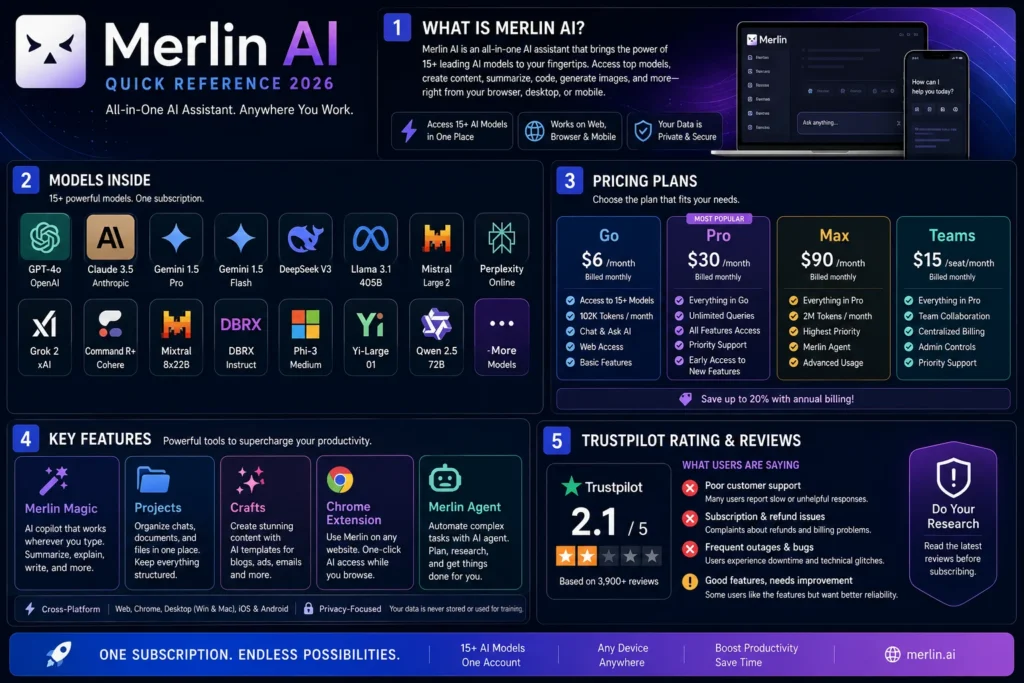
Merlin AI is an all-in-one browser assistant that bundles access to 15+ AI models including GPT-4.1, Claude 3.7, Grok 3, Gemini 2.5 Pro, and DeepSeek V3 through a single Chrome extension and web platform. It works with a Ctrl+M shortcut for instant access on any webpage, offering features like model switching, Projects (custom AI assistants), Crafts (app/diagram generation), and Merlin Magic (auto model selection). Pricing starts at $6/month for the Go plan (10,000 queries) with Pro at $30/month (60,000 queries, all models) and Teams at $15/seat/month. However, Merlin carries a 2.1/5 Trustpilot rating with complaints about no OCR for scanned PDFs, slow performance, buggy mobile apps, and difficult refunds. It’s best for budget-conscious users who work primarily in browsers and don’t need scanned document processing.
What Is Merlin AI?
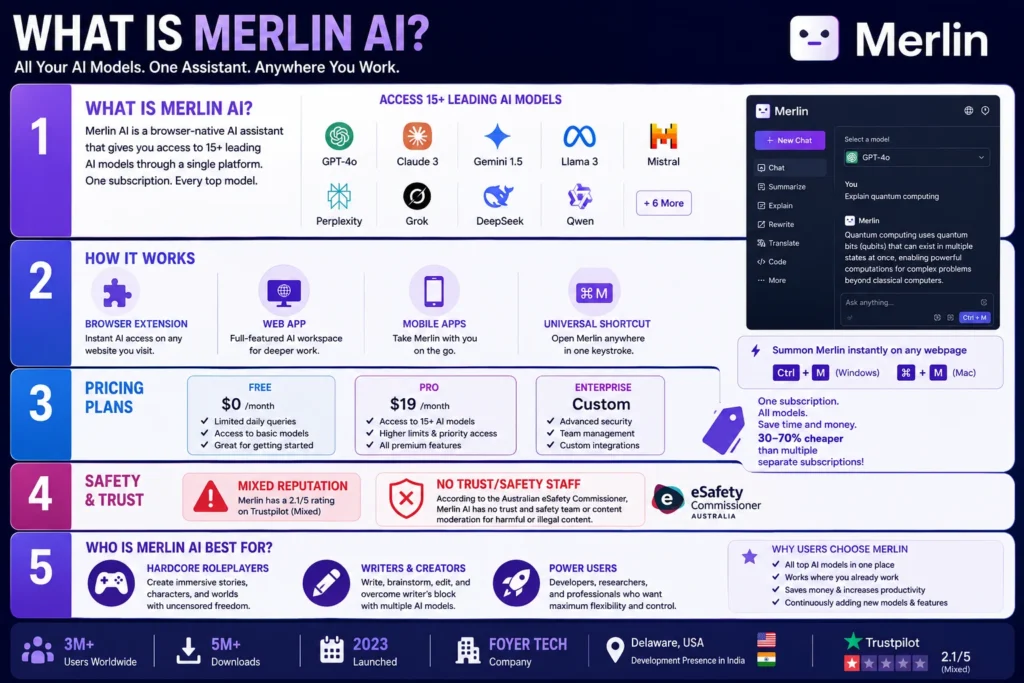
Merlin AI is a browser-native AI assistant that bundles access to 15+ leading AI models through a single Chrome extension, web app, and mobile apps. Instead of juggling separate subscriptions for ChatGPT, Claude, Gemini, and others, you pay one fee and get them all in one place.
The platform works as both a browser extension and a web application. You can summon it instantly with Ctrl+M on Windows or ⌘+M on Mac from any webpage, making it feel like an AI assistant that lives right where you work.
Merlin is developed by Foyer Tech, a company registered in Delaware, USA, with a development presence in India. The platform launched in 2023 and has grown into one of the more popular all-in-one AI tools, though it carries a mixed reputation on review platforms like Trustpilot (2.1/5 rating).
How Merlin AI Works: Core Features
The Model Hub: 15+ Models Under One Roof
Merlin’s biggest selling point is its unified model hub. You get access to models from OpenAI, Anthropic, Google, and others without needing separate accounts.
Available models include:
| Model | Best For | Credit Cost |
|---|---|---|
| GPT-4.1 | Advanced coding, complex reasoning | 15 ⚡/response |
| GPT-4.1-mini | Fast general tasks | 3 ⚡/response |
| GPT-4.1-nano | Large documents, budget | 1 ⚡/response |
| Claude 3.7 Sonnet | Creative writing, nuanced conversation | Variable |
| Claude 3.5 Sonnet | Creative tasks, ethical reasoning | Variable |
| Grok 3 | Mathematical reasoning, advanced coding | 25 ⚡/response |
| Grok 3 Mini | Quick math, coding snippets | 2 ⚡/response |
| Gemini 2.5 Pro | Research, data analysis | Variable |
| DeepSeek V3 | GPT-4o-level performance, cost-effective | 2 ⚡/response |
| Llama 3.1 405B | Open-source alternative | Variable |
| Mistral Large | General purpose | Variable |
Merlin Magic: The Autopilot Model Picker
Merlin Magic is a one-click autopilot feature that automatically analyzes your prompt, identifies the task type, and selects the cheapest capable model from the 15+ lineup. This eliminates the need to manually research which model works best for each query.
How it works:
- Analyzes prompt content and complexity
- Classifies the task type (creative, analytical, technical)
- Matches the optimal model based on requirements
- Runs the query automatically
Use Merlin Magic when speed or simplicity matters and let credits, model choice, and context switching take care of themselves.
Projects: Custom AI Assistants
Projects let you train dedicated AI assistants on your own knowledge base. You can upload Notion pages, Google Drive folders, URLs, or files, and then chat with your own corpus.
Key capabilities:
- Semantic search across uploaded documents
- Vector-based retrieval for relevant information
- Customizable AI writers and code reviewers
- Fine-tune temperature, tone, and permissions
For thesis writing or research-heavy work, this feels like having a private research analyst in your browser.
Crafts: Build Apps and Diagrams from Prompts
Crafts is one of Merlin’s most powerful features. It lets you generate full-stack React apps, Mermaid diagrams, SQL schemas, or Python notebooks from plain English prompts.
Features:
- Live preview next to the chat
- One-click export to GitHub or CodeSandbox
- Drag-and-drop CSV/JSON for instant analysis
- Automated chart generation
Chrome Extension: AI Where You Work
The Chrome extension is where Merlin truly shines. It operates as a sidebar on any website, providing contextual assistance without tab switching.
What you can do in the sidebar:
- Summarize articles and YouTube videos with timestamped chapters
- Chat with webpage content in real-time
- Draft emails in Gmail
- Generate posts and replies on X and LinkedIn
- Translate content in 128+ languages
- Rewrite and paraphrase any highlighted text
One user noted: “Because Merlin sits beside my existing tools, I use AI more often: tiny bursts instead of marathon chats. That low-friction help keeps me in flow—priceless under deadline pressure.”
Merlin Agent: The macOS Desktop App
In 2026, Merlin launched Merlin Agent, a native macOS desktop app that works directly with your local files. It can read PDFs, documents, images, and code folders without uploading them to third-party servers first.
What you can do with Merlin Agent:
- Drop a folder of PDFs for instant research summaries
- Debug, refactor, and ship code without model switching
- Point it at a folder of assets and get complete campaigns
- Work with files already on your Mac, no uploading required
Merlin AI Pricing: The Credit System Explained
Merlin uses a credit-based system where different models cost different amounts. The platform offers three tiers for individuals and a separate Teams plan.
Personal Plans
| Plan | Price | Monthly Queries | Model Access | Key Features |
|---|---|---|---|---|
| Go | $6/month (yearly) | 10,000 | Lite models + auto-routing | Local file access, 10+ app connections, vibe coding |
| Pro | $30/month (yearly) | 60,000 | All models (Lite + Pro) | Pro image/video gen, priority support |
| Max | $90/month (yearly) | 200,000 | All models | Highest limits, unlimited Lite usage after cap, dedicated support |
Teams Plan
For organizations, Merlin Teams costs $15/seat/month (billed annually, minimum 5 seats). This includes everything in Pro plus:
- Team member management
- Larger context windows
- Usage dashboard
- SOC2, GDPR, and ISO 27001 compliance
How Credits Work: Real Examples
Different models have different credit costs:
| Model | Credit Cost |
|---|---|
| GPT-4.1-nano | 1 ⚡ |
| GPT-4.1-mini | 3 ⚡ |
| Grok 3 Mini | 2 ⚡ |
| GPT-4.1 | 15 ⚡ |
| Grok 3 | 25 ⚡ |
Important: The Pro plan at $30/month gives you 60,000 queries, but this includes both lite and pro model usage. Once you hit your limit, you can continue using lite models for free.
Merlin AI vs ChatGPT: The Head-to-Head Comparison
Merlin positions itself as a cost-effective alternative to ChatGPT. Here’s how they compare:
| Feature | Merlin AI | ChatGPT |
|---|---|---|
| Primary Form Factor | Browser extension + web + mobile | Web + desktop + mobile apps |
| Model Access | 15+ models (GPT, Claude, Grok, DeepSeek) | Native GPT only |
| Cost (Teams) | $15/seat/month | $25/seat/month |
| TCO (100 seats) | ~$18,000/year | ~$30,000/year |
| Browser Integration | Native sidebar on any website | Limited |
| Deep Research | Web search + Focus Modes | First-party connectors |
| Data Analysis | Analyst Mode (zero-setup) | Advanced Data Analysis |
| Content Creation | Social drafting, email inline | Native multimodal models |
| Privacy | Teams data not used for training | Business data excluded from training |
| Certifications | SOC2, GDPR, ISO 27001 | SOC2 Type 2, ISO 27001 |
Merlin wins on: Cost, model diversity, browser-native workflow, and speed of rollout.
ChatGPT wins on: Mature enterprise governance, deeper connectors, and native multimodal models.
Merlin AI vs Competitors: Quick Comparison
| Feature | Merlin AI | ChatGPT | Perplexity AI | Claude |
|---|---|---|---|---|
| Model Access | 15+ models | GPT only | Multiple models | Claude only |
| Browser Extension | Yes (native sidebar) | Limited | Yes | No |
| File Upload | Yes (with OCR limitations) | Yes | Yes | Yes |
| Projects | Yes | Yes | Yes | No |
| Image Generation | Yes | Yes | No | No |
| Crafts (Apps/Diagrams) | Yes | Limited | No | No |
| Teams Pricing | $15/seat/month | $25/seat/month | ~$20/seat/month | ~$30/seat/month |
| Free Tier | Limited | Yes | Yes | Limited |
The Good: Why Users Love Merlin
1. Genuine Cost Savings
Merlin delivers on its promise of cost savings. Instead of paying $20/month for ChatGPT Plus plus $30/month for Claude Pro plus more for other tools, Merlin bundles them all. One user noted: “I cancelled two separate AI plans after moving to Merlin Pro. One bill, broader coverage.”
2. Browser-Native Experience
The extension is Merlin’s killer feature. Being able to summon AI with Ctrl+M from any webpage without switching tabs creates a seamless workflow. As the company puts it: “Adoption often rises when the tool lives where work happens.”
3. Model Diversity
Having 15+ models in one place is genuinely valuable for different tasks. Use Claude for creative writing, Grok for math, GPT-4 for coding, and DeepSeek for budget-conscious work.
4. Merlin Magic Simplifies Choice
For casual users, Merlin Magic’s automatic model selection eliminates the paralysis of choice. It picks the cheapest capable model for your task.
5. New Features Are Coming Fast
Merlin consistently rolls out new capabilities: Projects, Crafts, Merlin Agent, and personalization features. The development velocity suggests a team that’s actively iterating.
The Bad: The Trustpilot Reality
Merlin AI has a 2.1/5 rating on Trustpilot with numerous negative reviews. Here’s what real users are saying:
1. No OCR for Scanned PDFs
This is the most serious limitation. Merlin cannot process PDFs that contain scanned text or images. One student wrote: “The main issue is that Merlin AI lacks Optical Character Recognition (OCR). This means it cannot process PDFs that contain scanned text or images, which is very common in academic materials.
For students or anyone working with scanned documents, this is a deal-breaker.
2. Slow Performance
Multiple users report that Merlin is significantly slower than ChatGPT. One reviewer wrote: “The current performance is atrocious—it is literally about ten times slower than the free version of ChatGPT.” Another noted: “Importing files is extremely slow.”
3. Refund Policy Issues
Users report difficulty getting refunds even when following the stated policy. One reviewer wrote: “Despite clearly following their Refund Policy for annual subscriptions, the company refused my request, citing a 3-month limit that only applies to low-usage refunds.”
4. “Unlimited” Isn’t Really Unlimited
Some users feel misled by the “unlimited” claims. One wrote: “I bought a year’s subscription on a ‘special discount’, marketed as being exactly the same as the regular unlimited year plan, only to find they put drastically decreased server limits on the plan, with no disclaimers.”
5. Support Is Unresponsive
Multiple reviewers complain about poor customer support. One wrote: “Their support team consists maybe of ONE guy who literally closes the tickets without confirming if he’s managed to resolve your issue.”
6. iOS App Is Buggy
Users report that the iOS app is “buggy” and “breaks and fails so bad that it’s basically useless.” File imports are slow and often fail.
Who Is Merlin AI For?
Best Fit
Students and researchers who need summarization and research help across multiple sources, but don’t need OCR for scanned documents.
Content creators and marketers who want in-page help drafting social posts, emails, and content directly where they work.
Budget-conscious users who want access to multiple AI models without paying for separate subscriptions.
Sales and support teams who spend their day in browser-based tools and want AI contextual assistance.
Casual AI users who want an easy, one-stop solution and don’t need enterprise-grade reliability.
Not a Good Fit
Students working with scanned PDFs — the lack of OCR is a deal-breaker.
Users who need near-instant responses — Merlin is reportedly much slower than ChatGPT.
Privacy-conscious professionals — while Merlin claims data isn’t used for training, ChatGPT offers more transparency and certifications.
Users who want a mature, stable product — review history suggests Merlin still has significant bugs and reliability issues.
Anyone who might want a refund — the refund process appears difficult.
Frequently Asked Questions
Is Merlin AI free?
Merlin offers a limited free tier with basic model access and daily usage caps. However, for meaningful use, you’ll need a paid plan starting at $6/month.
How much does Merlin AI cost?
Go plan: $6/month (yearly, 10,000 queries). Pro: $30/month (yearly, 60,000 queries, all models). Max: $90/month (yearly, 200,000 queries). Teams: $15/seat/month.
What models does Merlin AI support?
Merlin supports GPT-4.1, GPT-4.1-mini, GPT-4.1-nano, Claude 3.7 Sonnet, Claude 3.5 Sonnet, Grok 3, Grok 3 Mini, Gemini 2.5 Pro, DeepSeek V3, Llama 3.1 405B, Mistral Large, and more.
Can Merlin AI read scanned PDFs?
No. Merlin lacks OCR capability, meaning it cannot process PDFs with scanned text or images. This is a major limitation for students and researchers.
Is Merlin AI better than ChatGPT?
Merlin wins on cost and model diversity, but ChatGPT wins on stability, speed, OCR capabilities, and enterprise governance. Choose Merlin for browser-native workflow and cost savings; choose ChatGPT for reliability and document processing.
Does Merlin AI have a mobile app?
Yes, but users report significant bugs and poor performance on iOS.
Conclusion
Merlin AI delivers on its core promise: access to 15+ AI models for less than what you’d pay for a single ChatGPT subscription. The Chrome extension genuinely improves workflows by putting AI where you already work. The model diversity is impressive, and features like Merlin Magic, Projects, and Crafts add real value.
But the Trustpilot reviews paint a sobering picture. The lack of OCR for scanned PDFs is a serious limitation for students and researchers. Slow performance, buggy apps, and poor customer support suggest a product that’s still maturing. The refund issues should give anyone pause.
If you work primarily in a browser, need access to multiple AI models on a budget, and don’t need to process scanned documents, Merlin AI is worth trying. Start with a monthly plan to test it thoroughly before committing to an annual subscription. The cost savings are real, but the stability concerns are equally real.
If you need OCR, reliability, or responsive customer support, stick with established players like ChatGPT or Claude until Merlin matures further.

Kevin Brooks is a grammar specialist at GramBrix.com, dedicated to helping readers understand language rules with clarity and confidence. He simplifies complex grammar concepts through practical examples and easy explanations.