Last Updated on August 16, 2026
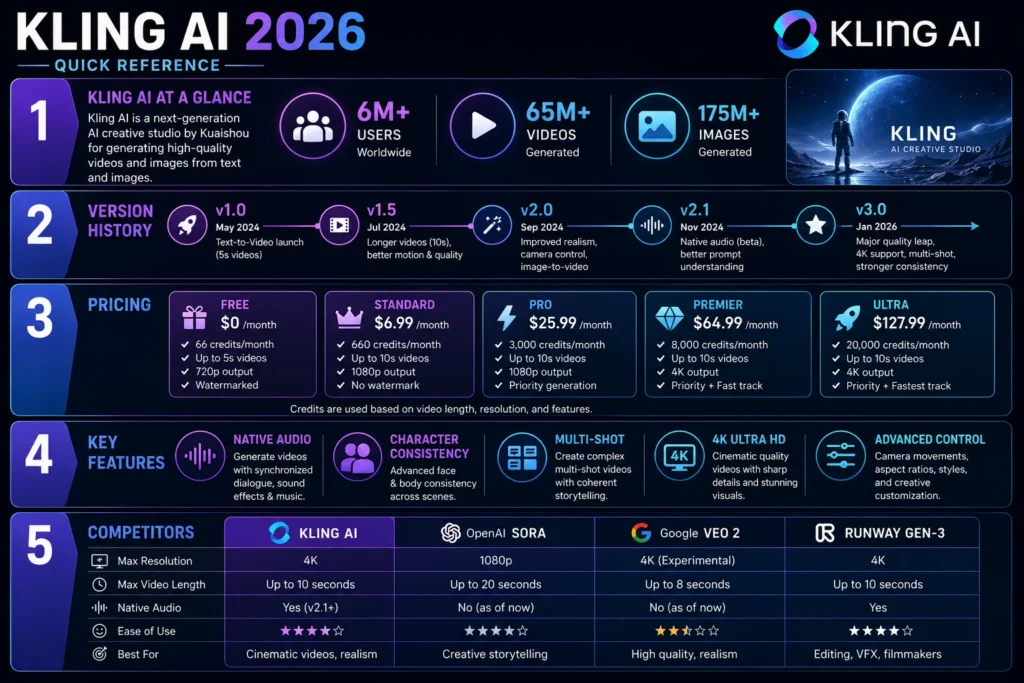
Kling AI is a leading AI video generation platform developed by Kuaishou Technology with over 6 million users and 65 million videos generated. Launched in June 2024, it has rapidly evolved through versions including v2.6 with native audio and v3.0 Omni with 15-second generation, native multi-shot capabilities, character consistency, and 4K output. The platform offers subscription plans from $6.99/month for Standard (660 credits) to $127.99/month for Ultra (26,000 credits). Kling 3.0 Omni supports text-to-video and image-to-video generation with Motion Control, native audio and lip sync, and storyboard narration for up to six shots. Commercial rights are included on paid plans. The platform is available on web browsers and as a mobile app. It competes with Sora, Veo, and Runway, excelling at high-volume social content where speed, consistency, and affordability matter. Key limitations include a very limited free tier and credit costs that add up quickly, especially with audio generation. Kling has been used in professional productions including Amazon Prime Video’s House of David and award-winning advertising.
What Is Kling AI?
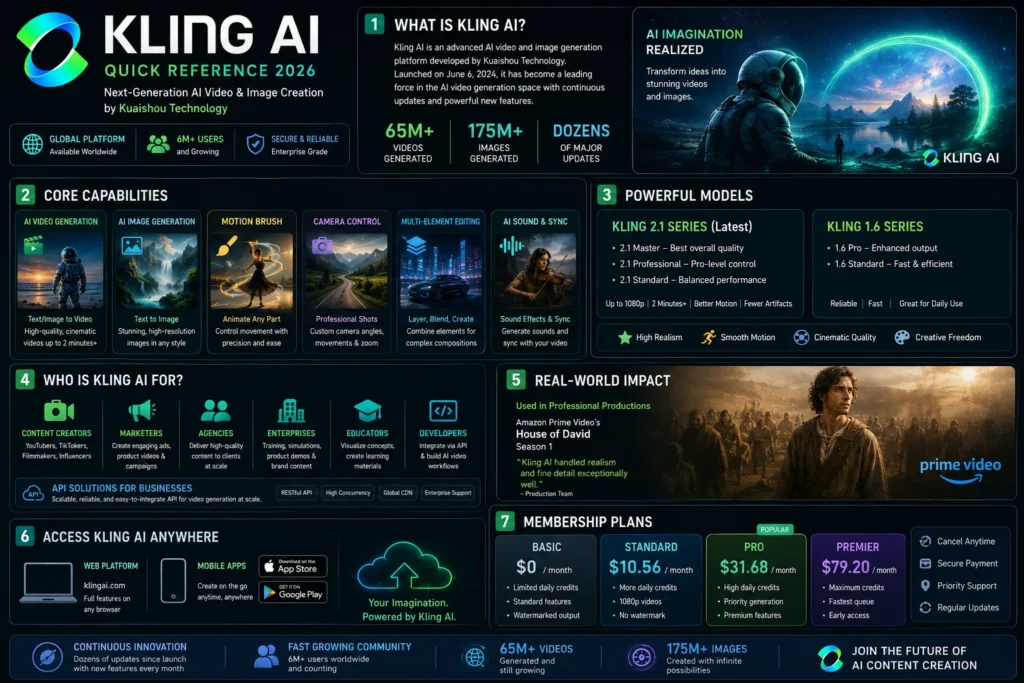
Kling AI is an advanced AI video and image generation platform developed by Kuaishou Technology, a Chinese content community and social platform. Since its initial rollout on June 6, 2024, the platform has undergone dozens of extensive iterations and upgrades, establishing itself as a leading player in the AI video generation space .
Kling AI is available globally and offers both individual membership services and API solutions for businesses. It’s accessible on web browsers and as a mobile app on iOS and Android. The platform now boasts a user base of over six million, with more than 65 million videos and 175 million images generated .
Kling AI serves content creators, marketers, agencies, and enterprises who need high-quality AI-generated video content at scale. It has been used in professional productions including Amazon Prime Video’s House of David Season 1, with creators noting it “handled realism and fine detail exceptionally well” .
Kling AI Version History and Evolution
Understanding Kling AI’s development helps you appreciate its current capabilities. The platform has evolved rapidly since its launch.
| Version | Release Date | Key Changes |
|---|---|---|
| v1.0 | June 2024 | Initial text-to-video and image-to-video capabilities |
| v1.5 | September 2024 | 1080p support, motion brush, I2V-only model |
| v1.6 | November 2024 | Lip sync, camera paths, effects API, multi-image reference |
| v2.0 | March 2025 | Major quality leap, kling-v2-master model |
| v2.1 | June 2025 | Optimized image-to-video generation |
| v2.5 Turbo | September 2025 | 40% faster, best speed/quality ratio |
| v2.6 | December 2025 | Native audio, 30-48 FPS, highest quality |
| v3.0 | January 2026 | Unified multimodal training, native 4K output |
| v3.0 Omni | February 2026 | Native audio, multi-shot, 15-second generation |
The v2.6 milestone was particularly significant. It introduced Kling’s first “Native Audio” model, generating visuals, natural voiceovers, matching sound effects, and ambient atmosphere in a single pass . Previously, Kling’s video models could only generate “silent visuals.” Creators had to manually find voiceovers, add sound effects, and adjust the pace. This upgrade transformed content from “viewable” to “immersive” .
The v3.0 era represents the platform’s biggest leap. Kling AI entered the “3.0 era” on January 31, 2026, with fully rolled-out models . The VIDEO 3.0 Omni model leverages a deeply integrated unified model training framework, achieving more native multimodal input and output.
Core Features of Kling AI
Native Audio Generation
One of Kling AI’s biggest differentiators is its native audio generation. The VIDEO 2.6 model introduced this capability, and VIDEO 3.0 Omni expanded it significantly .
Audio capabilities:
- Native lip-sync: Multi-language support with accurate mapping between text and visual characters
- Voice extraction: Clean tone from 3-30 second audio or video clips
- Vocal binding: Locks unique voices to characters across videos, scenes, and shots
- Audio types supported: Voice narration, dialogue, singing/rap, ambient sound effects, object/action sound effects, and mixed sound effects
The system can extract the original voice of a character from a reference video and apply it to the visual performance. Characters not only look the same but also sound the same across different scenes and shots . A creator noted that Kling “can generate not only visuals, but also voice, sound effects, and background music, allowing me to bring the emotion and atmosphere of a story to life much faster” .
Character Consistency (Elements 3.0)
Maintaining visual identity across shots has historically been challenging. Kling’s Elements 3.0 system addresses this .
Reference modes:
- Video character reference: Upload a 3-8 second video clip to extract identity, motion, and original voice
- Multi-angle image reference: Upload up to 4 images from different perspectives
- Feature retention: Locks core traits across diverse cinematic angles
- Voice binding: Add a unique voice to character elements
Kling 3.0 Omni adds “Voice” to the element, allowing you to bind a unique voice to a character, ensuring they not only “look the same” but also “sound the same” across different videos, scenes, and shots . Whether it’s speech, dialogue, or narration, the voice perfectly matches the character’s personality, creating truly reusable “Character Assets with Voice.”
Storyboard Narration and Multi-Shot
The Storyboard Narration feature allows creators to build a true sequence where each shot has a specific angle and framing .
Multi-shot capabilities:
- Custom shot control: Specify duration, framing, angle, narrative content, and camera movement for each individual shot
- 15-second generation: Increased duration from the previous 10-second limit
- Native multi-shot: Create well-paced, structurally complete narratives in a single generation
One creator noted this feature helps craft “crisp, consistent, uniquely stylized short videos” .
Text-to-Video and Image-to-Video Generation
Kling AI supports both text-to-video and image-to-video generation workflows .
Workflow options:
- Text-to-video: Describe your scene and let the AI generate it
- Image-to-video: Upload an image and transform it into an animated scene
- Start and end frame control: Define the beginning and ending frames of your video
- Multi-image reference: Upload multiple images of the same subject for consistency
Motion Control
The Motion Control feature enables precise control of a character’s movements and facial expressions based on a reference image .
VIDEO 3.0 Motion Control enhancements:
- Consistent facial identity from any angle
- Complex emotions faithfully reproduced
- Face occlusion with high-fidelity restoration
- Consistent facial clarity across dynamic framing
Key principle: Upload facial references that match the result you want to generate. For more accurate head turns, upload front-facing and side views. For better facial expressions, upload neutral and smiling front-facing images .
Image 3.0 for Visual Generation
Kling’s IMAGE 3.0 model offers powerful image generation capabilities .
Key advantages:
- Feature retention: Ensures main elements stay stable without deviation
- Precise detail modification: Every adjustment is executed as expected
- Accurate style control: Ensures a unified atmosphere throughout the image
- Rich imagination: Brings creative visions to life with added tension
The model supports extracting features from up to 10 reference images, precisely locking in subject contours, core elements, and tonal qualities. This makes it ideal for IP character design, comic scene creation, and brand consistency in visual design .
Video Extension
Kling AI supports extending videos by 4-5 seconds at a time, with multiple continuations reaching a total length of up to 3 minutes .
Two modes:
- Auto-Extend: The model autonomously continues the video based on its interpretation of the content
- Customized Extend: Users dictate continuation via text input using the formula Prompt = Subject + Movement
Key tip: The prompt needs to be consistent with the main subject of the original video; unrelated text may cause a camera cut or transition .
Native 4K Output
Kling AI offers cinema-grade native 4K output. One creator noted: “Kling is the only usable model that can create native 4K video outputs. It’s a game-changer for wide shots” .
Kling AI Pricing 2026
Subscription Plans
Kling AI uses a credit-based subscription model .
| Plan | Monthly Price | Monthly Credits | Best For |
|---|---|---|---|
| Basic (Free) | $0 | No monthly credits (30 generations total) | Testing the interface, non-commercial use |
| Standard | $6.99 / month | 660 credits | Regular use, 1080p video, commercial rights |
| Pro | $25.99 / month | 3,000 credits | Heavy use, priority access |
| Premier | $64.99 / month | 8,000 credits | Professional creators, priority access |
| Ultra | $127.99 / month | 26,000 credits | Production-scale use, beta test invites |
Free tier details :
- Element creation quantity: 30
- Generated content is not for commercial use
Standard plan and above includes :
- Commercial use rights
- Fast-track generation
- 1080p video generation
- Image upscaling
- Brand watermark removal
- Video extension
Credit Costs for Video 3.0 Omni
The VIDEO 3.0 Omni model has specific credit pricing based on resolution and audio settings .
| Mode | Resolution | Native Audio On | Native Audio Off |
|---|---|---|---|
| Text-to-Video | 1080p | 12 credits/second | 8 credits/second |
| Text-to-Video | 720p | 9 credits/second | 6 credits/second |
| Image-to-Video | 1080p | Not supported yet | 16 credits/second |
| Image-to-Video | 720p | Not supported yet | 12 credits/second |
Motion Control pricing :
| Model | Mode | Credit Usage |
|---|---|---|
| VIDEO 3.0 Motion Control | Professional | 12 credits/s |
| VIDEO 3.0 Motion Control | Standard | 9 credits/s |
| VIDEO 2.6 Motion Control | Professional | 8 credits/s |
| VIDEO 2.6 Motion Control | Standard | 5 credits/s |
Cost estimate: A 5-second 1080p video with audio costs approximately 60 credits on the 3.0 Omni model.
API Pricing (Estimated)
For developers using Kling through API, pricing is typically per-video or per-second .
| Mode | Resolution | Duration | Estimated Cost |
|---|---|---|---|
| Standard | 720p | 5 sec | ~$0.10-0.20 |
| Standard | 1080p | 5 sec | ~$0.20-0.40 |
| Pro | 1080p | 5 sec | ~$0.40-0.80 |
| Pro | 1080p | 10 sec | ~$0.80-1.60 |
Kling AI vs Competitors
The AI video market has multiple players. Here’s how Kling AI compares.
| Feature | Kling 3.0/O3 | Sora 2 | Veo 3.1 | Runway Gen-4.5 |
|---|---|---|---|---|
| Max Duration | 15s | 60s | 8s | 10s |
| Resolution | 4K/60fps | 1080p | 4K | 4K |
| Native Audio | Yes (multi-speaker) | Yes | Yes | Limited |
| Multi-Shot | Yes (6 shots) | No | No | No |
| Character Consistency | Excellent (3+ chars) | Moderate | Good | Excellent |
| Best For | Social content, IP, ads | Narrative, storytelling | Cinematic B-roll | Professional filmmaking |
When to Choose Each Model
Choose Kling AI if:
- You generate multi-shot content and need identity to hold across outputs
- Your videos depend on fast motion or camera movement that must survive iteration
- You prioritize volume and efficiency over one-off cinematic moments
- You need character consistency across shots with native audio
One creator described Kling as “a groundbreaking tool that demonstrated the potential of controllable AI video generation through its start and end frame workflow” .
Choose Sora if:
- Your video needs to hold up next to live-action footage
- You are producing fewer videos with higher creative stakes
- Narrative flow and cause-and-effect are central to the shot
Choose Veo if:
- You need stable cinematic camera motion at high resolution
- Your footage must feel polished without heavy post-production cleanup
- Sound design and visuals need to arrive together
Choose Runway if:
- You are still shaping the visual direction
- You want to remix, edit, and experiment in one place
- Speed and creative freedom matter more than final polish
Who Is Kling AI For?
Content Creators and Social Media Managers
Kling AI excels at high-volume social content. It’s built for creators who move fast and test relentlessly. One creator noted Kling “allows me to create visuals that feel cinematic, controlled, and intentional, without losing the emotion or energy of the piece” .
Ideal use cases:
- UGC ads and social media content
- Faceless YouTube automation
- Multi-shot sequences where identity consistency matters
- Video variations and A/B testing
Agencies and Marketing Teams
Kling AI has been used in award-winning advertising. One creator’s project MagicMirror AI won an advertising award at WAIFF Seoul 2026, and they attended the AI Film Festival Cannes 2026. Kling “leveled the playing field for creators,” giving independent artists, filmmakers, and storytellers the chance to create work that once required a much bigger team, budget, or studio .
Filmmakers and Studios
Kling has been used in professional productions including Amazon Prime Video’s House of David Season 1. One creator noted: “Kling let us generate highly detailed static shots with extremely specific motion and effects that complemented live action, at a moment when other models simply couldn’t match that quality. Shots that would’ve meant a heavy VFX lift, or wouldn’t have been attempted at all, became achievable inside the production timeline” .
Developers and Enterprises
For businesses, Kling AI offers API solutions with competitive rates and unified billing. The API supports text-to-video and image-to-video generation with programmatic control .
Pros and Cons Summary
Pros
- Native audio generation: No need for separate audio passes or re-sync work
- Character consistency: Elements 3.0 system maintains identity across shots
- Multi-shot capability: Generate up to 6 distinct shots in a single pass
- 15-second duration: Longer than many competitors (Runway: 10s, Veo: 8s)
- 4K native output: Cinema-grade resolution without upscaling artifacts
- Motion Control: Precise control over character movements and expressions
- Commercial rights: Available on paid plans
- Mobile app: Available on iOS and Android
- Real-world production use: Featured in Amazon Prime Video series
Cons
- Limited free tier: 30 generations total, no commercial use
- Credit costs add up: Audio generation doubles credit cost
- Generation time: Can be 60-90 seconds for complex videos
- Complex pricing: Multiple tiers and features make cost prediction difficult
- Image-to-video audio: Not yet supported on Omni model
- Region restrictions: Some features may vary by region
Frequently Asked Questions
Is Kling AI free?
Kling AI has a Basic (free) plan with 30 generations total. Generated content on the free plan cannot be used commercially. The Standard plan starts at $6.99/month .
How much does Kling AI cost?
Plans range from $6.99/month for Standard (660 credits) to $127.99/month for Ultra (26,000 credits). Credits are consumed per generation, with audio generation doubling the cost .
What can I create with Kling AI?
You can create AI videos from text prompts, images, or multi-image references. Features include native audio, lip sync, character consistency, multi-shot generation, Motion Control, and 4K output .
How long are Kling AI videos?
Kling 3.0 supports videos up to 15 seconds, up from 10 seconds in previous versions .
Does Kling AI have an app?
Yes. Kling AI is available on web browsers and as a mobile app on iOS and Android.
Can I use Kling AI for commercial projects?
Yes. Commercial rights are included on all paid subscription plans. The free plan does not allow commercial use .
Has Kling AI been used in professional productions?
Yes. Kling has been used in Amazon Prime Video’s House of David Season 1 and award-winning advertising including work that won at WAIFF Seoul 2026 .
Conclusion
Kling AI has established itself as one of the most capable and practical AI video generation platforms in 2026. Its rapid evolution from a basic text-to-video tool to a sophisticated multimedia platform with native audio, character consistency, and 4K output is remarkable.
For content creators, marketers, and agencies producing high-volume social video content, Kling AI offers a compelling combination of speed, consistency, and affordability. The platform’s character consistency, multi-shot capability, and native audio generation are genuine differentiators that competitors are still catching up on. One creator summed it up: “Kling always figures out creators’ unspoken needs ahead of time, using each new model to open up fresh creative possibilities” .
However, Kling AI isn’t the right tool for every job. If you need cinematic realism and narrative coherence for premium commercials, Sora sets the bar. If you need polished camera motion for agency-grade B-roll, Veo delivers. If you’re still exploring visual direction and need maximum creative flexibility, Runway is your sandbox.
Start with Kling AI’s Standard plan at $6.99/month to test your specific use case. Run five test shots through the platform before committing to a higher tier. Track your credits carefully – audio generation doubles costs, and re-rolls add up. If you’re producing video content daily, the Pro or Premier plans will likely be more cost-effective than buying add-on credits.
If you need API access or enterprise features, contact Kling AI directly for custom pricing. The platform continues to evolve rapidly, and new features are being added regularly. Keep an eye on the release notes to stay current with capabilities and pricing changes.
Kevin Brooks is a grammar specialist at GramBrix.com, dedicated to helping readers understand language rules with clarity and confidence. He simplifies complex grammar concepts through practical examples and easy explanations.