Last Updated on August 8, 2026
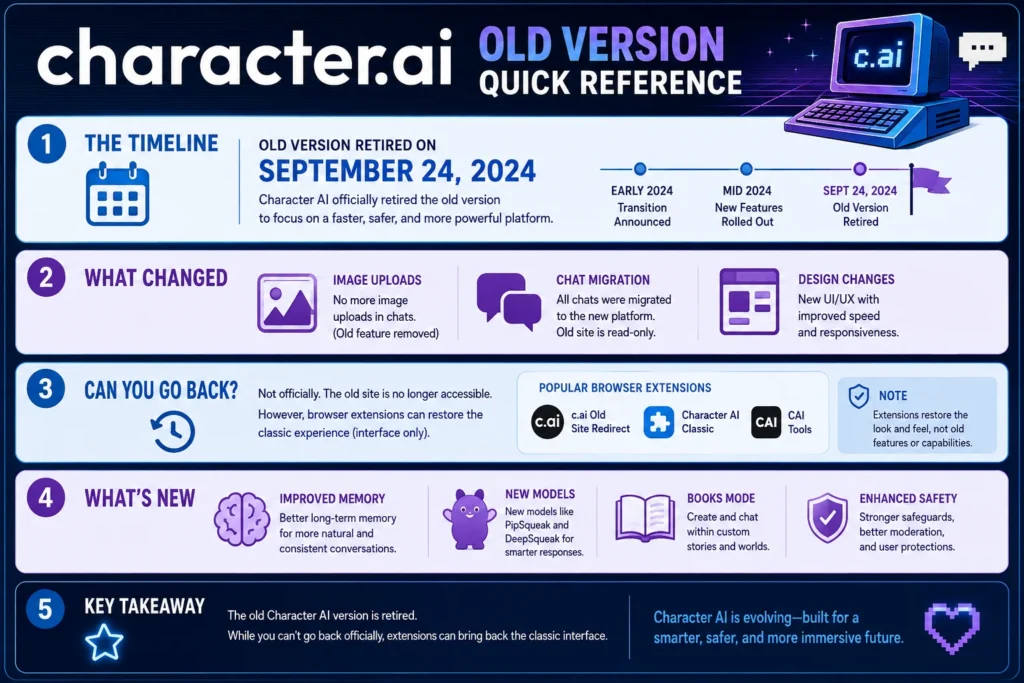
Character AI retired its old/beta site on September 24, 2024. The company made this change to “allocate resources to focus on improvements, better address your Character feedback, and improve overall server stability.” All chats from the old site were preserved and migrated to the new platform. While users can no longer access the classic interface through official channels, browser extensions like Character.AI Old-ifier (Firefox) and Character.AI Legacy Chats (Chrome) offer workarounds to restore some old features and the classic look. Since the retirement, Character AI has introduced major upgrades including new models (PipSqueak, DeepSqueak), smarter memory features (Story Memory, Facts, Pin to Memory), safety improvements for teen users, and the Books mode for interactive classic literature roleplay. These upgrades run on Character AI’s latest generation of chat styles and are available across web and mobile platforms. The platform continues to evolve, with c.ai+ subscribers receiving enhanced features like larger memory capacity and priority access.
What Happened to the Old Character AI?
If you’ve been using Character AI for a while, you’ve probably noticed something changed. The familiar beta interface that many users fell in love with disappeared on September 24, 2024. That was the day Character AI officially retired the old/beta site for good.
The official announcement from Character AI’s support team confirmed the retirement: “The old/beta site has been fully retired on September 24, 2024.” This wasn’t a gradual phase-out or a temporary test. It was a permanent shutdown of the classic interface that many users had grown comfortable with.
Why did they do it? The company explained that retiring the old site allowed them to “allocate resources to focus on improvements, better address your Character feedback, and improve overall server stability.” Basically, maintaining two separate versions of the platform was splitting their attention and resources.
What Was the Old Character AI?
The “old” Character AI refers to the original beta version of the platform that launched publicly on September 16, 2022. This version had a distinct look and feel that many users preferred over the modern interface.
Key characteristics of the old/beta version:
- Simpler design language: A more straightforward, functional UI without the modern bells and whistles
- Image upload capability: Users could upload images directly in conversations, a feature that didn’t immediately carry over to the new version
- Different chat layout: The conversation interface had a distinct visual style compared to today’s version
- Beta features: It was the testing ground where many of Character AI’s core features were developed
The beta version was so beloved that when Character AI announced its retirement, a browser extension called “Character.AI Old-ifier” was created specifically to bring back the old design. This extension, available for Firefox, “changes the theme for character.ai to match old.character.ai (aka beta.character.ai).”
What Happened to Your Old Chats?
One of the biggest concerns when Character AI retired the old site was whether users would lose their conversations. The company addressed this head-on in their FAQ.
The short answer: Your chats are preserved and accessible on the new site and mobile app.
Here’s what Character AI said about chat migration:
- Recent chats: Available immediately on the new site or mobile app
- Older chats (6+ months): Required manual migration by locating the chat in your history and clicking “Migrate chats”
- Migration in progress: If you were missing chats during the transition period, the company noted that “migration is currently in progress and may take a few days”
- Longer chats: Inactive chats may take longer to migrate, but all chats would eventually be preserved
The bottom line is that your conversations should still be accessible today. If you’re having trouble finding an old chat, Character AI recommends checking back after some time or contacting support.
Character AI’s Evolution: Beyond the Beta
Since retiring the old site, Character AI has continued to evolve significantly. Understanding what’s changed helps explain why the old interface couldn’t stick around forever.
Major Changes Since the Beta Retirement
1. New Safety Features (December 2024)
In response to multiple lawsuits and concerns about teen safety, Character AI introduced significant safety updates. These included:
- A dedicated model for users under 18 that moderates responses to sensitive subjects like violence and sex
- Input and output filters to block harmful content
- Notifications after 60 minutes of continuous engagement
- Clearer disclaimers that AI characters are not real individuals
2. Model Upgrades
Character AI CEO Karandeep Anand announced in August 2025 that the platform had begun “rolling out new and powerful open-source models, fine-tuned with our proprietary tech stack.” This included:
- PipSqueak: An advanced model with improved memory and roleplay capabilities
- Ongoing improvements: The company committed to “continually work on transforming open-source models into Character models”
3. Filter Adjustments
The community had been vocal about false positives from the content filter blocking harmless fictional content. In response, Character AI “adjusted our filter to recognize different types of roleplay in adventure better” and “implemented improved messaging so that our chat models will keep the subject of conversations within our policies.”
4. Memory Upgrades
In May 2026, Character AI introduced smarter memory features:
- Story Memory: A place to add backstory, key events, and special moments
- Pin to Memory: Long-press a message to lock it into Story Memory
- Facts: Automatic capture of character traits, quirks, and relationships
- Memory Usage visualization: A clearer view of what’s filling up your chat’s memory
These features run on the latest chat styles including PipSqueak 2 (free) and DeepSqueak (c.ai+). c.ai+ subscribers get twice as many pins, more memory, and better memory management.
5. Books Mode (April 2026)
Character AI introduced an ambitious new feature called “Books” that lets users step into classic novels. At launch, it included:
- 20+ classic public domain titles from Project Gutenberg
- Book arc mode: Follow the original narrative while weaving the user into the story
- Off-script mode: Freely interact with the world and characters
- AU Remixes: Alternative universe versions (e.g., Alice in Wonderland as a romcom in space)
- TapTale (coming soon): A more guided experience with pre-written prompts
Books is available to all users, though free users only get a “handful of free turns.” It’s restricted to users 18 and older, reflecting Character AI’s increased focus on safety after lawsuits alleging harm to teens.
Can You Still Use the Old Character AI?
The short answer is no. The old/beta site is permanently retired and no longer accessible through official channels.
However, there are some workarounds if you prefer the classic experience.
Workaround 1: Browser Extensions
The Character.AI Old-ifier extension for Firefox changes the new site’s theme to match the old beta design. This doesn’t restore the old functionality, but it gives you the classic look if you prefer the visual aesthetic.
Important note: This extension was last updated in September 2024. While it still works, it’s not officially maintained by Character AI.
Workaround 2: Legacy Chat Extensions
The Character.AI Legacy Chats Chrome extension adds a button to create new chats using the legacy/old chat interface. This restores some classic functionality like image uploads.
Caveats:
- The extension only works with the old version of character.ai
- It accesses your authentication token from your browser’s local storage (though the developer states it’s only used for the request and nothing else)
- Use at your own risk – the developer notes they “don’t know” if Character AI has logs to detect legacy endpoint usage
- No mobile support – extensions aren’t supported in the mobile version of Chrome
Workaround 3: Third-Party Tools
The CAI Tools Legacy Firefox extension offers additional features for power users:
- Background manager for roleplay backgrounds
- Font manager to change text appearance
- Character import from third-party sources
- Chat export in multiple formats
- Memory extension with customizable reminders
- Private copies of bots for editing
These tools are unofficial and not endorsed by Character AI.
The Feature Gap: What the Old Site Had That the New One Lacked
When Character AI first retired the beta, some features were missing from the new interface. The most notable was the ability to upload images in conversations.
Why did this matter? Image upload was particularly useful for:
- Visual storytelling in roleplay scenarios
- Sharing reference images with characters
- Creating more immersive chat experiences
Where things stand today: While the new interface has evolved significantly since the beta retirement, some longtime users still prefer certain aspects of the old experience. The developer of the Character.AI Legacy Chats extension noted that “the new chat interface is still a bit buggy and lacks some features that the old interface had.”
Frequently Asked Questions
When was the old Character AI beta retired?
The old/beta site was fully retired on September 24, 2024. The company announced this retirement in advance and provided migration support for users’ chats.
Did I lose my chats from the old version?
No. All chats were preserved and migrated. Recent chats were available immediately on the new site. Older chats (6+ months) could be manually migrated by locating the chat and clicking “Migrate chats.” The company confirmed migration was in progress and all chats would eventually be accessible.
Can I still access the old Character AI interface?
No. The old/beta website is no longer accessible through official channels. However, browser extensions like Character.AI Old-ifier (Firefox) and Character.AI Legacy Chats (Chrome) can restore the classic look and some old functionality.
What features did the old version have that the new one lacked?
Image upload was the most commonly cited missing feature. The new interface also lacked some chat management capabilities that the legacy interface provided.
What new features has Character AI added since retiring the beta?
Major additions include PipSqueak and DeepSqueak models, Story Memory, Facts, Pin to Memory, safety features for teen users, and the Books mode for interactive classic literature roleplay.
Is it safe to use third-party extensions to access old features?
Use at your own risk. The developer of the Character.AI Legacy Chats extension notes they “don’t know” if Character AI has logs to detect legacy endpoint usage. The extension accesses your authentication token from your browser’s local storage, and while the developer states it’s only used for the request, you should be cautious with any third-party tool.
Conclusion
The old Character AI beta holds a special place in the hearts of longtime users. It was the platform’s foundation, where many discovered the magic of AI character chat for the first time. But technology moves forward, and Character AI made a calculated decision to retire the old interface in pursuit of better performance, new features, and improved safety.
Today’s Character AI is a very different platform. The models are more capable. The memory is vastly improved. The safety measures protect younger users. And new features like Books mode are exploring entirely new ways to interact with AI.
But if you miss the old interface, you’re not alone. The existence of extensions like Character.AI Old-ifier and Character.AI Legacy Chats proves there’s a dedicated community of users who prefer the classic experience. These tools won’t restore everything, but they can bring back the look and some of the functionality you loved.
Ultimately, Character AI’s evolution reflects a broader trend in AI platforms: balancing user preference with the technical demands of running a massive AI service. The old beta is gone, but the spirit of what made it special lives on in the features and experiences the platform continues to deliver.

Justin Powell is a writer at GramBrix.com who focuses on grammar, clarity and effective communication, helping readers strengthen their language skills.