Last Updated on August 8, 2026
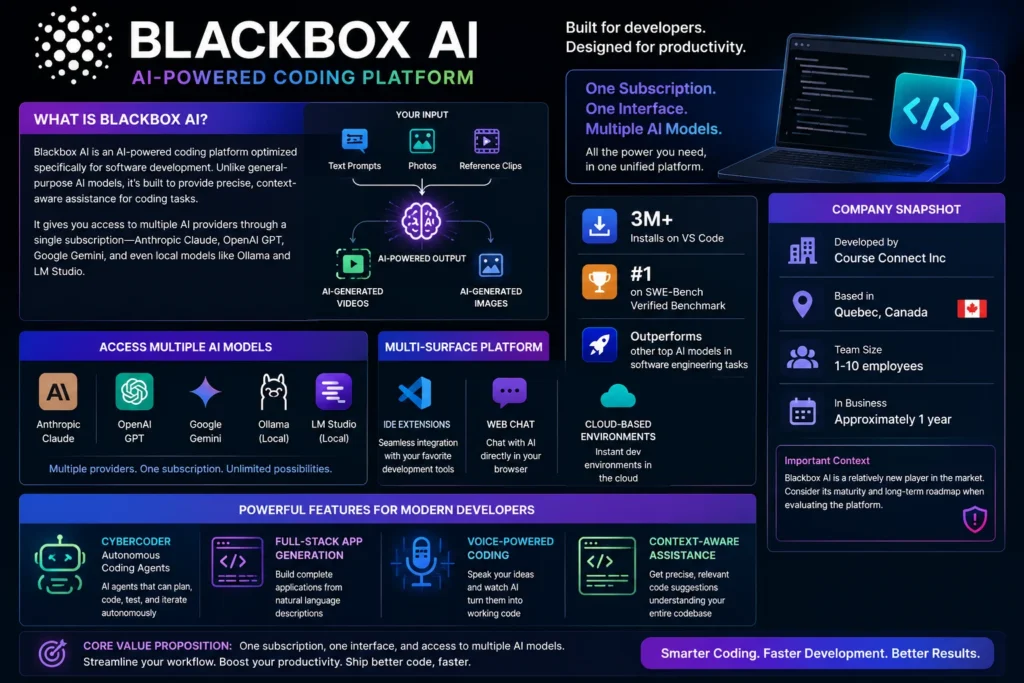
Blackbox AI is a multi-model AI coding platform that gives you access to multiple AI providers—Anthropic Claude, OpenAI GPT, Google Gemini, and local models like Ollama—through a single subscription. Developed by Course Connect Inc in Quebec, Canada, the platform has over 3 million VS Code installs and ranks #1 on the SWE-Bench Verified benchmark with a 49% score on SWE-Bench Lite. Key features include the Full-Stack Agent that builds complete applications from natural language descriptions, specialized AI agents triggered with mentions, voice-powered coding assistance, and browser-based development environments. The platform offers credit-based pricing with manual and auto-refill options, though specific tier details require sign-up to fully evaluate. Available as a VS Code extension, Chrome extension, and web interface, Blackbox AI provides model flexibility without managing multiple subscriptions. However, according to MIT’s AI Agent Index, the platform has no documented safety policies, controls, guardrails, monitoring procedures, or customer restrictions, and remains closed source with minimal documentation.
What Is Blackbox AI?
Blackbox AI is an AI-powered coding platform optimized specifically for software development . Unlike general-purpose AI models, it’s built to provide precise, context-aware assistance for coding tasks . The platform gives you access to multiple AI providers through a single subscription—Anthropic Claude, OpenAI GPT, Google Gemini, and even local models like Ollama and LM Studio .
Here’s the quick breakdown: Blackbox AI is a multi-surface AI coding platform with IDE extensions, web chat, and cloud-based development environments . Developed by Course Connect Inc, a corporation based in Quebec, Canada , the platform has over 3 million installs on VS Code alone . It ranks #1 on the SWE-Bench Verified benchmark, outperforming other top AI models in software engineering tasks .
The platform’s core value proposition is simple: one subscription, one interface, and access to multiple AI models. But there’s more beneath the surface. Blackbox AI also offers autonomous coding agents (CyberCoder), full-stack app generation from natural language descriptions, and voice-powered coding assistance .
How Blackbox AI Works: Core Features
The Multi-Model Approach
The standout feature of Blackbox AI is its model flexibility. Instead of paying separate subscriptions to each provider, you pay one fee and choose which model to use for each task .
Supported AI providers include :
- Anthropic Claude — Recommended for most coding tasks
- OpenAI GPT — Great for general-purpose coding
- Google Gemini — Good for multimodal tasks
- Local Models — Ollama and LM Studio support
This flexibility lets you leverage model-specific strengths without manual testing. Need Claude for clean code? GPT for complex logic? Gemini for multimodal understanding? They’re all in the same dashboard.
Full-Stack Agent: From Idea to App in Seconds
The Full-Stack Agent is Blackbox AI’s most powerful feature . You describe your project in plain English, and it builds the entire application—frontend, backend, and database components—in a single workflow .
Here’s how it works :
- Natural language input — Describe your project in plain English
- Full-stack generation — Generates all frontend, backend, and database components
- Interactive development — Collaborate with the Agent in real-time
- Browser-based coding — Access a VS Code environment directly in your browser
- Automatic deployment — Delivers your finished app to a public URL
- Self-fixing tests — Runs integration tests and resolves bugs automatically
You can provide instructions like “Build me a Dropbox clone” or even deploy a GitHub repository . The Agent launches a VS Code instance in your browser connected to a virtual machine, executes commands, and handles the entire development pipeline .
Smart Code Completions
Stop staring at blank files. Blackbox AI generates production-ready, context-aware code that seamlessly fits your project’s structure and style . The platform processes and edits multiple files simultaneously, providing real-time completions while you write .
Automate Your Entire Workflow
Repetitive coding tasks become history with Blackbox AI . The platform eliminates boilerplate code, automates routine refactoring, and streamlines development processes from repetitive tasks to tests .
AI Agents: Specialized Helpers for Specific Tasks
Blackbox AI includes intelligent assistants designed to handle everything from code analysis to data processing . Each agent is optimized for its designated function, allowing users to automate repetitive tasks and focus on higher-level objectives .
How to use agents :
You can head to blackbox.ai and use @ to mention a specific agent. For example, try something like @react build me a chatgpt clone and the React agent will handle it and build it in React .
You can also create custom agents if you can’t find the right one for your specific use case .
Voice with the Agent
Natural voice conversations with AI enable hands-free coding assistance . You can issue real-time voice commands and receive audio feedback and responses .
Advanced Features
Browser Agent: Enables agents to navigate websites, test applications, interact with web interfaces, and capture screenshots .
Agent with GPUs: Let the Blackbox AI Coding Agent run on GPUs for processing training data and fine-tuning .
VS Code Extension Features :
- Code Chat — Answer coding questions and assist with writing code
- Generate Code — Create entire functions by itself as an agent expert
- Code Completion — Automatically suggests next lines of code based on repo context
- Code Commenting — Properly writes commenting for code files
- Explain Code — Explains complex code sections
- Improve Code — Optimize your code
- AI README — Effortlessly create detailed README files
- Commit Message Generation — Write commit messages for repo changes
- View Diff History — Track changes in your project locally
- Share Code Link — Share code links anywhere
- BLACKBOX Snippet — Save and reuse best snippets
Chrome Extension Features :
- Code Chat for answering coding questions
- GitHub Integration — Ask questions about code directly on GitHub
- Image-to-Text (OCR) — Extract text from images
Blackbox AI Performance: The SWE-Bench Benchmark
Blackbox AI ranks #1 on the SWE-Bench Verified benchmark, a standardized evaluation framework designed to assess an AI system’s ability to solve software engineering tasks . It scores 49% on SWE-Bench Lite, outperforming top AI models .
What this means: The platform’s specialized focus on software development gives it an edge over general-purpose models that distribute their intelligence across multiple domains .
Blackbox AI Pricing: Free vs. Paid Plans
Blackbox AI operates on a credit-based pricing model. Credits are automatically allocated with your subscription and refresh at the start of each subscription period .
Free Tier
The free tier exists primarily for testing and getting a feel for the platform. However, it throttles aggressively once the daily allowance is spent. The Chrome extension has a 2.7-star rating (1,196 reviews) , reflecting some user dissatisfaction.
Pro / Paid Plans
Pricing details and specific tier information require signing up to fully evaluate . The platform uses a credit system:
Credit Management :
- Credits are automatically allocated with your subscription
- Your credit balance refreshes at the start of each subscription period
- Monitor your credit usage in the Settings tab
When credits are running low :
- Manual Refill — Purchase additional credits at any time
- Auto Refill — Enable automatic credit purchases when your balance is low
- Usage Tracking — Monitor your credit consumption in real-time
Pro Tip: Enable auto refill to ensure uninterrupted access to Blackbox AI’s features. You can set custom thresholds and limits for automatic refills .
Blackbox AI vs GitHub Copilot: The Head-to-Head Comparison
GitHub Copilot is Blackbox AI’s primary competitor. Here’s how they stack up:
| Feature | Blackbox AI | GitHub Copilot |
|---|---|---|
| Model Access | Multiple providers (Claude, GPT, Gemini, local models) | Curated set, premium models gated to Pro+ |
| Model Flexibility | Choose which model to use for each task | Fixed model per tier |
| SWE-Bench Score | 49% on SWE-Bench Lite, ranked #1 | Lower |
| Autonomous Agents | Full-Stack Agent, specialized AI agents | Agent mode for multi-file edits |
| IDE Coverage | VS Code, Chrome extension, web chat, CLI | VS Code, JetBrains, Visual Studio, Neovim, Xcode, CLI |
| Pricing Model | Credit-based subscriptions | Usage-based billing with AI Credits |
| Developer | Course Connect Inc (Canada) | Microsoft (GitHub) |
| Deployment | Full-stack app generation, automatic deployment to public URL | Limited deployment features |
| Privacy | No safety policies documented | Standard |
Which Should You Choose?
Choose Blackbox AI if you want:
- Model flexibility without managing multiple subscriptions
- Full-stack app generation from natural language descriptions
- Specialized AI agents for different coding tasks
- The #1 ranked AI on SWE-Bench Verified
- Autonomous full-stack project completion
Choose GitHub Copilot if you want:
- Deeper GitHub integration with repo-wide context
- More mature multi-file edits and refactoring
- Predictable team pricing with admin controls
- A more generous free tier
Technical Specifications
AI Model Coverage
Blackbox AI supports multiple AI providers through a single interface :
- Anthropic Claude — Recommended for most tasks
- OpenAI GPT — Great for general coding tasks
- Google Gemini — Good for multimodal tasks
- Local Models — Ollama, LM Studio support
Enterprise Deployment
The platform supports advanced features including :
- Agent with GPUs for processing training data
- Custom agent creation
- Project structure understanding
- Conversation history maintenance
- Preference learning
Privacy and Security
Important note: According to MIT’s AI Agent Index, Blackbox AI has no documented safety policies, controls, guardrails, monitoring procedures, or customer restrictions . The platform is closed source with minimal documentation .
Chrome extension privacy :
- The developer states the product does not collect or use your data
- Data is not sold to third parties
- Data is not used for credit determination purposes
Configuration
Chat Settings :
- Mode — Switch between Auto and Manual modes for different levels of control
- Custom Instructions — Add your coding preferences
- Always Allow Read-Only — Auto-approve file reading
Security Note: Always review commands and file changes before approving them. Blackbox AI will ask for permission before making any changes to your system .
Frequently Asked Questions
Is Blackbox AI free?
Yes. Blackbox AI offers a free tier for testing and getting a feel for the platform. However, it throttles aggressively once the daily allowance is spent, so it’s more for experimentation than regular use.
What AI models does Blackbox AI support?
Blackbox AI supports multiple AI providers including Anthropic Claude (recommended for most coding tasks), OpenAI GPT (great for general coding), Google Gemini (good for multimodal tasks), and local models like Ollama and LM Studio.
What is the Full-Stack Agent?
The Full-Stack Agent is Blackbox AI’s most powerful feature. You describe your project in plain English, and it builds the entire application—frontend, backend, and database components—in a single workflow. It launches a VS Code instance in your browser connected to a virtual machine, executes commands, and handles the entire development pipeline including automatic deployment to a public URL.
How does Blackbox AI compare to GitHub Copilot?
Blackbox AI offers model flexibility with multiple providers and ranks #1 on SWE-Bench Verified with a 49% score. GitHub Copilot offers deeper GitHub integration, more mature multi-file edits, and better repository-wide context. Blackbox AI is better for model flexibility and full-stack generation, while Copilot is better for GitHub-native workflows.
Is Blackbox AI safe to use?
According to MIT’s AI Agent Index, Blackbox AI has no documented safety policies, controls, guardrails, monitoring procedures, or customer restrictions. The platform is closed source with minimal documentation. The Chrome extension developer states the product does not collect or use your data, and data is not sold to third parties.
How does Blackbox AI pricing work?
Blackbox AI uses a credit-based pricing model. Credits are automatically allocated with your subscription and refresh at the start of each subscription period. You can purchase additional credits manually or enable auto-refill when your balance is low. Specific tier pricing details require signing up to fully evaluate.
Conclusion
Blackbox AI is a powerful multi-model coding platform that brings flexibility and efficiency to software development. The ability to choose between Claude, GPT, Gemini, and local models within a single interface is a significant advantage over competitors that lock you into one provider. The Full-Stack Agent’s ability to generate complete applications from natural language descriptions is genuinely impressive, and the platform’s #1 ranking on SWE-Bench Verified validates its coding capabilities.
But Blackbox AI isn’t without concerns. The lack of documented safety policies, guardrails, and customer restrictions is notable for a platform with over 3 million installs. The closed-source nature and minimal documentation may be a concern for enterprise users with strict security requirements. The Chrome extension’s 2.7-star rating suggests user experience isn’t universally positive.
Our honest recommendation: If you’re a developer who wants model flexibility and autonomous full-stack generation capabilities, Blackbox AI is worth serious consideration. The platform’s SWE-Bench performance indicates genuine coding competence. Start with the free tier to get a feel for the platform, then consider upgrading if it fits your workflow.
If you primarily work in GitHub and VS Code and need deep repository-wide reasoning, GitHub Copilot remains the more mature choice with better integration and established enterprise support.
If you have strict security requirements or need transparent AI governance, the lack of documented safety policies at Blackbox AI may be a dealbreaker.
The best approach is to test the free tier thoroughly, evaluate the specific models you’ll use most frequently, and monitor your credit consumption carefully before committing to a paid plan.

Victoria Lane is a grammar-focused writer at GramBrix.com, passionate about helping readers master the rules of language. She provides clear explanations and practical examples that make writing more accurate, polished and confident.