Last Updated on August 8, 2026
A song maker AI is a generative tool that creates original music from text prompts in under 30 seconds. Top platforms include Suno (speed, stem export), Udio (studio-quality instruments), and ElevenLabs Music (voice cloning). Free tiers exist, but commercial use requires caution US copyright law doesn’t protect fully AI generated songs. Always check licensing terms before publishing to YouTube or Spotify.
You have a melody stuck in your head. You can hear the beat, the lyrics, the drop. But you don’t play an instrument. You don’t know music theory. And you definitely don’t have a recording studio in your basement.
Here’s the good news. You don’t need any of that anymore.
A song maker AI can turn a simple text description into a fully produced track in under thirty seconds. It’s not science fiction. It’s happening right now. And the technology is advancing faster than most people realize.
This guide cuts through the hype. We’ll explore the top AI music generators on the market. We’ll compare audio quality, control, and pricing. And we’ll tackle the elephant in the room—who actually owns the song you create?
Let’s dive in.
What Is a Song Maker AI?
A song maker AI is a generative artificial intelligence system that creates original music from user inputs. You type a description like “upbeat pop song with a female vocalist and a catchy chorus.” The AI analyzes your prompt. It generates lyrics, a melody, chord progressions, instrumentation, and even vocals. The output is a complete audio file you can download and share.
These tools use deep learning models trained on massive datasets of existing music. They understand musical structure. They can mimic genres. They can even capture specific moods and emotions .
But here’s the crucial distinction. Not all AI song makers are created equal. Some focus on full songs with vocals. Others specialize in instrumental backgrounds. A few let you upload your own lyrics or even clone your voice.
Understanding these differences is key to picking the right tool for your needs.
The Big Three: Full-Song Generators
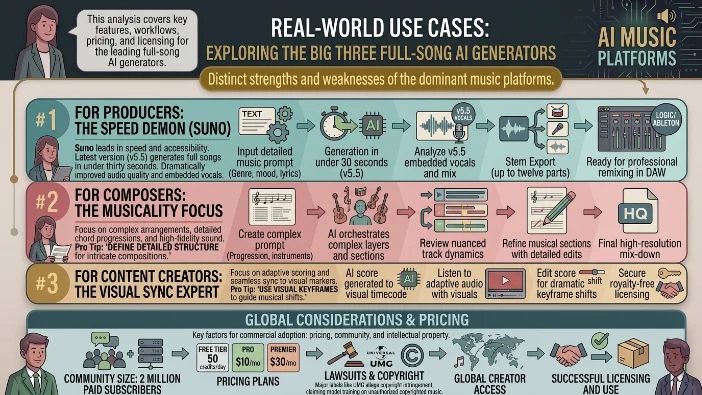
Three platforms dominate the full-song generation space. Each has distinct strengths and weaknesses.
Suno: The Speed Demon
Suno leads the pack in terms of speed and accessibility. Their latest version, v5.5, generates complete songs in under thirty seconds. The audio quality has improved dramatically. Vocals now sound embedded in the mix rather than hovering awkwardly above it .
What makes Suno stand out:
- Genre range. Suno handles everything from Hinglish pop to Bollywood ballads surprisingly well.
- Stem export. You can split tracks into up to twelve parts for remixing in a DAW like Logic or Ableton.
- Community size. With roughly 2 million paid subscribers, the community is massive. That means more shared prompts and inspiration.
Pricing: Free tier with 50 credits per day. Pro plan costs $10 monthly. Premier runs $30 monthly .
The catch: Suno is currently fighting lawsuits from major labels like Universal Music Group. The allegations center on copyright infringement. The labels claim Suno trained its models on their copyrighted music without permission .
Udio: The Studio-Quality Realist
Udio was built by former DeepMind scientists. It feels less like a toy and more like a serious production tool. The audio has more “breath” and dynamics than Suno’s output. For genres like jazz, rock, and acoustic, Udio often sounds more authentic .
What makes Udio stand out:
- Inpainting. You can fix a single verse or bridge without regenerating the entire song. This saves massive amounts of time.
- Superior live instrumentation. Acoustic guitars sound like acoustic guitars. Drums have proper room tone.
- More nuanced vocals. The emotional delivery feels more natural.
Pricing: Free tier with 100 credits. Standard plan at $10 monthly. Pro at $30 monthly.
The catch: Udio settled a lawsuit with Universal Music Group in late 2025. The settlement forced them to transition to a new licensed model. This caused them to block downloads platform-wide during the transition . Double-check their terms before publishing anything commercially right now.
ElevenLabs Music: The Voice Cloning Specialist
ElevenLabs built its reputation on AI voice cloning. Their music model extends that expertise into singing. If you need a consistent “brand voice” across multiple songs, ElevenLabs Music is your best bet .
What makes ElevenLabs stand out:
- Granular vocal control. You can adjust timbre, emotion, and delivery style.
- Multilingual support. Handles emotional delivery in multiple languages.
- Licensed training data. ElevenLabs secured deals with Kobalt and Merlin. This makes their outputs safer for commercial use .
Pricing: Starts at $6 monthly.
The catch: It’s a newer entrant. The community is smaller. Some users report that instrumental quality lags behind Suno and Udio .
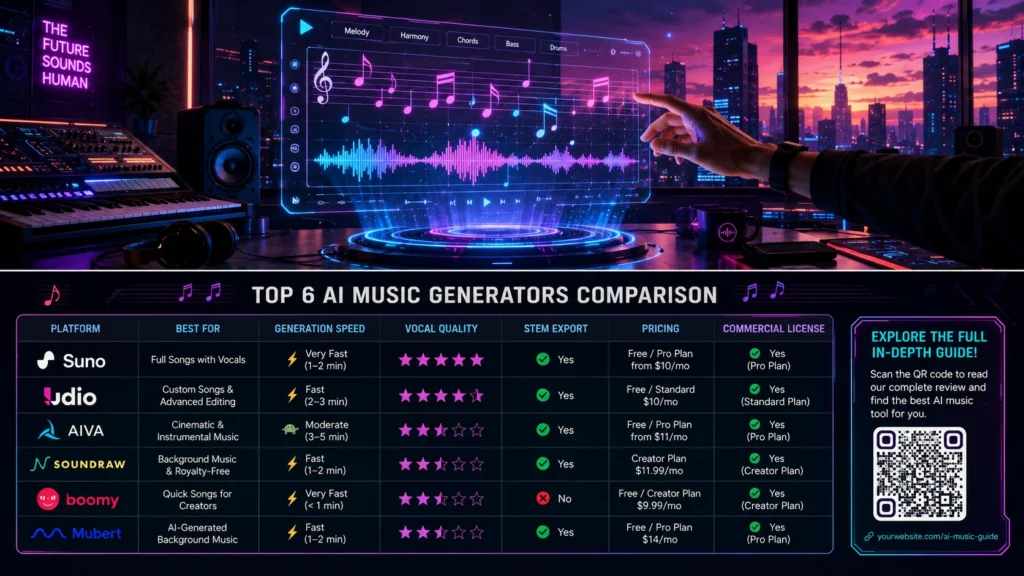
| Feature | Suno | Udio | ElevenLabs Music |
|---|---|---|---|
| Generation Speed | <30 seconds | 30-60 seconds | 30-60 seconds |
| Best For | Speed & variety | Realistic instruments | Voice cloning |
| Vocal Quality | Good, improving | Excellent | Excellent |
| Stem Export | Yes (12 parts) | Limited | Limited |
| Commercial License | Yes (with restrictions) | Check current terms | Yes (licensed) |
| Price (Monthly) | $10-$30 | $10-$30 | $6+ |
Specialized Tools for Specific Needs
Not everyone needs a full song with vocals. Sometimes you just need a background track or a specific sound effect.
For Video Editors and Podcasters: Beatoven.ai and Soundraw
Beatoven.ai focuses on soundtracks. You select emotions like anxiety, warmth, or sadness for specific sections of your timeline. The AI composes music to fit the scene length. It’s perfect for YouTubers who hate copyright claims.
Soundraw generates royalty-free instrumental background music. You can edit the energy level dynamically. Want a track that builds tension over ninety seconds? Soundraw can do that.
For Sound Designers: Stable Audio 3.0
Stability AI (the Stable Diffusion folks) focuses on sound effects and loops rather than full vocal tracks. They train on licensed datasets like AudioSparx. The latest version generates up to six minutes and twenty seconds of audio .
The big advantage? Stable Audio just released “open weights” models. Developers can build custom versions for specific applications. This makes it a favorite among sound designers and game developers.
For Classical and Film Scoring: AIVA
AIVA is recognized as a composer by SACEM, the French authors’ society. It generates sheet music and MIDI. This is useless for pop songwriters but gold for film composers looking for a starting point. You get a score you can actually edit note by note.
The Elephant in the Room: Copyright and Lawsuits
Let’s address the uncomfortable truth. In 2026, you cannot copyright a fully AI-generated song in the United States. The law requires a “human author.”
This isn’t a gray area. It’s black letter law. The U.S. Copyright Office has made this explicit.
What this means for you:
Personal use. You’re fine. Use AI for fun, memes, or demos. No one cares.
Commercial use. This gets tricky. Even if the platform gives you a “commercial license,” you don’t own the copyright. You can distribute the song. You can put it on Spotify. But you can’t stop someone else from copying it. You can’t sue for infringement. The song belongs to no one.
The lawsuits. Suno and Udio are actively fighting lawsuits from major labels. The labels claim these companies scraped their songs from YouTube and other platforms to train their models . The outcome will shape the entire industry.
The “good” guys. ElevenLabs and Stable Audio are training on licensed data. This makes their outputs safer for commercial use. But they also sound less “human” than Suno or Udio. You’re trading safety for quality.
Real-world impact. An AI-generated song did top the US iTunes charts in April 2026. But it was a novelty. A publicity stunt. The artist couldn’t monetize it exclusively. And the labels are fighting back hard .
How to Write a Good Prompt
Prompt engineering matters. A vague prompt gives you garbage. A specific prompt gives you gold.
The formula:
[Key] [BPM] [Genre] [Mood/Emotion] [Vocal description] [Key instruments] [Production style]Bad prompt: “Pop song.”
Good prompt: “E minor, 90 BPM, acoustic guitar ballad with a male vocalist, emotional and introspective. Warm reverb. Intimate studio feel.”
Why this works: You’re giving the AI concrete parameters. Key and BPM control the musical foundation. Genre sets the sound palette. Mood shapes the emotional delivery. Instruments define the texture. Production style adds the final polish .
Pro tip: If the platform allows, upload a reference track. The AI can mimic the sound quality without copying the melody. This gives you much better results than text alone.
Lyrics. Many platforms auto-generate lyrics from your prompt . But you can also provide your own. Use structure tags to control the arrangement. [Verse], [Chorus], [Bridge], and [Outro] tell the AI where to place each section .
Visual inputs. Google’s Lyria 3 lets you upload a photo or video. The AI generates a track based on the visual content. A sunset photo might produce a mellow ambient piece. A cityscape at night might generate a driving electronic beat .
What AI Still Sucks At
Let’s be honest about the limitations.
Professional DAW integration. A recent ETH Zurich study tested twelve models with 2,500 human listeners. They found that while Suno currently leads in human preference, none of the models reliably produce stems that integrate cleanly into a professional DAW session . The stems glitch. The timing drifts. The frequencies clash.
Complex arrangement. AI struggles with “surprising” creativity. It mimics patterns. It doesn’t break them. If you need a song with unusual time signatures or unexpected key changes, hire a human .
Consistency. A study on repeatability showed that Suno and Udio are exciting but inconsistent. Soundful and Mubert are dull but predictable. If you need 100 tracks for a background music library, pick Soundful. If you need one banger, pick Suno.
Use Cases: Who Should Use a Song Maker AI?
Content creators. Yes. Use AI for background music in reels, shorts, and YouTube videos. Beatoven and Soundraw are great for this. They generate copyright-safe tracks that won’t get you demonetized.
Songwriters. Yes. Use AI to get past writer’s block. Generate ten variations of a chorus you’re stuck on. Steal the harmonic structure. Change the melody. Make it your own.
Podcasters. Yes. Use AI for intro and outro music. It’s cheaper than hiring a composer and faster than browsing royalty-free libraries.
Professional artists. No. Not yet. The quality isn’t there. The legal landscape is unstable. And audiences can tell the difference . Use AI for demoing. Don’t rely on it for your final album.
The Future of Song Maker AI
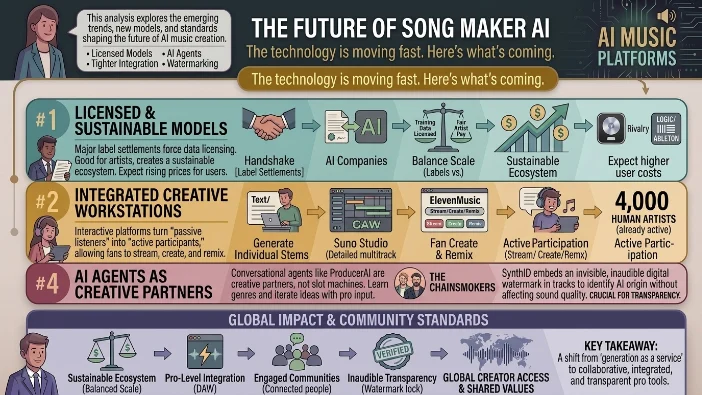
The technology is moving fast. Here’s what’s coming.
Licensed models. The settlements with labels are forcing AI companies to license their training data. This is good for artists. It creates a sustainable ecosystem. It also raises prices for users.
Tighter integration. Suno recently launched Suno Studio, a “generative audio workstation.” It rivals professional DAWs like Logic and Ableton. You can generate individual stems, edit on a multi-track timeline, and export as audio and MIDI . The line between AI and professional production is blurring.
Interactive tools. ElevenLabs launched ElevenMusic, a platform for fans to stream, create, and remix music. It turns “passive listeners into active participants” . About 4,000 human artists are already on the platform.
AI agents. Google’s ProducerAI uses a conversational agent. You talk to it like a producer. Ask questions. Learn about genres. Iterate on ideas. It’s not a slot machine. It’s a creative partner . The Chainsmokers are involved.
Watermarking. Google’s SynthID embeds a digital watermark in AI-generated audio. It shows the track was made with AI without changing how it sounds. This is crucial for transparency .
FAQs
Is it legal to use a song maker AI for commercial projects?
Yes and no. You can use AI-generated music commercially, but the legal landscape is messy. In the United States, you cannot copyright a fully AI-generated song because the law requires human authorship. This means you have a usage right—not ownership. If a platform like Suno gives you a commercial license, you can distribute the track on Spotify or YouTube. But you can’t stop others from copying it. You also can’t sue for infringement. Some platforms like ElevenLabs and Stable Audio train on licensed data, making their outputs safer for commercial use. Always read the terms of service before publishing.
Which AI song maker is best for beginners?
Suno is the most beginner-friendly option. You just type a prompt, hit generate, and get a full song in under thirty seconds. The interface is clean and intuitive. The free tier gives you fifty credits daily, so you can experiment without spending money. Udio is also accessible but requires slightly more tweaking. For pure simplicity, Suno wins.
How much does an AI song maker cost?
Most platforms offer free tiers with limited credits. Suno gives fifty daily credits on its free plan. Udio offers one hundred credits. ElevenLabs starts at $6 monthly. Paid plans range from $10 to $30 monthly depending on features and credit limits. Some platforms like Soundraw and Beatoven operate on subscription models starting around $10 per month. Free versions usually include watermarks or lower audio quality.
Can I upload my own lyrics to an AI song maker?
Yes. Most full-song generators like Suno, Udio, and ElevenLabs let you provide custom lyrics. You can paste your own words and the AI will set them to music. Structure tags like [Verse], [Chorus], and [Bridge] help the AI arrange your lyrics properly. Some platforms also generate lyrics automatically based on your prompt.
Will AI replace human musicians?
Not anytime soon. AI is a tool, not a replacement. It generates patterns based on existing music. It lacks genuine creativity, emotional depth, and the ability to surprise. Professional artists use AI for demos and inspiration, not final releases. The best music comes from humans who use AI thoughtfully, not from people who try to automate the entire creative process.
What’s the difference between Suno and Udio?
Suno generates songs faster (under thirty seconds) and offers better stem export (up to twelve parts). It’s great for speed and variety. Udio produces more realistic instrumentals, especially for genres like jazz, rock, and acoustic. The audio has more dynamics and “breath.” Udio also features inpainting, which lets you fix a single verse without regenerating the entire song. Suno is better for quick demos. Udio is better for studio-quality production.
Can I use AI-generated music on YouTube without copyright claims?
It depends on the platform and the copyright holders. YouTube’s Content ID system can flag AI-generated music if it resembles copyrighted material. Some platforms like Beatoven and Soundraw generate fully royalty-free tracks. Suno and Udio offer commercial licenses, but they’re currently fighting lawsuits from major labels. The safest bet is using platforms that train on licensed data, like ElevenLabs or Stable Audio. Always check the platform’s terms before uploading.
How do I write a good prompt for an AI song maker?
Use this formula: Key + BPM + Genre + Mood + Vocal description + Instruments + Production style. Instead of “pop song,” try “E minor, 90 BPM, acoustic guitar ballad with a male vocalist, emotional and introspective, warm reverb, intimate studio feel.” The more specific you are, the better the output. Uploading a reference track also helps the AI match the sound quality you want.
Conclusion
Song maker AI tools are incredible muses. They let you iterate a hundred ideas an hour instead of one idea a day. They break down barriers. They democratize music creation.
But they aren’t replacements for human artistry. They’re amplifiers. They take your vision and give it a voice. They don’t replace the vision itself.
If you’re using a song maker AI for fun, go wild. Create a hundred tracks. Share them with friends. Experiment with weird prompts. The technology is a playground.
If you’re using it commercially, tread carefully. Read the terms. Understand the copyright limitations. And remember: a song generated by AI can’t be copyrighted in the US. You have a usage right, not ownership.
The future is collaborative. Humans and AI working together. The best music will come from people who use these tools thoughtfully, not from people who try to replace themselves entirely .
So go ahead. Open an app. Type a prompt. Hear your idea come to life. Then take that spark and make it truly yours.

Kevin Brooks is a grammar specialist at GramBrix.com, dedicated to helping readers understand language rules with clarity and confidence. He simplifies complex grammar concepts through practical examples and easy explanations.