Last Updated on August 16, 2026
Descript AI is an AI-powered video and podcast editor that lets you edit audio and video by editing text. Instead of scrubbing through timelines, you delete words from the transcript, and the corresponding video disappears. Founded in 2017, Descript has become the category leader with a 4.6/5 G2 rating. Key features include Studio Sound for noise removal, Filler Word Removal to cut “ums” and “uhs,” Overdub for voice cloning, AI Avatars, and the Underlord AI agent that automates editing tasks. Pricing starts free with 60 media minutes and 100 AI credits, then scales from $16/month (Hobbyist) to $50/month (Business). The AI credit system powers features like Studio Sound (10 credits/use), Green Screen, Eye Contact, and text-to-speech. Marketing teams use it to repurpose long-form content into shorts. L&D teams create training videos. Podcasters edit episodes in minutes instead of hours. The main limitations are basic color grading, limited multicam support, and AI credit exhaustion for heavy users. For the 80% of business content—talking-head videos, tutorials, webinars—Descript offers the fastest path from messy recording to publishable content. Try the free plan to see if the workflow clicks for you.
What Is Descript AI and Why Is Everyone Talking About It?
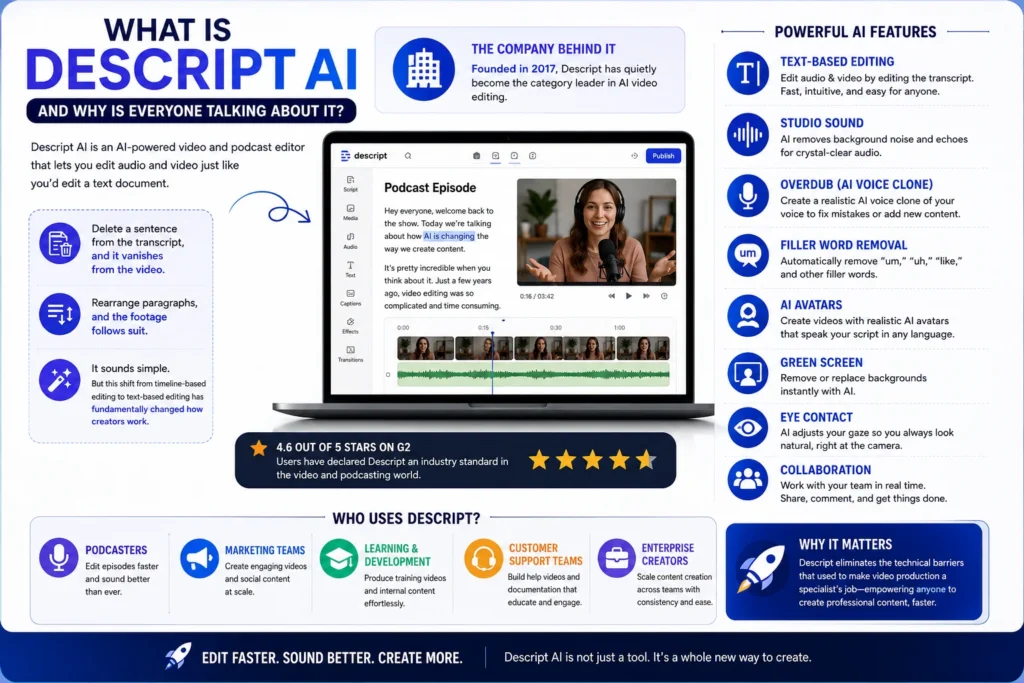
Let’s cut through the hype. Descript AI is an AI-powered video and podcast editor that lets you edit audio and video just like you’d edit a text document. Delete a sentence from the transcript, and it vanishes from the video. Rearrange paragraphs, and the footage follows suit.
It sounds simple. But this shift from timeline-based editing to text-based editing has fundamentally changed how creators work .
The company behind it: Founded in 2017, Descript has quietly become the category leader in AI video editing. With a 4.6-out-of-5-star rating on G2, users have declared it an industry standard in the video and podcasting world .
The user base isn’t just podcasters anymore. Marketing teams, learning and development departments, customer support teams, and enterprise content creators have all adopted the platform . Why? Because it eliminates the technical barriers that used to make video production a specialist’s job.
How Text-Based Editing Actually Works
The “Edit Like a Doc” Philosophy
Traditional video editors like Premiere Pro or Final Cut Pro operate on a timeline. You scrub through footage, make cuts, drag clips around, and pray you didn’t accidentally delete something important. It’s visual, but it’s also tedious.
Descript flips that entirely. Here’s what happens:
- Upload your media (video, audio, or screen recording)
- Automatic transcription converts speech to text
- Every word links directly to the corresponding video frame
- Delete text = delete video. No timeline gymnastics required
The result? Tasks that once took editors hours or even days now take minutes or even seconds. A 30-minute video that might have taken two to three hours to clean up without Descript can often be ready to publish in an hour or so .
How Accurate Is the Transcription?
With clear audio, accuracy hits around 95%. Background noise, crosstalk, and strong accents can reduce precision. A studio microphone or decent lavalier helps significantly.
Pro tip: If your audio quality is questionable, run Studio Sound first. It cleans up room echo and background noise before transcription, which improves accuracy .
The Underlord AI Agent
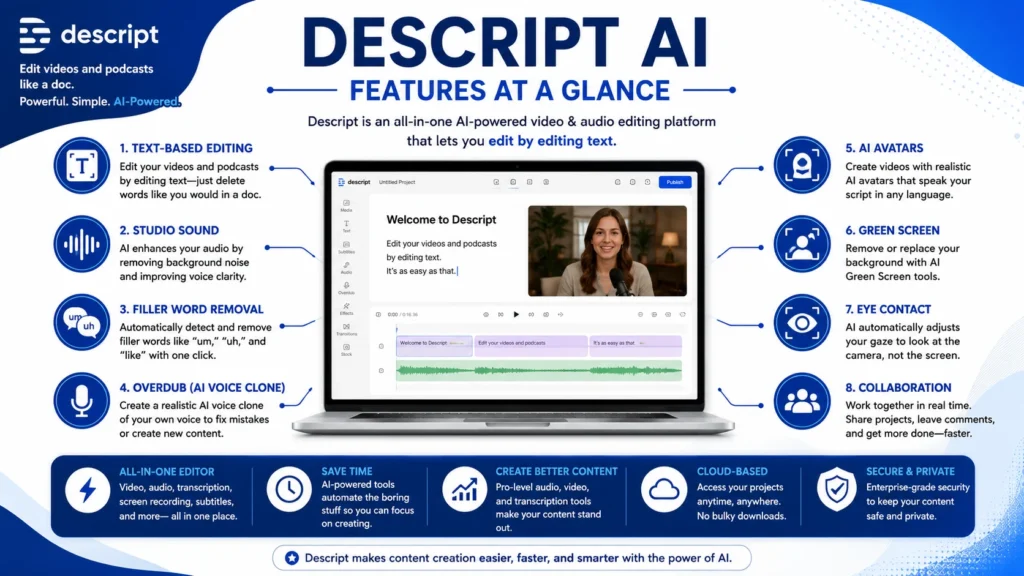
Descript’s AI agent, called Underlord, handles the grunt work. It handles audio cleanup, automatic removal of filler words, long pauses, and studio-quality audio enhancement without manual EQ or compression .
There’s also an Eye Contact effect that subtly corrects gaze when talent is reading from a script. It’s not perfect, but it’s surprisingly convincing for talking-head content .
Key Features That Make Descript Different
Filler Word Removal
This is one of Descript’s most beloved features. The tool automatically detects “um,” “uh,” “like,” and other verbal tics. You can remove them in bulk with a single click .
The catch: Removing every filler word can make the pacing feel too tight. Preview before committing. Descript shows you exactly what will be cut before you apply the change.
Studio Sound
This AI enhancement reduces room echo and background noise. On untreated recordings, it can make you sound like you used a professional booth. However, pushing it too hard introduces a faint “AI glaze.” Keep the strength around 30-50% for natural results .
Overdub (Voice Cloning)
This feature lets you generate realistic voice clones from your recordings. It’s useful for patching mistakes without reshoots .
Ethical guardrail: Overdub requires explicit consent and a training script. You can’t clone someone’s voice without their permission. Descript enforces this by design.
AI Avatars
Descript lets you create AI avatars that animate in sync with your speaker’s voice. You can:
- Upload your own photo
- Generate an avatar from a text prompt
- Use an image as a base and customize it with a prompt
Best practices for avatars: Use a clear, human-like face with even lighting and a relaxed, natural expression. A close-up headshot with shoulders slightly visible works best. The subject should be centered and squared to the camera .
File requirements:
- Supported formats: JPEG, PNG, and WEBP
- Maximum file size: 10 MB
- Best aspect ratio: 16:9
Collaboration and Review
Instead of exporting video files and emailing them back and forth, Descript lets you share a link. Team members can leave timestamped comments directly on the transcript .
The benefit: It turns video review into a document review workflow. No more “at 3:24, change that word” confusion. Just highlight the text and type your comment.
Brand Studio
For teams maintaining consistent brand identity, this feature stores fonts, logos, colors, and templates in one place. No more emailing “what’s the right font file?” every time you start a new project .
The Descript API
This is where things get really interesting. Descript’s API is built around a single agentic endpoint called Underlord. Instead of exposing 20 different endpoints for individual features, they consolidated everything into one .
What you can automate:
- Import media from URL or local upload
- Remove filler words
- Add Studio Sound
- Generate captions
- Create clips
- Translate and dub
- Build rough cuts
Who can use it: API access is available for all paying users at no additional cost. Usage draws from AI credits and media minutes on your plan .
Pricing Plans: What You Actually Get
Descript overhauled its pricing in 2025-2026. The new system simplifies usage into just two resource pools: media minutes and AI credits .
| Plan | Price | Media Minutes | AI Credits | Key Features |
|---|---|---|---|---|
| Free | $0 | 60/month | 100 (one-time) | 720p export, watermark-free, limited AI tools |
| Hobbyist | $16/month | 600/month | 400/month | 1080p export, Studio Sound, Remove Filler Words, Overdub |
| Creator | $24/month | 1,800/month | 800/month | 4K export, full Underlord access, stock media library |
| Business | $50/month | 2,400/month | 1,500/month | Brand Studio, translation, custom avatars, priority support |
| Enterprise | Custom | Custom | Custom | SSO/SCIM, brand controls, custom legal terms |
What are AI credits? Credits draw down whenever you use AI-powered features like Underlord, Studio Sound, Green Screen, Eye Contact, text-to-speech, AI avatars, or generative video . This replaces the old system where each feature had separate limits.
The math: On the Hobbyist plan, 400 credits roughly equals 40 Studio Sound uses. Heavy users on lower tiers can exhaust credits within the first two weeks of the month .
Can you buy more? Creator and Business plans can purchase top-ups anytime .
Use Cases: Who Actually Uses Descript?
Podcasters
This is Descript’s original audience. The workflow is straightforward: record your podcast, upload the audio, get a transcript, edit by deleting sections, remove filler words, export. Transcript-based editing makes the process much faster .
Learning and Development Teams
Companies use Descript to create training videos, update them when policies change, and collaborate with subject matter experts. When a policy changes, you don’t need to reshoot the entire video. Just edit the transcript and re-export .
Marketing and Content Teams
Social media teams use Descript to repurpose long-form content into shorts. The tool automatically finds highlights, creates clips of any length, writes YouTube descriptions, generates chapters, and even starts blog posts from a single piece of content .
Newsrooms and Media Teams
Digital-first journalism needs tools built for speed, accuracy, and distributed teams. Descript turns reporters into video editors by letting them cut their own video by editing text. No new skills required .
Key benefits for newsrooms:
- Reporters can cut their own video in the field
- One story can become a podcast, YouTube explainer, and three social clips from a single edit
- Studio Sound cleans up noisy field recordings instantly
The AI Credit System Explained
| Tool | Description | Credits Used |
|---|---|---|
| Studio Sound | Audio enhancement and noise removal | 10 credits per use |
| Green Screen | Background removal and replacement | 10 credits per use |
| Eye Contact | Gaze correction for talking-head videos | 10 credits per use |
| Text-to-Speech | Generate voice from text | Varies by length |
| AI Avatars | Create and animate custom avatars | Varies by generation |
| Underlord | Agentic video co-editor | Varies by complexity |
Common Pain Points and Limitations
Transcript accuracy depends on audio quality. Garbage in, shaky transcript out. Use a decent microphone.
Color grading is basic. If you’re picky about skin tones or want film emulation, finish in a dedicated NLE.
Multicam support is limited. Complex multi-camera setups require manual work. Descript isn’t designed for 10-camera podcast productions.
AI credits can get expensive. Heavy users on lower-tier plans can exhaust credits within two weeks .
Some AI tools have restrictions:
- Not supported with empty scripts
- Some require video (not just audio)
- Some don’t support sequences
Frequently Asked Questions
Is Descript free? Yes, there’s a free plan with 60 media minutes and 100 one-time AI credits. Watermark-free 720p exports are included .
What are AI credits? Descript’s usage-based currency for AI features like Studio Sound, Eye Contact, Overdub, and generative video. Different plans include different credit amounts .
Can I edit multi-camera videos in Descript? Basic multicam support exists but requires manual setup. Some AI tools require a sequence with multiple video tracks .
Does Descript export to Premiere Pro? Not directly. There’s a “Timeline Export” feature that generates XML files for import into NLEs, but it can require media relinking.
What’s the difference between Descript and Speechify? Descript is for audio/video editing. Speechify is for text-to-speech, reading, and dictation. They solve different problems.
How accurate is Descript’s transcription? With clear audio, around 95% accuracy. Background noise, crosstalk, and strong accents reduce precision.
Conclusion
Descript is the tool that makes video editing feel like writing. It’s not perfect. Color grading is basic. Multicam is limited. AI credits can be a constraint. But for the 80% of business content—talking-head videos, tutorials, podcasts, webinars, demos—Descript is the fastest path from messy recording to clean, publishable content.
The real value isn’t just the features. It’s the shift in thinking. Editing becomes editing content, not manipulating a timeline. Reviews become comments on a document, not email chains. Mistakes become text fixes, not reshoots.
If you’re creating video content regularly, Descript deserves a spot in your toolkit. Try the free plan. See if the workflow clicks. For most creators, it will.

Kevin Brooks is a grammar specialist at GramBrix.com, dedicated to helping readers understand language rules with clarity and confidence. He simplifies complex grammar concepts through practical examples and easy explanations.