
Last Updated on August 4, 2026
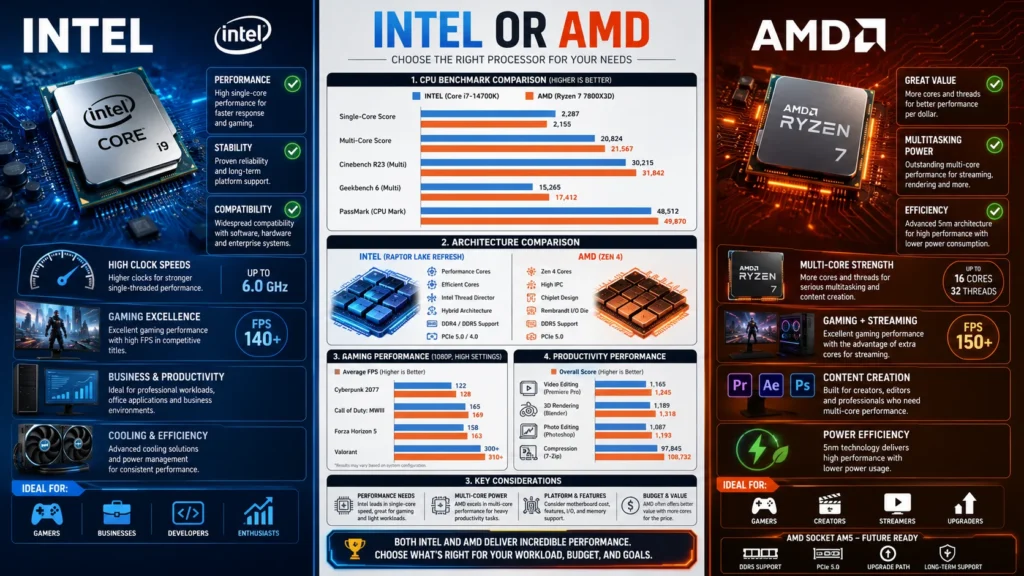
Intel or AMD is one of the most common questions when buying a computer or building a PC. Intel processors are often known for strong single-core performance and stability, while AMD processors are praised for excellent multi-core performance, value for money, and efficient power usage. The best choice depends on your budget, workload, gaming needs, and upgrade plans.
When buying a new computer, building a gaming PC, or upgrading an existing system, one question appears again and again: Intel or AMD?
For many years, Intel and AMD have competed to produce the best processors for consumers, gamers, students, professionals, and businesses. Both companies offer powerful CPUs that can handle everything from web browsing and office work to video editing, software development, and competitive gaming.
Choosing between Intel or AMD is not always easy. Some people assume Intel is always faster. Others believe AMD always offers better value. The truth is more complex. Both brands have strengths and weaknesses, and the best option depends on how you plan to use your computer.
This guide explains everything you need to know about Intel or AMD. You will learn how processors work, compare features, understand advantages and disadvantages, explore real-world examples, avoid common mistakes, and discover which CPU is right for your needs. Whether you are a beginner or an experienced PC builder, this article will help you make a confident decision.
Quick Answer
If you want a short answer to the Intel or AMD debate:
| Use Case | Recommended Choice |
|---|---|
| Budget PC | AMD |
| Gaming PC | Intel or AMD |
| Content Creation | AMD |
| Video Editing | AMD |
| Office Work | Intel or AMD |
| Streaming | AMD |
| Power Efficiency | AMD |
| High Refresh Rate Gaming | Intel |
| Upgrade Flexibility | AMD |
| Enterprise Systems | Intel |
In reality, both brands offer excellent CPUs, and modern processors from either company can deliver outstanding performance.
What Is a CPU?
Before comparing Intel or AMD, it helps to understand what a CPU is.
CPU stands for Central Processing Unit.
The CPU acts as the brain of your computer. It processes instructions and performs calculations needed to run applications and operating systems.
Examples of tasks handled by a CPU include:
- Opening programs
- Running games
- Editing videos
- Browsing websites
- Managing system resources
- Processing calculations
The speed and efficiency of your CPU directly affect how responsive your computer feels.
Understanding Intel Processors
What Is Intel?
Intel Corporation is one of the world’s largest semiconductor manufacturers.
The company has produced processors for decades and powers millions of computers worldwide.
Popular Intel processor families include:
- Intel Core i3
- Intel Core i5
- Intel Core i7
- Intel Core i9
- Intel Xeon
These processors serve different audiences ranging from casual users to professional workstations.
Intel Naming Explained
Example:
Intel Core i7-14700K
Breakdown:
- Core i7 = Performance tier
- 14 = Generation
- 700 = Model number
- K = Unlocked for overclocking
Higher model numbers generally indicate stronger performance.
Understanding AMD Processors
What Is AMD?
Advanced Micro Devices, commonly known as AMD, is Intel’s biggest competitor in the desktop CPU market.
AMD gained significant popularity through its Ryzen processor lineup.
Popular AMD processor families include:
- Ryzen 3
- Ryzen 5
- Ryzen 7
- Ryzen 9
- Threadripper
- EPYC
AMD has become especially popular among gamers, creators, and PC enthusiasts.
AMD Naming Explained
Example:
AMD Ryzen 7 7800X3D
Breakdown:
- Ryzen 7 = Performance tier
- 7 = Generation
- 800 = Model number
- X3D = Extra 3D cache technology
AMD’s naming system is relatively straightforward once you understand the structure.
Intel or AMD: Key Differences
Architecture
Both companies use different processor architectures.
Intel focuses heavily on balancing:
- Performance cores
- Efficiency cores
- High clock speeds
AMD focuses on:
- Efficient chiplet design
- High core counts
- Strong multi-threaded performance
These design philosophies affect gaming, productivity, and power consumption.
Core Count
Modern software increasingly benefits from multiple cores.
| Processor | Typical Core Count |
|---|---|
| Intel Core i5 | 10 to 14 cores |
| Intel Core i7 | 12 to 20 cores |
| Intel Core i9 | 16 to 24 cores |
| AMD Ryzen 5 | 6 cores |
| AMD Ryzen 7 | 8 cores |
| AMD Ryzen 9 | 12 to 16 cores |
AMD traditionally offers excellent multi-core performance for productivity workloads.
Clock Speed
Clock speed measures how quickly a CPU processes instructions.
Measured in GHz, higher numbers generally indicate faster operation.
Intel often excels in:
- Single-thread performance
- High clock speeds
- Competitive gaming workloads
AMD also offers strong clock speeds but often relies on architectural efficiency and larger cache sizes.
Cache Memory
Cache is ultra-fast memory located inside the processor.
AMD’s X3D processors include large cache amounts that improve gaming performance.
Example:
- Ryzen 7 7800X3D
- Ryzen 9 7950X3D
These CPUs are considered among the best gaming processors available.
Intel or AMD for Gaming
Gaming is one of the biggest reasons people compare Intel or AMD.
Why CPUs Matter in Gaming
The CPU handles:
- Physics calculations
- AI behavior
- Player input
- World simulation
- Frame generation support
A weak CPU can limit even the most powerful graphics card.
Intel Gaming Advantages
Intel often provides:
- Excellent single-core performance
- Strong frame rates
- Great esports performance
- Broad motherboard support
Games that benefit include:
- Counter-Strike
- Valorant
- Fortnite
- League of Legends
AMD Gaming Advantages
AMD offers:
- Excellent gaming efficiency
- Large cache technology
- Strong performance per watt
- Competitive frame rates
The Ryzen X3D series is particularly popular among gamers.
Gaming Comparison Table
| Category | Intel | AMD |
|---|---|---|
| Esports Gaming | Excellent | Excellent |
| AAA Gaming | Excellent | Excellent |
| Power Efficiency | Good | Excellent |
| Gaming Value | Good | Excellent |
| Cache Technology | Good | Excellent |
| Upgrade Path | Average | Excellent |
Winner: Depends on the specific model.
Intel or AMD for Productivity
Productivity workloads often use multiple cores.
Examples include:
- Video editing
- 3D rendering
- Programming
- Virtual machines
- Data analysis
Intel Productivity Performance
Intel performs well in:
- Adobe Photoshop
- Office applications
- Software development
- Hybrid workloads
Its performance cores and efficiency cores help balance multitasking.
AMD Productivity Performance
AMD shines in:
- Blender rendering
- Video editing
- Streaming
- Large compilation projects
- Heavy multitasking
Many Ryzen 9 processors deliver exceptional productivity performance.
Intel or AMD for Students
Students typically need:
- Web browsing
- Online classes
- Microsoft Office
- Light multitasking
For these tasks:
- Intel Core i5 works well.
- AMD Ryzen 5 works equally well.
Most students should prioritize:
- Battery life
- RAM
- SSD storage
rather than focusing solely on Intel or AMD.
Intel or AMD for Content Creators
Content creators need strong multi-core performance.
Common workloads include:
- Video editing
- Motion graphics
- Audio production
- Graphic design
AMD often offers better value in this category due to higher core counts.
However, Intel remains excellent for applications optimized for its architecture.
Intel or AMD for Streaming
Streaming requires:
- Game performance
- Video encoding
- Background processes
AMD processors generally excel because they handle many simultaneous tasks efficiently.
A streamer may:
- Play a game
- Run OBS
- Manage chat
- Record footage
all at the same time.
Intel or AMD for Laptops
Laptop buying decisions involve more than raw CPU performance.
Consider:
- Battery life
- Cooling
- Weight
- Display quality
Intel Laptop Strengths
- Strong software compatibility
- Excellent business laptop presence
- Mature ecosystem
AMD Laptop Strengths
- Better power efficiency
- Competitive integrated graphics
- Strong battery performance
Many modern AMD laptops offer outstanding value.
Intel or AMD Integrated Graphics
Integrated graphics allow a computer to display video without a dedicated graphics card.
Intel Integrated Graphics
Intel processors often include:
- Intel UHD Graphics
- Intel Iris Xe
Suitable for:
- Office work
- Streaming
- Light gaming
AMD Integrated Graphics
AMD’s integrated graphics are frequently stronger.
Examples include:
- Radeon 780M
- Radeon 890M
These can handle:
- Casual gaming
- Older AAA titles
- Creative workloads
AMD generally leads in integrated graphics performance.
Advantages and Disadvantages of Intel
Advantages
- Strong gaming performance
- Excellent single-core speed
- Broad software support
- Mature platform
- Widely available
Disadvantages
- Often higher power consumption
- Motherboard upgrades may require new sockets
- Some models run hotter under load
Advantages and Disadvantages of AMD
Advantages
- Excellent value
- Strong multi-core performance
- Efficient power usage
- Longer socket support
- Outstanding gaming cache technology
Disadvantages
- Some applications may favor Intel
- High-end models can still be expensive
- Performance varies significantly by generation
Intel or AMD Upgrade Paths
Upgrade paths matter because they affect future costs.
Intel
Intel has historically changed sockets more frequently.
This may require:
- New motherboard
- CPU upgrade
- Potential system rebuild
AMD
AMD often supports sockets for longer periods.
Benefits include:
- Easier upgrades
- Lower costs
- Better long-term value
Many users view this as a major AMD advantage.
Real World Examples
Example 1: Student Laptop
Needs:
- Research
- Office apps
- Zoom classes
Recommended:
- Intel Core i5
- AMD Ryzen 5
Either works perfectly.
Example 2: Gaming PC
Needs:
- High FPS
- Fast response times
Recommended:
- Intel Core i7
- AMD Ryzen 7 X3D
Example 3: Video Editor
Needs:
- Rendering speed
- Multitasking
Recommended:
- AMD Ryzen 9
- Intel Core i9
Example 4: Office Computer
Needs:
- Spreadsheets
- Web browsing
Recommended:
- Intel Core i3
- AMD Ryzen 3
Regional and Global Usage
The Intel or AMD debate varies around the world.
North America
Both brands maintain strong market share.
Gaming enthusiasts increasingly choose AMD for value.
Europe
AMD has gained popularity due to:
- Competitive pricing
- Energy efficiency
- Upgrade flexibility
Asia
Intel remains strong in business and enterprise markets.
AMD continues growing in gaming and DIY PC communities.
Common Mistakes When Choosing Between Intel or AMD
Buying Based Only on Brand
Wrong:
“Intel is always better.”
Correct:
Ignoring Motherboard Costs
A cheaper CPU may require a more expensive motherboard.
Always compare total platform costs.
Ignoring Cooling Requirements
High-performance CPUs often need:
- Better coolers
- Better airflow
These add to overall expenses.
Choosing Too Many Cores
Most users do not need 16 or 24 cores.
Buying more CPU than necessary wastes money.
Ignoring Power Consumption
Power efficiency affects:
- Electricity use
- Heat output
- Noise levels
AMD often performs well in this area.
Intel or AMD Comparison Table
| Feature | Intel | AMD |
|---|---|---|
| Gaming | Excellent | Excellent |
| Productivity | Excellent | Excellent |
| Power Efficiency | Good | Excellent |
| Upgrade Path | Good | Excellent |
| Integrated Graphics | Good | Excellent |
| Multi Core Workloads | Very Good | Excellent |
| Single Core Workloads | Excellent | Very Good |
| Value for Money | Good | Excellent |
| Streaming | Very Good | Excellent |
| Content Creation | Very Good | Excellent |
Related Concepts and Comparisons
Understanding Intel or AMD becomes easier when you know these related concepts.
CPU vs GPU
CPU:
- General processing
GPU:
- Graphics processing
- AI workloads
- Gaming rendering
Cores vs Threads
Core:
- Physical processing unit
Thread:
- Virtual processing pathway
More cores and threads help multitasking.
Clock Speed vs Core Count
Higher clock speed helps:
- Gaming
- Single-thread tasks
More cores help:
- Rendering
- Streaming
- Productivity
DDR4 vs DDR5 Memory
Modern CPUs support:
- DDR4
- DDR5
DDR5 provides:
- Higher bandwidth
- Better future compatibility
PCIe Generations
Modern Intel and AMD systems support:
- PCIe 4.0
- PCIe 5.0
These improve SSD and GPU performance.
Exercises With Answers
Exercise 1
Which processor characteristic helps multitasking most?
A. RGB lighting
B. Core count
C. Case color
Answer: B. Core count
Exercise 2
Which company created Ryzen processors?
A. Intel
B. NVIDIA
C. AMD
Answer: C. AMD
Exercise 3
Which CPU feature often improves gaming performance?
A. Larger cache
B. Wallpaper quality
C. Monitor stand
Answer: A. Larger cache
Exercise 4
True or False:
AMD generally offers strong multi-core performance.
Answer: True
Exercise 5
True or False:
You should choose a CPU based only on brand reputation.
Answer: False
FAQs
Is Intel or AMD better for gaming?
Both are excellent. High-end AMD X3D processors often lead gaming benchmarks, while Intel remains extremely competitive.
Should I buy Intel or AMD for a budget PC?
AMD frequently offers better value in budget systems, though Intel budget CPUs can also be excellent choices.
Which is better for video editing, Intel or AMD?
AMD often performs exceptionally well in multi-core rendering workloads, while Intel remains strong in many editing applications.
Is Intel more reliable than AMD?
Both companies produce reliable processors. Reliability depends more on system quality and cooling.
Which CPU brand lasts longer?
Processor lifespan is similar for both brands. Most CPUs can function effectively for many years.
Is AMD better for streaming?
AMD’s strong multi-core performance often makes it an excellent choice for streaming and multitasking.
Can I upgrade an Intel motherboard to AMD?
No. Intel and AMD use different sockets and motherboard platforms.
Does Intel or AMD use less power?
Modern AMD processors frequently offer better performance per watt and lower power consumption.
Which is better for programming, Intel or AMD?
Both are excellent. Developers should focus on core count, RAM capacity, and storage speed.
What is the best Intel or AMD processor today?
The answer depends on your workload. High-end Ryzen 9, Ryzen X3D, and Core i9 processors all compete at the top level.
Conclusion
The question of Intel or AMD does not have a single answer for everyone. Both companies produce exceptional processors that can power gaming systems, workstations, laptops, and everyday computers.
Intel continues to offer strong single-core performance, excellent gaming results, and broad software compatibility. AMD delivers impressive multi-core performance, outstanding value, efficient power consumption, and long-term upgrade flexibility. For many users, AMD currently offers an attractive balance of performance and price, while Intel remains a powerful choice for gaming and professional workloads.
The smartest approach is to compare specific processor models rather than choosing based solely on brand reputation. Consider your budget, gaming goals, productivity requirements, power efficiency needs, and future upgrade plans.
If you mainly game, look at modern Intel Core i7 and AMD Ryzen 7 X3D processors. If you create content, edit videos, or multitask heavily, Ryzen 9 and Core i9 models deserve attention. For students and office users, mid-range Ryzen 5 and Core i5 processors provide more than enough performance.
Ultimately, the best Intel or AMD processor is the one that matches your specific needs and budget.

Justin Powell is a writer at GramBrix.com who focuses on grammar, clarity and effective communication, helping readers strengthen their language skills.