Last Updated on August 8, 2026
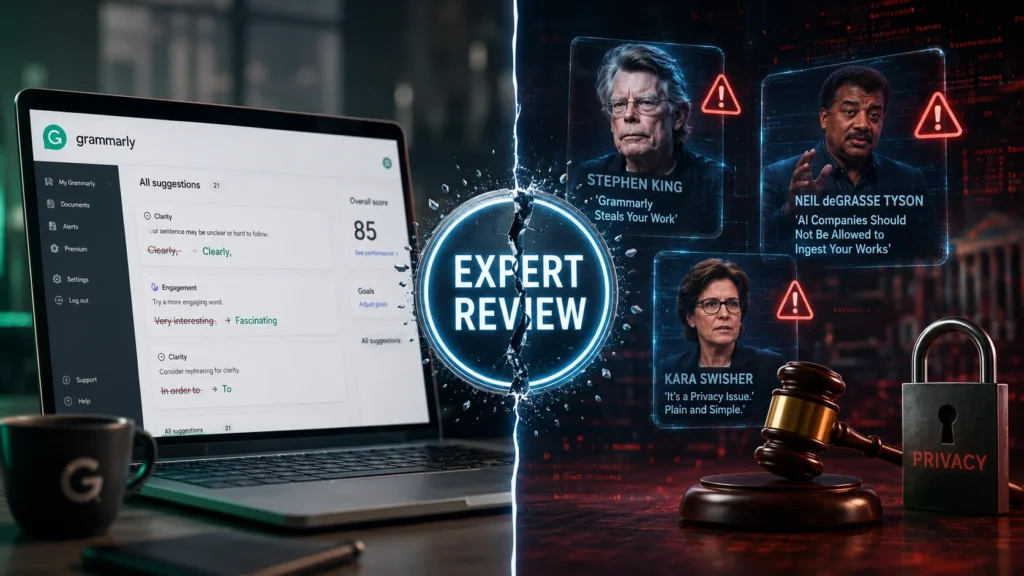
Grammarly AI has evolved from a simple grammar checker into a comprehensive AI writing platform. However, 2026 brought major controversy when its “Expert Review” feature used real authors’ names without permission, leading to a federal class-action lawsuit . Independent academic research shows ChatGPT-4 now outperforms Grammarly in error detection and correction , though Grammarly still excels at accessibility and cross-platform integration. This review covers everything you need to know.
Remember when Grammarly was just that handy little browser extension that caught your typos and reminded you to add commas? That version of Grammarly is long gone.
The company rebranded its parent organization as Superhuman, which now includes Grammarly, Superhuman Go, Coda, and Superhuman Mail . They’ve transformed from a proofreading tool into an ambitious AI platform that promises to handle everything from brainstorming to document grading. But here’s the honest truth: not all these changes have been for the better.
Grammarly was founded in 2009 and has since grown into a platform used by over 40 million people and 50,000 organizations . It works across more than 500,000 applications and websites. But the AI landscape has shifted dramatically, and Grammarly is scrambling to keep up.
This Grammarly AI review cuts through the marketing hype. We’ll examine the real features, the genuine performance data from independent research, the privacy concerns, and the controversies that erupted in early 2026. No fluff. Just what you actually need to know.
What Is Grammarly AI Today?
Grammarly started as a straightforward grammar-checking tool in 2009. Fast forward to 2026, and it’s now a comprehensive AI writing assistant with significant new generative capabilities.
The Superhuman Suite
The company now operates under the parent brand Superhuman, which includes four main products:
| Product | Function |
|---|---|
| Grammarly | AI writing assistance across apps and browsers |
| Superhuman Go | Proactive AI that schedules meetings and updates project management apps |
| Coda | AI-powered workspace for collaborative projects |
| Superhuman Mail | AI inbox management for Gmail and Outlook |
Platform Reach
Grammarly works across more than 500,000 applications and websites. You can access it through:
- Browser extensions (all major browsers)
- Desktop apps (macOS and Windows)
- Mobile keyboards (Android and iOS)
- Native integration with Microsoft 365 apps
- A full-featured web-based editor
Recent Feature Updates (2025-2026)
Grammarly has been busy rolling out significant updates. Let’s look at what’s actually new.
Multilingual Support now covers Spanish, French, Portuguese, German, Italian, Mandarin, Japanese, Indonesian, and Turkish. You get red underlines for errors in these languages plus paragraph-level rewrites.
Style Guide Toggles give individual users control over which rules apply to their writing. You can switch between assigned style guides so suggestions fit the relevant audience or project.
Advanced Snippets now include dynamic fields like dropdowns, text boxes, and insertable fields for standardized responses.
Authorship Analytics for education users now more accurately reflects how AI-assisted writing appears in reports. This tracking is now available in Microsoft Word in addition to Google Docs.
Citation Finder detects which sections need citations, finds reputable sources, and generates formatted citations across APA, MLA, and Chicago styles.
The AI Features: A Deep Dive
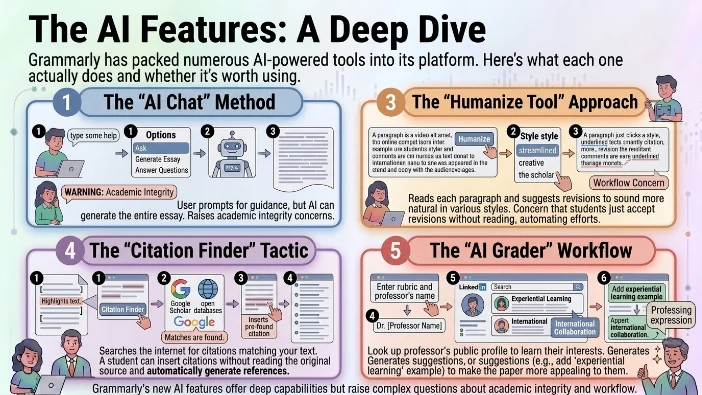
Grammarly has packed numerous AI-powered tools into its platform. Here’s what each one actually does and whether it’s worth using.
AI Chat
This is Grammarly’s built-in generative AI chatbot, similar to a less powerful version of ChatGPT. It can read from and edit your document. You can ask it to make edits, write new text from scratch, or answer factual questions.
However, there’s a catch. When you ask it for “some help,” it might generate the entire essay for you rather than offering guidance . This raises obvious academic integrity concerns.
Humanize Tool
The humanize tool is designed to make your AI writing sound more human. You can choose from a few different styles like “streamlined,” “creative,” or “the scholar.” What it does is read each paragraph and then suggest revisions to sound more natural .
The concern here is workflow. Students can easily just go through and accept these revisions without even reading them. The tool makes AI-generated text appear human-written with minimal effort.
AI Detector
Exclusive to the Pro plan, this tool scans your document for AI-generated text. In testing, the AI detector flagged AI-generated or edited prose fairly reliably but struggled with bulleted lists and brief notes . It even flagged text “humanized” by Grammarly itself.
Researchers note that AI detectors are more likely to give false positives for writing from students for whom English is a second language. This is a serious equity concern.
Citation Finder
This is one of the most alarming new tools. When you click on the citation finder, Grammarly begins searching the internet for citations that match the text you’ve written or generated. It scans Google Scholar and other open-source databases to find sources that would substantiate the arguments in your paper .
Here’s the problem: a student can insert an in-text citation without ever having to actually read the original source before inserting it into their paper. It also generates the references list automatically.
AI Grader
Perhaps the most invasive new tool is the AI grader. You can add in the rubric if you have one. And you can also add the name of the instructor who will be grading the manuscript .
What Grammarly does is look up the professor by name. It searches for the professor’s public-facing profile, things like LinkedIn or a Google Scholar profile, to learn more about the professor who will be grading the manuscript. Then it generates suggestions to make the manuscript more attractive to that specific professor .
For example, when an experiential learning professor was entered as the grader, Grammarly suggested adding experiential learning examples to make the paper more appealing. It also suggested including language about international collaboration, which was another scholarly interest of that professor .
The Expert Review Controversy: What You Need to Know
This deserves its own section because it’s the biggest story in Grammarly’s history and a major factor in any Grammarly AI review.
What Happened
In August 2025, Grammarly launched “Expert Review,” a feature that claimed to provide writing feedback inspired by real authors and experts. Users could select from a roster that included household names. The “experts” included Stephen King, Neil deGrasse Tyson, Kara Swisher, Nilay Patel, and the late historian David Abulafia .
The Problems Uncovered
The feature presented editing suggestions designed to emulate the style of journalists, authors, or other writers without their permission . None of the featured experts granted permission. At least one featured expert, historian David Abulafia, had died in January 2026 .
The feedback appeared personal and direct, with disclaimers buried in fine print. Users had to click through to discover the “inspired by” language. In testing, Grammarly generated comments tied to real newsroom staffers including Nilay Patel, Sean Hollister, Tom Warren, and David Pierce, none of whom had given permission .
The Verge also found inaccurate or outdated expert descriptions, and said some source links behind the feature pointed to archived, spammy, or mismatched pages. Comments shown in Google Docs could look a lot like feedback from an actual person rather than an AI-generated suggestion .
The Legal Action
Julia Angwin, an award-winning investigative journalist, filed a federal class-action lawsuit in March 2026. She announced her intention to sue in a New York Times op-ed, stating: “Like all writers, I live by my wits. My ability to earn a living rests on my ability to craft a phrase… Grammarly hadn’t checked with me before using my name. I learned that an A.I. company was selling a deepfake of my mind only from an article online” .
The lawsuit argues it is unlawful to use names for commercial purposes without consent and seeks to stop the platform from attributing advice to experts that they “never gave” . It also asks Superhuman for compensation for the time the feature was live .
The tort of false endorsement occurs when a business falsely implies a person (usually a celebrity or expert) endorses their product or service, leading to consumer confusion . The Lanham Act prohibits any “false designation of origin, false or misleading description of fact” that is “likely to cause confusion” .
The Aftermath
Grammarly suspended the feature following the backlash. CEO Shishir Mehrotra stated: “the agent was designed to help users discover influential perspectives and scholarship relevant to their work… We hear the feedback and recognize we fell short on this. I want to apologize and acknowledge that we’ll rethink our approach going forward” .
A Superhuman spokesperson said: “Based on the feedback we’ve received, we clearly missed the mark. We are sorry and will do things differently going forward” .
What This Means for Users
The Expert Review controversy raises legitimate questions about Grammarly’s approach to content rights and privacy. While the feature is suspended, the lawsuit may determine whether similar features can exist in the future. Over 100 writers have reached out to join the case .
Real Performance: What the Research Says
Let’s look at independent academic studies rather than marketing claims. This is crucial for any serious Grammarly AI review.
Grammarly vs ChatGPT
A 2026 study published in the Cambridge Journal of Applied Linguistics compared ChatGPT and Grammarly on automated written corrective feedback . Testing 560 ungrammatical sentences representing 20 error types, the study found:
| Tool | Error Detection Accuracy | Error Correction Accuracy |
|---|---|---|
| ChatGPT-4 | Highest among all tested | Best performance |
| ChatGPT-3.5 | Second highest | Second best |
| Claude 3 | Third | Third |
| Gemini | Fourth | Fourth |
| Grammarly | Lowest | Lowest |
Key finding: All LLM tools outperformed Grammarly, with ChatGPT-4 leading in both error detection and correction . However, the study also identified strengths and weaknesses in the correction of specific error types, including misused forms, incorrect omissions, unnecessary words, misplaced words, and confused words .
Another Comparative Study
A study of Korean university students’ essays evaluated four tools on Grammarly’s own five criteria: accuracy, clarity, conciseness, tone, and formality . ChatGPT demonstrated the highest overall mean score, followed by Perplexity and Grammarly. Gemini showed the lowest mean score .
Significant differences were found in accuracy, clarity, conciseness, and formality (p<.001), but not in tone (p=.132) .
EFL Student Perceptions
A study involving 300 EFL university students found that students perceived ChatGPT to be more effective in improving grammar, increasing confidence, and enhancing understanding of grammar rules. Both tools were similarly rated in terms of clarity of feedback .
The Wilcoxon Signed-Rank Test revealed that ChatGPT significantly outperformed Grammarly in terms of correction accuracy across most grammar categories. ChatGPT was more closely associated with deeper learning and critical engagement, whereas Grammarly was valued for quick, surface-level corrections .
The Bigger Picture
The consensus from research: LLM-based tools like ChatGPT have surpassed Grammarly for error correction when users know how to prompt them effectively. But Grammarly remains superior for users who want a plug-and-play experience.
Strengths and Limitations of LLM-Based Writing Tools
Research has identified several key strengths of LLM-based writing tools:
- They provide immediate, individualized feedback that helps students improve grammar, syntax, and coherence
- They increase learner motivation and reduce teacher workload
- They improve writing quality, coherence, and lexical diversity over time
But there are also significant limitations:
- Inconsistent or irrelevant feedback: This can confuse students and reduce trust in AI-generated suggestions
- Overcorrection: AI tools may modify sentence structure excessively, reducing students’ original voice
- Academic integrity concerns: Students may misuse AI-generated text or rely on it too heavily, limiting creativity and critical thinking
User Experience: What Real Users Say
Looking at actual user reviews provides additional context for this Grammarly AI review.
The Good
One user comments: “I think Grammarly is amazing, it has helped me so much! It applies extensive vocabulary to your writing and masks any small imperfections with its clarity checker” .
The Bad
Another user explains the downsides: “The user interface is so intrusive it makes the app nearly impossible for me to use. If I give it access to Pages, corrections are marked whether I want them to be or not. The free version keeps trying to sell me an upgrade to the paid version. How it’s done is so intrusive, so frequent, and so disruptive to my workflow that once I’ve finished this document, I’ll delete it” .
The Pricing Complaint
A student user highlights the pricing concern: “I think it is a bit wild how restricted the other features are if you do not have premium. I am still a secondary school student and do not fancy asking my parents to pay that much money per month for Grammarly. I feel like it is inappropriate pricing and that those features should come free or at least as a cheaper one-time purchase .
Pricing Breakdown
Grammarly offers three main plans according to its official website :
| Plan | Price | Key Features |
|---|---|---|
| Free | $0 | Basic grammar/spelling, 100 AI prompts/month |
| Pro | $12/month (annual billing) | Full-sentence rewrites, tone adjustment, 2,000 AI prompts/month, plagiarism detection |
| Enterprise | Custom | Unlimited AI prompts, dedicated support, data loss prevention, granular roles and permissions |
The Pro plan is available in monthly ($30), quarterly ($59.99), and annual ($139.99) subscriptions . Grammarly Premium (available through App Store and Google Play) differs from Grammarly Pro (available via web purchase) in that Pro includes team features for up to 149 members, style guides, brand tones, and usage analytics .
The Honest Pros and Cons
What Actually Works Well
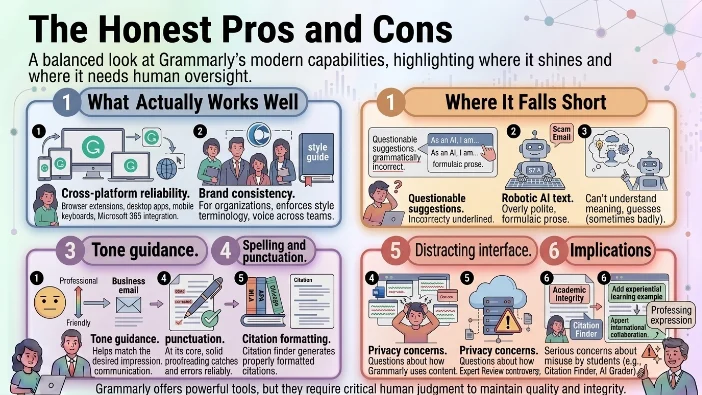
Cross-platform reliability. Grammarly works almost everywhere you type. Browser extensions, desktop apps, mobile keyboards, and native integration with Microsoft 365 make it seamless .
Brand consistency. For organizations, Grammarly enforces style guides, terminology, and voice across teams.
Tone guidance. The tone checker helps you match the desired impression for your audience. This is genuinely useful for business communication.
Spelling and punctuation. At its core, Grammarly still catches typos and punctuation errors reliably. For basic proofreading, it’s solid.
Citation formatting. The citation finder can generate properly formatted citations in MLA, APA, and Chicago styles .
Where It Falls Short
Questionable suggestions. Multiple users report Grammarly suggesting grammatically incorrect changes.
Robotic AI text. When asked to generate content, Grammarly produces overly polite, formulaic prose that sounds like a scam email.
Limited context understanding. Grammarly can’t truly understand your meaning. It guesses (sometimes badly) at what comes next.
Distracting interface. In Microsoft Word and Google Docs, the constant underlines and pop-ups can be distracting for long-form writing.
Privacy concerns. Despite claims of not selling user data, the Expert Review controversy raised questions about how Grammarly uses content.
Academic integrity implications. Tools like Citation Finder and AI Grader raise serious concerns about how students might misuse them .
Who Should Use Grammarly AI in 2026?
Yes, If:
- You need basic spelling and punctuation checking across multiple platforms
- You want consistent brand voice across a team or organization
- You don’t have the time or knowledge to craft sophisticated AI prompts
- You’re a student who needs citation formatting help (but read the sources yourself)
- You want tone guidance for business communication
No, If:
- You’re writing creative or literary prose (Grammarly’s suggestions are weaker here)
- You need advanced AI-powered editing (ChatGPT with good prompts outperforms it)
- You have privacy concerns about your content
- You rely on AI detection features (they’re inconsistent)
- You want to avoid the ethics baggage of the Expert Review controversy
FAQs
Is Grammarly AI free?
Yes, a free tier provides basic grammar and spelling corrections plus 100 AI prompts per month .
How much does Grammarly cost?
Pro is $12/month billed annually. Monthly billing is $30/month .
Can Grammarly detect AI-generated text?
Yes, but detection is inconsistent. Grammarly warns against relying solely on it .
What happened to Expert Review?
Grammarly suspended it after a lawsuit and backlash over using authors’ names without permission .
Is Grammarly better than ChatGPT?
For plug-and-play proofreading, yes. For advanced error correction with good prompts, no. Research shows ChatGPT-4 outperforms Grammarly in both error detection and correction .
Does Grammarly sell my data?
Grammarly states it doesn’t sell or monetize user content or allow third-party services to train on it.
Can Grammarly replace a human editor?
No. It catches surface errors but lacks context understanding.
Does Grammarly work in languages other than English?
Yes, now supporting Spanish, French, Portuguese, German, Italian, Mandarin, Japanese, Indonesian, and Turkish.
Conclusion
Grammarly AI in 2026 is a platform in transition. It’s pivoting from a simple grammar checker to an ambitious AI productivity suite while dealing with a major legal controversy.
What remains strong: The basic proofreading works. The cross-platform integration is unmatched. For organizations needing consistent communication, it delivers value.
What’s in trouble: The advanced AI features are being outperformed by general-purpose LLMs. The Expert Review scandal damaged trust. The AI grader and citation finder raise serious academic integrity concerns.
The bottom line: Use Grammarly for what it’s good at: catching typos, fixing punctuation, and maintaining style consistency. Don’t expect it to be your AI creative partner. And if you need serious editing, pay for a human.
The free tier costs nothing and gives you 100 AI prompts monthly. That’s enough to decide if the Pro plan at $12/month is worth it. Just remember: Grammarly is a tool, not a replacement for understanding how to write well.

Justin Powell is a writer at GramBrix.com who focuses on grammar, clarity and effective communication, helping readers strengthen their language skills.