Last Updated on August 12, 2026
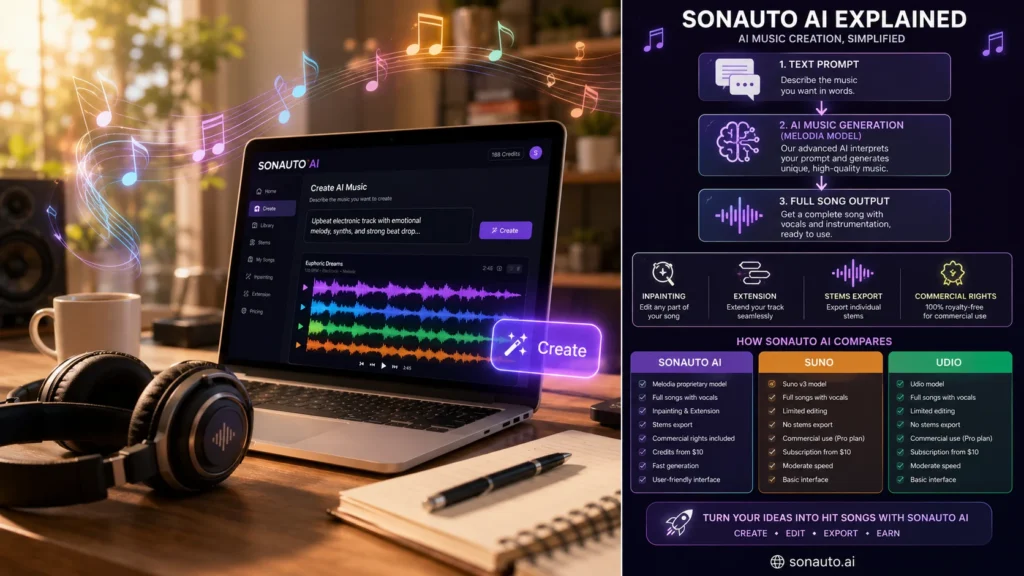
Sonauto AI is a Y Combinator backed AI music generator that turns text prompts, lyrics, or melodies into full songs with vocals and instrumentals. It uses a latent diffusion model called Melodia and offers unlimited free generation on its web platform. Unlike many competitors, Sonauto’s Terms of Service assign output ownership to users, permitting commercial use. The platform features inpainting for section replacement, song extension, stem export, and community sharing. However, its consumer pricing page is not published, and its terms disclaim warranties about copyrightability. For a detailed feature breakdown and comparison with Suno and Udio, read the full review below.
Music creation is changing fast. Sonauto AI puts powerful AI music generation tools within reach of creators, musicians, content creators, and curious beginners. Instead of spending hours building melodies, arranging instruments, or experimenting with production software, users can turn ideas into original music with AI-assisted workflows.
But what makes Sonauto AI different from other AI music generators? How does it work? What can you actually create with it? And is it worth using in 2026?
This guide explores Sonauto AI from a practical, user-focused perspective. We’ll look at its core features, music-generation capabilities, creative workflow, potential use cases, limitations, and what creators should know before relying on AI-generated music. Whether you want background tracks, song ideas, experimental compositions, or a faster way to explore musical concepts, understanding how Sonauto AI works can help you decide whether it fits your creative workflow in 2026.
What Is Sonauto AI? The Core Technology
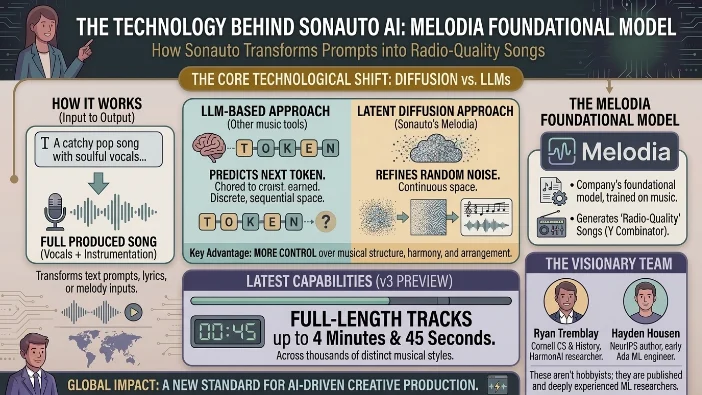
At its simplest, Sonauto AI is an AI music generation platform that transforms text prompts, lyrics, or melody inputs into fully produced songs complete with vocals and instrumentation .
But the tech underneath is what makes it interesting.
Most AI music tools rely on large language models (LLMs) adapted for audio. Sonauto takes a different approach. It uses a latent diffusion model similar to what powers image generators like Stable Diffusion, but trained on music . The company calls its foundational model Melodia.
Why does this matter? Diffusion models work in continuous space. They don’t predict the next token like an LLM. Instead, they gradually refine random noise into structured audio. This theoretically gives more control over the output’s musical structure, harmony, and arrangement .
According to Y Combinator’s launch page, Melodia generates “radio-quality songs with no prior knowledge” . The v3 Preview model now produces full-length tracks up to 4 minutes and 45 seconds across thousands of styles .
The team behind it also stands out. Ryan Tremblay graduated from Cornell with CS and History degrees, spending a year and a half researching music AI with HarmonAI (by Stability) and open-source researchers. Hayden Housen was a published NeurIPS author at eighteen and became one of Ada’s youngest ML engineer interns. These aren’t hobbyists .
Core Features: What You Can Actually Do
Sonauto AI isn’t just a one shot generator. It’s a creative workspace. Here’s the breakdown of what’s confirmed, what’s claimed, and what you should test yourself.
Text-to-Song Generation
This is the core. Describe a genre, mood, tempo, and theme. The AI generates a complete track with lyrics and vocals. You can also provide your own lyrics and let the AI compose the music around them .
For example, a prompt like “90s alt-rock, 100 BPM, E minor, male vocal, verse-chorus-bridge structure” yields far better results than “make a cool song” . This is prompt engineering for music, and it matters.
Instrumental Mode
Toggle vocals off. Perfect for background tracks, video scores, or podcast intros where lyrics would be distracting .
Inpainting (Section Replacement)
This is a game changer. Instead of regenerating an entire track to fix one weak section, you can select a specific part say, the second chorus and regenerate just that segment. The AI seamlessly stitches it back in . Multiple YouTube tutorials demonstrate this workflow, though it’s not heavily documented on the official site.
Song Extension
If you like a 60-second clip but need a full 3-minute track, the extension feature adds 60-90 seconds of new material that matches the style and feel of the original .
Stems Export
Several demos and reviews claim Sonauto exports separate stems: vocals, drums, bass, and instrumental mix . This is huge for producers who want to bring AI-generated ideas into a traditional DAW for final mixing and mastering. However, official documentation on this feature is scarce. Test it in your workflow before relying on it.
BPM Control
Version 2.2 added manual tempo control. Set the beats per minute to match your project’s needs .
AI Radio
An endless personalized stream of original music based on your style tags. Useful for discovering new sounds or finding inspiration.
Community Platform
Sonauto isn’t just a tool; it’s a social space. Users share creations, comment, and remix each other’s tracks. There are genre-specific groups like “Heavy Metal, Progressive Metal” and “METAL RULES!” with active moderation . This collaborative angle is rare in AI music tools.
The catch on features: Official consumer feature pages are sparse. Many capabilities are confirmed through third-party tutorials and demos, not first-party specs. Treat the list above as features to verify in your own testing, not a guarantee .
The Price Question: Is Sonauto AI Really Free?
This is where things get interesting—and slightly messy.
The short answer: The web app appears to be genuinely free and unlimited. Multiple third-party reviews, LinkedIn posts, and community discussions characterize it this way . One tech reviewer called it a “hidden gem that’s completely free and unlimited” with “no reason not to try this one since it costs nothing .
The longer, more honest answer: There is no official consumer pricing page. Sonauto’s website doesn’t state “free forever” or “unlimited” in any first-party documentation. The Terms of Service and developer docs confirm API pricing, but the web app’s cost structure isn’t publicly specified .
What we know from official sources:
| Aspect | Details |
|---|---|
| API Pricing | Clearly documented. One 1:35 song costs 100 credits. New accounts get 1,500 free credits. Monthly bundles from 20,000 to multi-million credits at ~$0.04-$0.06 per 100 credits . |
| Web App Pricing | Not officially published anywhere. Third-party sources claim it’s “free and unlimited,” but this is unverified . |
| Model on Fal.ai | Costs $0.075 per generation for the API version, with multiple output formats (WAV, FLAC, MP3, OGG, M4A) . |
| Model on ModelsLab | Costs $0.08 per generation via that platform . |
The smart take: Sonauto AI’s web app is functionally free right now. But “right now” is doing a lot of work. This is a startup. Free tiers change. Treat it as a current reality, not a permanent promise. If you build a business around this tool, have a backup plan.
The Rights Question: Do You Actually Own Your Songs?
This matters more than anything else. If you plan to use these tracks commercially, read this section twice.
What the Terms of Service say (Section 8, 2025):
“We hereby assign to You all our right, title, and interest, if any, in and to Your Outputs” .
That sounds definitive. Sonauto gives you their rights.
But there’s a catch:
“Sonauto makes no warranties or representations regarding the Outputs, including as to their copyrightability or legality” .
Translation: They’re passing the buck. They’re giving you what rights they have, but they’re not promising the outputs are actually copyrightable.
What does that mean in practice? The entire AI copyright landscape is in flux. No court has definitively ruled on whether AI-generated music qualifies for copyright protection. Sonauto’s legal team wrote their terms to protect the company, not to guarantee your rights.
The license-back clause: You grant Sonauto a license to use your outputs to operate and improve their services . This is standard for AI tools and not particularly concerning, but know it exists.
The commercial use FAQ: The Terms include an FAQ-style note indicating you don’t need to pay Sonauto for permission to use generated songs elsewhere. The platform’s Baidu Baike entry explicitly states “生成的音乐拥有商业使用权” (generated music has commercial usage rights) .
Practical Guidance (Not Legal Advice)
- Save dated copies of the Terms of Service at the time of generation.
- Avoid prompting with living artist names or trademarked terms. Stick to genre, era, tempo, and instrumentation .
- For commercial releases, consult your own legal counsel.
- Know that platforms like IRCAM Amplify can detect Sonauto-generated tracks, which may matter for platform compliance policies .
The bottom line on rights: Sonauto gives you the most favorable ownership language of any major AI music tool. But “most favorable” doesn’t mean “bulletproof.” The legal uncertainty isn’t Sonauto’s fault—it’s the industry’s.
Sonauto AI vs Suno vs Udio: The Head-to-Head
Here’s where we separate hype from reality.
| Feature | Sonauto AI | Suno | Udio |
|---|---|---|---|
| Core Technology | Latent diffusion model (Melodia) | Proprietary, likely LLM-based | Proprietary, from ex-Google researchers |
| Free Tier | Unlimited generation (claimed) | ~5-10 credits/day | ~20-30 credits/month |
| Commercial Rights | User owns outputs per ToS | Paid plans only | Paid plans only |
| Editing Tools | Inpainting, extension, stems | Limited | Limited |
| API Access | Yes, transparent credit pricing | Yes | Yes |
| Vocal Quality | Good, improving | Industry benchmark | Industry benchmark |
| Pricing Clarity | Web app unclear; API clear | Clear tier-based | Clear tier-based |
| Feature Documentation | Sparse for consumer | Well-documented | Well-documented |
Sources:
Where Sonauto wins: Cost (free), ownership (user-favorable terms), and editing flexibility (inpainting and extension are rare in competitors) .
Where Sonauto lags: Vocal realism (Suno and Udio still set the bar) and documentation (you’ll rely on third-party tutorials more than official specs) .
The verdict on the comparison: If you want the absolute best-sounding AI vocals and can pay a subscription, Suno and Udio are still ahead. If you want unlimited free generation with commercial rights and editing tools, Sonauto is the only real option.
Who Should Use Sonauto AI (And Who Shouldn’t)
Good fit:
- Content creators who need royalty-free background music and don’t want subscription fees.
- Hobbyists experimenting with AI songwriting for fun.
- Developers building music apps who need API access with transparent credit pricing .
- Indie producers who want to draft ideas quickly and export stems for finishing in a DAW.
Not ideal:
- Professional releases where clear copyright status is non-negotiable.
- Any project that requires documented training provenance or auditable IP posture.
- Client work where you need warranty-like assurance about output rights.
- High-stakes commercial use without legal review.
The safer alternatives for enterprise: Stability AI’s Stable Audio offers more explicit training/licensing positioning. Suno and Udio have clearer plan-level commercial rights documentation .
How to Get the Best Results: Practical Workflow
Prompting Principles
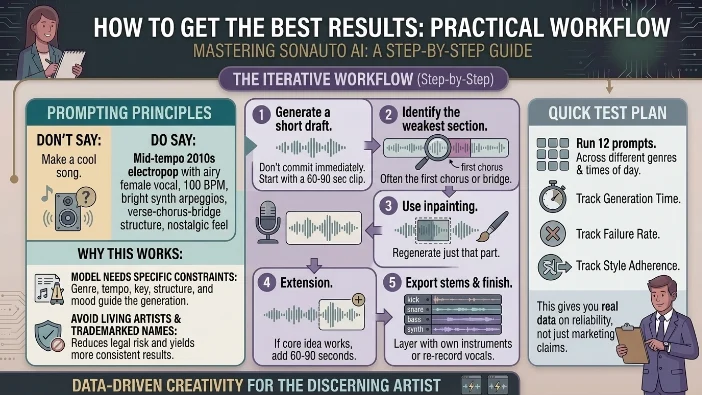
Don’t say: “Make a cool song.”
Do say: “Mid-tempo 2010s electropop with airy female vocal, 100 BPM, bright synth arpeggios, verse-chorus-bridge structure, nostalgic feel” .
Why this works: The model needs specific constraints. Genre, tempo, key, structure, and mood all guide the generation. Avoid living artists and trademarked names—this reduces legal risk and yields more consistent results.
The Iterative Workflow
- Generate a short draft. Don’t commit to a full 4-minute track immediately. Start with a 60-90 second clip.
- Identify the weakest section. Often the first chorus or bridge.
- Use inpainting to regenerate just that part .
- If the core idea works, use extension to add 60-90 seconds .
- Export stems and finish in your DAW. Re-record vocal lines or layer with your own instruments if needed.
Quick Test Plan
Run 12 prompts across different genres at different times of day. Track generation time, failure rate, and style adherence. This gives you real data on reliability, not just marketing claims.
FAQs
Is Sonauto AI really free?
Yes, the web app appears to be free and unlimited based on third-party reports. However, there is no official pricing page confirming this. The API has transparent credit-based pricing .
Can I use Sonauto AI songs commercially?
Sonauto’s Terms of Service assign output ownership to users. However, they also disclaim warranties about copyrightability and legality. Consult legal counsel for professional use .
How does Sonauto AI compare to Suno?
Sonauto offers unlimited free generation with user ownership. Suno has higher vocal quality but charges for commercial rights. Sonauto also offers editing features like inpainting and extension that Suno lacks .
What is the Sonauto AI API pricing?
One 1:35 song costs 100 credits. Monthly bundles range from 20,000 to multi-million credits at ~$0.04-$0.06 per 100 credits. New accounts get 1,500 free credits .
Can I export stems from Sonauto AI?
Multiple demos and reviews show stem export capability (vocals, drums, bass, instrumental mix). However, this is not officially documented, so verify it works in your workflow .
Who founded Sonauto AI?
Ryan Tremblay and Hayden Housen, Cornell alumni. The company is Y Combinator-backed (Winter 2024 batch) and based in San Francisco .
Conclusion
Bottom line: Sonauto AI offers something genuinely unusual unlimited free generation with a credible claim of user ownership. For hobbyists, content creators, and developers prototyping apps, that’s an incredibly compelling value proposition.
The caveats are real: Feature documentation is sparse. Commercial rights sit in a legal gray area that the entire industry is still navigating. And “free” isn’t a permanent condition for any startup.
The smart move: Use Sonauto AI to experiment, draft, and create. Export your stems. Keep dated records of the terms. But for serious commercial releases, proceed with caution and legal review.
The final thought: Whether Sonauto AI survives or becomes a footnote, it’s currently the best free option in AI music generation. That alone makes it worth trying especially when it costs nothing to find out.
Discover More Article:
- Character AI Age Verification| The Complete Guide For 2026
- AI Sentence Rewrite| The Ultimate Guide For 2026

Justin Powell is a writer at GramBrix.com who focuses on grammar, clarity and effective communication, helping readers strengthen their language skills.