Last Updated on August 16, 2026
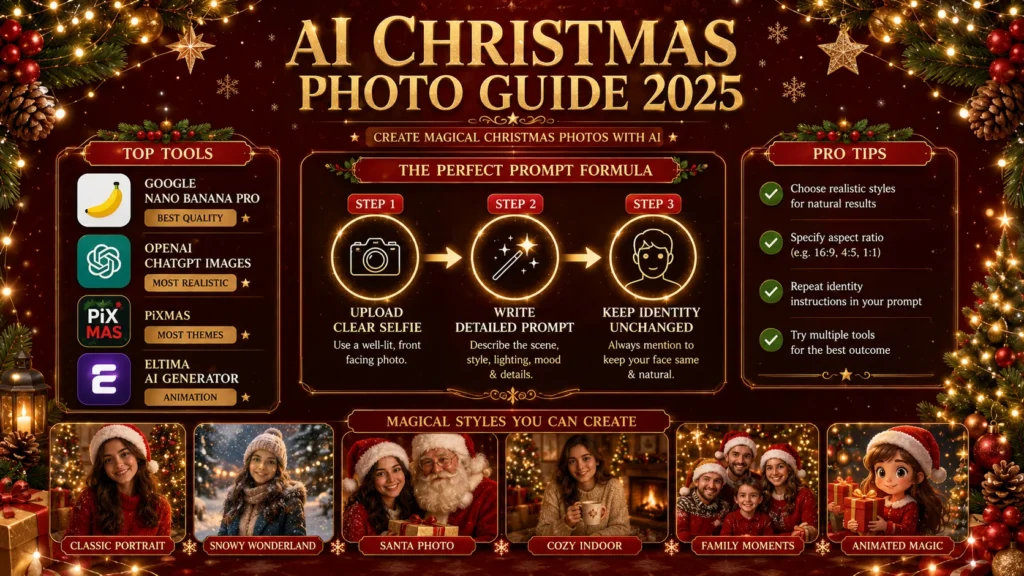
AI Christmas photo tools have transformed how we create holiday portraits in 2025. These AI-powered generators turn ordinary selfies into stunning festive scenes with snowy backgrounds, twinkling lights, and professional studio quality. Leading tools include Google’s Nano Banana Pro, OpenAI’s ChatGPT Images, PiXmas with over 500 themes, and Eltima’s AI generator that creates animated holiday clips. The technology preserves your real facial features while transforming everything around you into magical Christmas settings. The key to great results is a clear source photo and a detailed prompt that specifies the mood, setting, and outfit while explicitly instructing the AI to keep your identity exactly the same. These tools are perfect for creating holiday cards, social media profiles, family albums, and personalized gifts without the stress and expense of professional photo shoots. Most platforms offer free options, though premium features require payment. Privacy varies by tool, so look for apps that delete originals after processing and don’t use your photos for training. The technology has reached a point where the results look natural, warm, and genuinely magical – like having a professional photography studio in your pocket.
AI Christmas Photos Are the New Holiday Tradition
Forget struggling with professional photographers, battling mall crowds, or spending hours editing your holiday photos. AI Christmas photo tools have made it possible to turn any ordinary selfie into a stunning festive portrait in seconds. The technology has finally caught up to the small details that make a photo magical: the twinkle in your eyes, the way soft snow glows around someone’s face, and the blur of golden lights in the background.
With major players like Google’s Nano Banana Pro and OpenAI’s ChatGPT Images rolling out significant upgrades in late 2025, creating professional-quality holiday portraits is now easier and more convincing than ever. You take a regular picture, and suddenly you’re in a dreamy winter cabin or posing in a sparkling studio that looks like something from a Christmas movie.
Why AI Christmas Photos Are Taking Over in 2026
You know that feeling when you walk through a mall in December and everything smells like cinnamon and nostalgia? That’s what good AI holiday photos should feel like. Not fake or overdone, but warm and a little whimsical .
This year, the technology has finally caught up to the small things. The results feel closer to studio photography than random social media filters . Here’s why people are obsessed:
- No more expensive photo shoots – You get studio-quality portraits without the price tag
- Perfect for last-minute cards – Create professional holiday cards in minutes
- You don’t need to dress up – The AI adds festive outfits, lights, and backgrounds automatically
- Family photos without the stress – No more wrestling kids or pets into perfect poses
- From any photo you love – Selfie, family picture, your pet dressed as a reindeer – anything works
Think of it like wrapping paper. The gift inside is still you, still your family, still your moment. You just dress it up in something a little more magical .
Top AI Christmas Photo Tools in 2026
Google Nano Banana Pro
Google recently launched Nano Banana Pro, an upgraded version of its image model that focuses on improved accuracy and more natural-looking image generation . It’s particularly good at preserving your real facial features while transforming everything around you into a festive scene.
OpenAI ChatGPT Images
OpenAI has introduced ChatGPT Images, refining realism and giving users better control over how photos are transformed . The tool excels at creating warm, elegant portraits that look timeless and classic.
PiXmas
PiXmas offers over 500 Christmas themes, from cozy cabin rooms to Santa scenes and glam holiday portraits with silver or gold accents . It handles group photos well, kids and pets look adorable, and you don’t need to pose perfectly.
What makes PiXmas stand out:
- Massive variety of styles that actually look like real photography
- Works fast – images generate in seconds
- Feels fun, not like fighting sliders and menus
Eltima AI Photo Generator
Eltima creates a digital version of you based on 1-3 selfies. You can choose from holiday outfits, Christmas lights, trees, and cozy seasonal backgrounds . A standout feature is the ability to transform static photos into animated clips.
Key features:
- One free AI photo every day
- Customizable photo sizes (1:1, 21:9, 16:9, and more)
- Photo to animation conversion
- Wide selection of templates
Canva
Canva’s AI features help you generate complete Christmas card designs from simple prompts. Pick styles, colors and tones, add photos, tweak text, and export instantly. It’s beginner-friendly, quick, and ideal for last-minute cards that still look professionally designed .
Photoroom
Photoroom’s AI Images feature includes a dedicated Christmas card maker that creates personalized cards in seconds . It’s available for iOS and web, with Android support coming soon .
FestivAI (Santa Banana)
FestivAI offers dozens of magical, AI-powered styles including Santa’s Elf, Ugly Christmas Sweater, Winter Portraits, and 2027 Neon styles . The app features high-definition video previews for every effect .
AI Christmas Wish
This iPhone app generates beautiful AI Christmas images, animated videos, festive portraits, greeting cards, and Santa edits in seconds . It supports HD and 4K Christmas artwork .
| Tool | Best For | Free Option |
|---|---|---|
| Google Nano Banana Pro | Preserving facial features accurately | Yes (limited) |
| OpenAI ChatGPT Images | Realistic, timeless portraits | Limited |
| PiXmas | Variety of themes and ease of use | Yes |
| Eltima AI Generator | Animated holiday clips | 1 free daily |
| Canva | Complete card design | Yes |
| Photoroom | Christmas card maker | Pro users |
| FestivAI (Santa Banana) | Festive photo editing | Free with in-app purchases |
| AI Christmas Wish | AI images and videos | Free with in-app purchases |
How to Create the Perfect AI Christmas Photo
Step 1: Choose Your Tool
Pick from Google’s Nano Banana Pro, OpenAI’s ChatGPT Images, PiXmas, or any of the other tools we covered. The steps are almost identical regardless of which one you choose .
Step 2: Upload Your Best Selfie
For the most accurate results, your original photo matters as much as the prompt .
What makes a good source photo:
| Do This | Avoid This |
|---|---|
| Clear, well-lit selfie | Heavy shadows |
| Face fully visible | Sunglasses |
| Neutral expression | Heavy filters |
| Simple background (AI will change it anyway) | Extreme angles |
The clearer the original photo, the easier it is for the AI to preserve your real features . Busy backgrounds are less of an issue, as the model will often replace them entirely, but facial clarity is non-negotiable .
Step 3: Write Your Prompt (This Is the Most Important Step)
Your prompt is where the magic happens. Be specific about the mood and setting, and clearly instruct the AI to preserve your real facial features .
Always include this line: “Keep the person’s real facial features, skin texture, and identity exactly the same.” That one line makes a big difference .
Step 4: Generate and Refine
Tap generate. Wait a few seconds. Then watch as your photo transforms – almost like unwrapping a gift . You can try dozens of styles without thinking too hard about it. There’s no pressure. Just play .
Step 5: Save and Share
These aren’t just for posting. People use them for :
- Holiday cards
- WhatsApp profile photos
- Instagram stories
- Gifts
- Family albums
- Kids’ memories
- Company holiday messages
Best AI Christmas Photo Prompts to Try
Prompt 1: Classic Christmas Portrait
“Transform the uploaded photo into a warm, polished Christmas portrait. Keep the person’s real face, skin tone, expression, and facial features exactly the same. Add soft holiday lighting with gentle golden highlights. Surround the subject with evergreen branches, subtle twinkle lights, and a light bokeh glow in the background. Use rich reds, forest greens, and cozy winter textures. The final image should look realistic, elegant, and timeless, like a classic holiday photograph, not a cartoon or illustration.”
Prompt 2: Snowy Outdoor Scene
“Turn the selfie into a snowy Christmas portrait while preserving the person’s original facial features, skin texture, and identity exactly. Place them outdoors amid gentle snowfall, dressed in a winter coat and scarf. Add soft, festive lights in the background, with realistic snowflakes, cool winter tones balanced by warm lighting, and a cinematic Christmas mood.”
Prompt 3: Cozy Tree Decorating
“Keep the facial features of the person 100% identical. Create an intimate, cinematic Christmas self-portrait of a single person gently hanging small golden bell ornaments on a softly glowing Christmas tree. Warm fairy lights wrap around the branches, casting a golden halo on the subject’s face. The person wears an elegant, unisex festive party outfit with refined textures and subtle holiday accents.”
Prompt 4: Santa Portrait
“Keep the facial features of the person 100% identical. Create a cheerful solo holiday portrait of the person fully dressed in a classic Santa-inspired outfit, including a rich red suit with white fur trim, a Santa hat, and a soft, fluffy white beard. Gentle snowfall drifts through the air as twinkling lights glow in the background. The person’s expression is warm, joyful, and inviting.”
Prompt 5: Gift Exchange Moment
“Keep the facial features of the person 100% identical. Create a joyful Christmas portrait of the person holding several wrapped gifts in their arms. Festive ribbons, twinkling fairy lights, and a cozy living room setting surround them. The expression is genuine, bright, and full of holiday excitement.”
Prompt 6: Christmas Party Portrait
“Keep the facial features of the person 100% identical. Create a cheerful solo Christmas party portrait of the person wearing a festive, unisex outfit and a Christmas cap while holding a glass of a holiday drink. The background sparkles with party lights, colorful decorations, and softly blurred festive motion.”
Prompt 7: Winter Embrace Mood
“Keep the facial features of the person 100% identical. Create a sweet winter portrait of the person gently hugging a thick, cozy scarf around themselves. The person wears a stylish, unisex winter Christmas outfit with layered fabrics. A softly glowing Christmas tree and fairy lights appear behind them, slightly blurred.”
Prompt 8: Church Christmas Portrait
“Keep the facial features of the person 100% identical. Create a peaceful full-body Christmas portrait of a single person standing quietly in front of a beautifully decorated church at night. The person wears a cute, Korean-inspired winter Christmas outfit with layered textures and soft colors. Warm lantern light illuminates the scene, with wreaths, garlands, and gentle snowfall surrounding the church entrance.”
Creative Ideas for Your AI Christmas Photos
Family Cartoon Transformations
A viral trend in 2025 involves transforming family photos into colorful, personalized Christmas cartoons using tools like Nano Banana Pro. The process is simple: upload a photo, apply specific prompts, and the AI generates a cartoon-style image perfect for Christmas cards, social media profiles, or holiday greetings.
Christmas Cards with AI Tools
AI-powered tools create ready-made Christmas card designs using text prompts. They suggest layouts, images and copy, making it easy to personalize greetings quickly .
10 Creative Christmas Photo Ideas
| Idea | Style |
|---|---|
| Classic Vintage Christmas | Warm tones, retro typography |
| Neon Christmas Tree | Modern neon lights against dark background |
| Santa in Kawaii Style | Cute Santa, pastel colors, big eyes |
| Winter Village Scene | Snow-covered village, warm window lights |
| Winter Window View | Looking through frosty window into cozy interior |
| Typography with Lights | “Merry Christmas” in glowing text |
| Family Gathering | Warm family scene around Christmas tree |
| Christmas Portrait | Santa hat, bokeh background |
| Cute Animals | Reindeer, penguin, rabbits in Christmas setting |
| Bokeh Abstract | Warm golden bokeh, minimalist holiday motifs |
Group Photos Made Easy
AI tools now handle group photos well. Kids and pets look adorable, and you don’t need to pose perfectly. The AI fixes the imperfections without losing the soul of the moment .
Matching Couples Photos
Perfect for creating coordinated holiday photos without the stress of coordinating outfits or locations. Prompts can specify matching aesthetics, from glam indoor looks to cozy living room vibes .
Animated Christmas Photos
Tools like Eltima allow you to transform static photos into animated clips. Once your image is generated, tap the “Create Video” button to produce a short animated clip with a smooth, lively Christmas background .
Advanced Tips for Better Results
Be Specific About Your Prompt
The more detailed your prompt, the better your result. Mention specific outfits, lighting, and mood .
Specify Aspect Ratio
- 1:1 for Instagram
- 9:16 for Stories/Reels
- 16:9 for cinematic landscape
Mention Your Art Style
Options include realistic, cartoon, watercolor, vintage postcard, and more . Some tools offer 3D render, cinematic, or kawaii styles.
Repeat Key Instructions
Especially about retaining identity. Explicitly telling the AI not to change facial structure, skin texture, or expression can make the difference between a convincing portrait and something that looks overly edited .
Adjust and Explore
Maybe you want something softer, brighter, or with more snow. You can try dozens of styles without thinking too hard about it .
Privacy and Safety Considerations
What Happens to Your Photos?
Different tools handle your data differently. Eltima, for example, states that “your photos are only used to create your personal AI profile. Originals are deleted after processing, and your AI creations remain private. You retain full control and can delete any generated photos or your profile at any time” .
FestivAI (Santa Banana) similarly states: “Face selfie photos are not stored in our systems. We do not retain or store any face selfie images you may upload or use within the app. All such images are processed temporarily and deleted automatically after processing” .
What to Look For
- Clear privacy policy – The app should explain how your photos are used
- Data deletion options – You should be able to delete your photos and profile
- No unauthorized use – Your photos shouldn’t be used to train public models without consent
- Secure processing – Photos should be processed securely and deleted afterward
Frequently Asked Questions
How many photos do I need to create an AI Christmas portrait?
To create the most festive images, upload 1-3 clear selfies or portraits. The AI will use them to generate Christmas-themed creations, capturing your face accurately while adding the holiday vibe .
Do I need to dress up for an AI Christmas photo?
Absolutely not! The Christmas photo AI generator adds festive outfits, lights, and holiday backgrounds automatically. You can enjoy a seasonal portrait without having to dress up yourself .
Can I create animated Christmas photos?
Yes. Tools like Eltima allow you to transform static photos into animated clips. Once your image is generated, tap the “Create Video” button to produce a short animated clip with a smooth, lively Christmas background .
Are my photos safe with these AI tools?
It depends on the tool. Look for apps that explicitly state they delete originals after processing, don’t use your photos for training, and give you control over deleting your creations .
How long does it take to generate an AI Christmas photo?
Generating a single AI Christmas photo is almost instant, typically within seconds. Animating it into a short video may take a few minutes .
What kind of selfies work best for AI portrait creation?
Ideally, make sure that your face is clearly visible in the image. This ensures that the AI can capture details about your facial features, giving you a detailed Christmas portrait without altering your face .
Conclusion
AI Christmas photos aren’t about replacing real memories. They’re about enhancing them. That picture of your kid making a funny face at breakfast can now transport them to Santa’s workshop. A selfie you took during a walk can be wrapped in silver studio light and soft sparkles. Your dog looking confused can suddenly be wearing a tiny knitted hat in a winter cottage .
The technology has finally reached a point where the results look natural, not fake or overdone. Your face stays your face, the proportions stay real, but everything around you shifts into a holiday scene. It’s like having a professional photography studio in your pocket, available anytime you want to create a little Christmas magic .
The best part? It’s genuinely fun. Not in a cold, techy way, but in a warm, let’s make memories feel magical way. You’re not editing photos; you’re creating moments .
This Christmas, skip the stress of professional photo shoots, the frustration of perfect poses, and the disappointment of imperfect lighting. Pick a favorite photo, write a detailed prompt, and watch the AI transform it into something truly special. The results will bring smiles to faces and warmth to hearts and that’s what the holidays are really about.
Ready to create your own AI Christmas magic? Start with one photo you love. Pick a tool from our list. Use one of our prompts or write your own. Generate. Save. Share. And watch the joy spread.
Justin Powell is a writer at GramBrix.com who focuses on grammar, clarity and effective communication, helping readers strengthen their language skills.