Last Updated on August 16, 2026
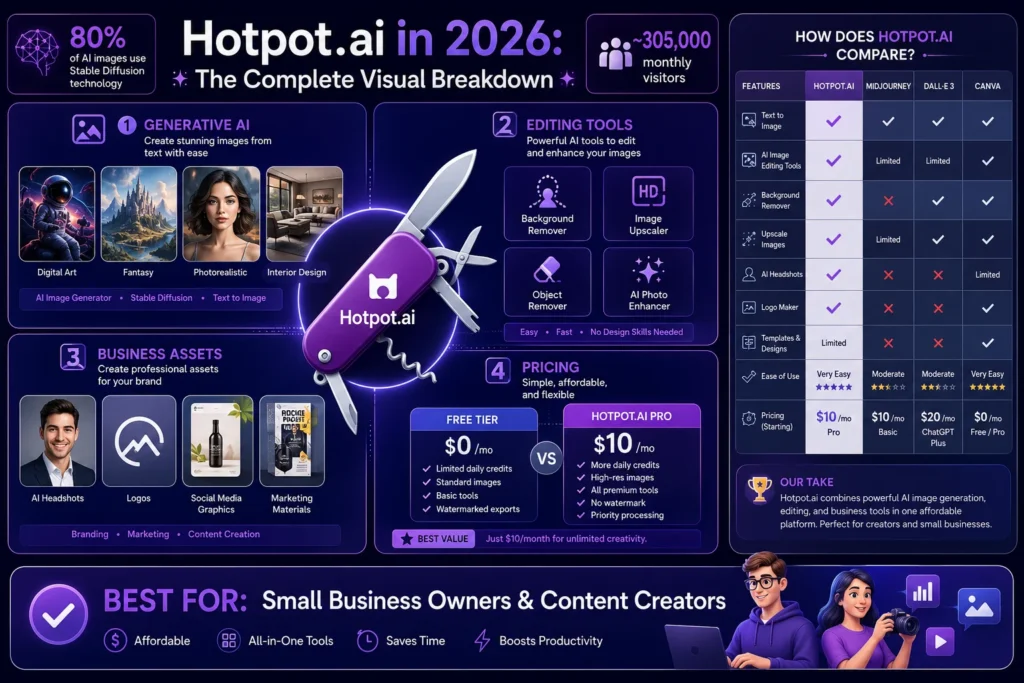
Hotpot.ai is a web-based AI platform offering a suite of creative tools for image generation, photo editing, headshot creation, background removal, upscaling, and copywriting. It uses a credit-based pricing system with a free tier (up to 75 watermarked images daily) and paid plans starting at $10/month. It targets small businesses and content creators who need an affordable, all-in-one solution for visual content creation, though it lags behind specialized tools like Midjourney on image quality.
So you’ve heard the buzz about Hotpot.ai. Maybe a friend used it to erase an annoying tourist from a vacation photo. Or you saw a slick LinkedIn headshot that looked too perfect to be real.
The promise is tempting: one platform for AI art, photo editing, headshots, background removal, upscaling, and even copywriting. All without jumping between five different tabs. But here’s the question that matters does being a jack of all trades make it a master of none?
I’ve dug through the data, tested the tools, and analyzed the pricing to give you the unvarnished truth. Forget the marketing fluff. This is what you actually need to know about Hotpot.ai in 2026.
What Is Hotpot.ai, Really?
Hotpot.ai is a web-based platform that bundles dozens of AI utilities into a single credit-based subscription . Think of it less as a single product and more as a portal. You get access to separate tools—each on its own URL—but they all share one credit balance.
The founding story matters here. Clarence Hu founded Hotpot under the parent company Panabee, LLC in 2019 . Hu previously created Panabee as a domain-name suggestion tool. That indie-product DNA explains a lot about Hotpot’s feel. It is not a venture-funded AI lab like Midjourney. It’s a practical toolkit built by someone who understands that small businesses just want things to work .
The Core Creative Suite
Hotpot’s strength lies in its modular toolkit covering almost the entire spectrum of visual content needs . The tools break down into three primary categories:
Generative AI for Visuals
The AI Art Generator serves as the front-door product. You type a prompt, pick a style preset (anime, oil painting, comic book, photo-real, watercolor), wait a few seconds, and get an image . A “Stock Photo” mode also exists for marketing images, plus a separate AI art generator for illustration-grade output. The platform routes requests through Stable Diffusion derivatives, the same open-source family driving most consumer AI-art . Industry estimates suggest roughly 80% of all AI-generated images globally come from Stable Diffusion or its forks . That means Hotpot’s output shares a DNA with many “different” tools. The difference lies in UX, presets, and post-processing.
Editing and Enhancement Tools
This is where Hotpot truly shines . The time-savers include:
- AI Background Remover: Lightning-fast and accurate for product photography
- AI Picture Restorer and Colorizer: Breathes new life into old, faded, or damaged photos with impressively natural results
- AI Object Remover: Brush over unwanted elements like a photobomber, and the AI intelligently fills the gap
- AI Photo Upscaler: Boosts low-resolution images up to 10x
- AI Face Enhancer: Refines facial features from AI image generators or old photos
Business and Marketing Asset Creation
Hotpet understands most users want to solve business problems, not just create art . The platform provides highly focused templates for common marketing needs:
- App Icon & Logo Generators: Draft foundational design concepts based on a brief, offering a quick alternative to hiring a designer for initial ideation
- Social Media Post Templates: Pre-configured for Instagram, Twitter, and LinkedIn
- AI Headshot Generator: Creates corporate or themed headshots for LinkedIn and business profiles
- AI Copywriter: Assists with writing tasks like product descriptions, Google ads, and Facebook ads
The Pricing Model: Credits, Not Subscriptions
Hotpot.ai ditches the standard “Pro” vs. “Enterprise” tiers. Instead, it runs entirely on credits. Each action costs between 1 to 3 credits depending on quality settings .
The Free Tier
The free tier is generous but comes with significant limitations:
- What you get: Up to 75 AI-generated images per day with no account or credit card required
- The catch: Visible watermarks on all outputs, standard resolution only, limited AI models, and personal use only
- Invisible watermarks: Hotpot may embed invisible watermarks for legal identification purposes
Paid Plans (The Real Numbers)
The platform offers monthly subscriptions, yearly plans, and one-time credit packs. Here’s the breakdown based on 2026 data :
| Plan Type | 1,000 Credits | 5,000 Credits | 10,000 Credits | 20,000 Credits |
|---|---|---|---|---|
| One-Time Pack | $12 | $60 | $120 | $240 |
| Monthly Subscription | $10/mo | ~$50/mo | $100/mo | $200/mo |
| Yearly Plan | $100/yr | ~$500/yr | $1,000/yr | $2,000/yr |
The takeaway: The $10/month tier works for casual users. Small teams pushing out daily social content will realistically need the $50/month pack as a baseline .
Commercial rights: Paid plans grant full commercial usage rights. Free-tier outputs do not. Using a watermarked image in a client deliverable violates terms .
Self-Hosted Containers for Enterprises
Hotpot offers self-hosted containers for large organizations requiring maximum data control and privacy. These enable an air-gapped architecture where company data never touches Hotpot’s systems .
The catch: Pricing starts at 2x the SaaS offerings and requires annual commitments and upfront payment . Fortune 500 companies tend to prefer this option. Startups and small organizations should stick with the standard SaaS model.
Who Is Hotpot.ai Actually For?
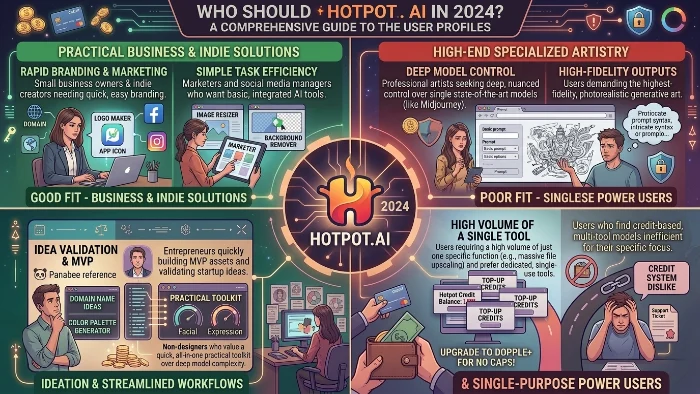
Hotpot.ai serves a specific user base. The following table breaks down who gets the most value :
| User Segment | Primary Benefit | Key Tools |
|---|---|---|
| Small Business Owners | Affordability and speed for product photos and marketing visuals | Background Remover, Logo Generator, Text Generators |
| Bloggers/Content Creators | Rapid creation of unique, non-stock images | AI Art Generator, AI Picture Restorer |
| Marketers | Prototyping dozens of concepts instantly | AI Headshot Generator, AI Object Remover, Templates |
| App Developers | Mockups, icons, and assets without a design team | App Icon Generator, Device Mockups |
For a marketer who needs three header images by the end of the day, Hotpet’s frictionless interface is worth real money . You get a browser-based experience with minimal onboarding. No Discord integration. No prompt-engineering rabbit holes. Just three fields and a button.
The Brutal Honesty: Where Hotpot.ai Falls Short
AI Image Quality Inconsistency
The output quality on complex prompts is uneven. Style adherence drifts. Hands and text inside images still misfire. Multiple reviews have called the default outputs “plain” or “bland” . Where Midjourney’s defaults push toward cinematic and Adobe Firefly’s lean toward editorial, Hotpot’s lean toward generic stock-photo. That’s fine for a quick blog header. It’s less fine for a brand campaign.
The Competitor Threat
The broader market context is critical. The global AI image-generator market is projected to grow from USD 484 million in 2026 to USD 1.75 billion by 2034 . Generative-AI estimates run higher: Grand View Research pegs the total market at USD 22.21 billion in 2025 .
The landscape is consolidating around a handful of very large platforms :
- Canva crossed 265 million monthly active users and USD 4 billion in ARR by year-end 2025
- Midjourney reached roughly 21 million registered users and pulled in USD 500 million in 2025 revenue
- ChatGPT reaches hundreds of millions weekly, with image generation bundled into its subscription
The structural threat is bundling. If a general-purpose chatbot also makes images, why open another tab? For small businesses, the answer is still: because Hotpot does a dozen other things ChatGPT does not . But that moat is thinning.
Missing Features
- No video capabilities: Hotpot focuses exclusively on static visuals . Competitors like Runway ML or Pika Labs offer video.
- No collaboration features: No version histories, no team sharing, no approval workflows . It’s built for solo creators.
- Web-only: No desktop or mobile app available . You’re locked to the browser.
- Limited template customization: Designs are easy to edit but restrict deep customization .
Hotpot.ai vs Midjourney vs DALL-E vs Canva
Here’s the direct comparison that matters most :
| Tool | Underlying Model | Entry Pricing (2026) | Strengths | Output Style |
|---|---|---|---|---|
| Hotpot AI | Stable Diffusion variants | Free tier; ~$10/mo subscription; $12 / 1,000 credits one-time | Breadth of tools, simple UI, cheap | Generic stock-photo, marketing-safe |
| Midjourney | Proprietary (V7) | $10/mo basic, $30/mo standard | Cinematic detail, art direction | Stylized, editorial |
| DALL-E (via ChatGPT or API) | GPT-Image-1 | $20/mo ChatGPT Plus; $0.04-0.12 per API image | Prompt obedience, integrated chat workflow | Polished, photorealistic |
| Stable Diffusion (self-hosted) | Stable Diffusion XL / 3 | Free (compute costs only) | Maximum control, custom models | Whatever you train it for |
| Canva AI (Magic Media) | Mix of SD + partners | Bundled with Canva Pro $14.99/mo | Tight design integration, brand kits | Clean, editorial |
Two patterns jump out:
- Raw image quality on hard prompts goes to Midjourney, with DALL-E close behind
- Value-per-dollar for a non-specialist often goes to Hotpot or Canva, because the tooling around the image saves more time than a marginally better generator
The Verdict: Should You Use Hotpot.ai?
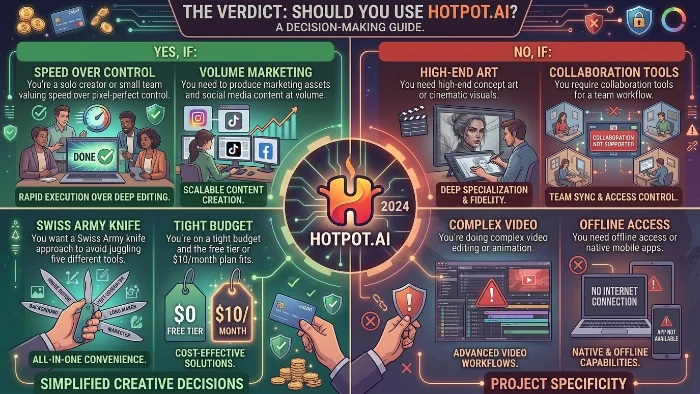
Yes, if:
- You’re a solo creator or small team valuing speed over pixel-perfect control
- You need to produce marketing assets and social media content at volume
- You want a Swiss Army knife approach to avoid juggling five different tools
- You’re on a tight budget and the free tier or $10/month plan fits
No, if:
- You need high-end concept art or cinematic visuals
- You require collaboration tools for a team workflow
- You’re doing complex video editing or animation
- You need offline access or native mobile apps
FAQs
Is Hotpot.ai completely free to use?
Hotpot.ai offers a generous free tier that gives you up to 75 AI-generated images per day without requiring an account or credit card. However, free outputs come with visible watermarks, limited resolution, and are restricted to personal use only. You cannot use free-tier images for commercial purposes. For commercial rights, higher resolution, and access to advanced AI models, you’ll need to purchase credits or subscribe to a paid plan starting at $10 per month.
How does Hotpot.ai’s pricing actually work?
Unlike traditional subscriptions, Hotpot.ai operates on a credit system. Each action—whether generating an image, removing a background, or upscaling a photo—costs between 1 to 3 credits depending on the tool and quality settings. You can buy credits as one-time packs starting at $12 for 1,000 credits, or subscribe monthly ($10–$200 per month) or yearly ($100–$2,000 per year) for better rates. Paid plans unlock full commercial usage rights and remove all watermarks.
Can I use Hotpot.ai images for my business or client work?
Yes, but only if you’re on a paid plan. Free-tier outputs are strictly for personal, non-commercial use. Once you purchase credits or subscribe, you gain full commercial rights to use generated images for marketing materials, social media, product photography, website content, and client deliverables. The platform may still embed invisible watermarks for legal identification purposes, but these don’t affect usage rights.
What’s the image quality like compared to Midjourney or DALL-E?
Hotpot.ai uses Stable Diffusion variants under the hood, so quality is competitive but not bleeding-edge. For quick blog headers, social posts, and marketing graphics, it performs admirably. However, for highly detailed, cinematic, or artistically complex outputs, Midjourney still holds a clear advantage. DALL-E typically delivers better prompt obedience and photorealism. Think of Hotpot as a practical workhorse for volume production rather than a high-end art studio.
Does Hotpot.ai have a mobile app or desktop version?
Currently, Hotpot.ai is web-only. There’s no dedicated mobile app for iOS or Android, nor a native desktop application. You access all tools exclusively through your browser. This works fine for most users, but it does mean you’ll need an internet connection and can’t work offline. The platform is mobile-responsive, so you can use it on your phone’s browser, though the experience is optimized for desktop.
What are the biggest limitations of Hotpot.ai?
Hotpot.ai has several notable gaps. It offers no video generation or editing capabilities whatsoever. There are zero collaboration features—no version history, team sharing, or approval workflows. It’s built purely for solo creators. The platform also lacks deep customization controls; you won’t find the layer-by-layer precision of Photoshop. Output quality can be inconsistent on complex prompts, and the estimated success rate hovers around 73% for accurate, usable results on the first try.
Is Hotpot.ai safe for business use and data privacy?
For most business scenarios, yes—especially if you use a paid plan. Hotpot offers self-hosted containers for enterprises requiring maximum data control, though pricing starts at roughly double the SaaS offerings. However, the free tier carries privacy risks. User inputs on free tools may be used to improve the model for everyone, meaning your prompts aren’t private. For sensitive client information, financial data, or proprietary content, stick with a paid subscription or the enterprise self-hosted option.
Who should use Hotpot.ai and who should avoid it?
Hotpot.ai is ideal for: small business owners, solo content creators, bloggers, marketers, and app developers who need fast, affordable visual assets without learning complex design software. It’s perfect for high-volume social media production, quick product photography edits, and rapid prototyping.
Avoid Hotpot if: you need cinematic concept art, team collaboration tools, video editing capabilities, mobile apps, or pixel-perfect control over every detail. For those requirements, specialized tools like Midjourney (art), Photoshop (editing), or Runway ML (video) will serve you better.
Conlusion
Hotpot.ai makes a clear promise: You won’t need five different AI tools for visual content. It delivers on that promise for a specific user. The credit system is flexible. The free tier lets you test-drive the full suite. But the limitations no video, no collaboration, web-only, and occasional output hiccups—are real.
Use Hotpot as your primary production engine for marketing assets and quick edits. For high-stakes concept art or complex retouching, bring in a specialist. The generalist won’t always win on quality. But it often wins on time. For most small businesses, that trade-off is one they’ll happily accept.

Victoria Lane is a grammar-focused writer at GramBrix.com, passionate about helping readers master the rules of language. She provides clear explanations and practical examples that make writing more accurate, polished and confident.