
Last Updated on August 8, 2026
Beautiful AI is an intelligent presentation platform that uses artificial intelligence to automate professional slide design. Unlike traditional tools like PowerPoint or Google Slides, this AI presentation maker handles layout decisions, visual hierarchy, formatting, and brand consistency automatically. Users simply type their content and the AI generates polished slides in seconds. The platform reduces presentation creation time by 50-75% while delivering designer-quality results. Perfect for business professionals, marketers, entrepreneurs, and educators who want stunning presentations without design expertise. Beautiful AI offers free, Pro, Team, and Enterprise plans starting at $0 with premium features available for $12 monthly. The AI adapts to your content type, maintains brand guidelines automatically, and supports real-time team collaboration. Export to PowerPoint, PDF, or share directly through the platform. Beautiful AI democratizes professional design, making anyone capable of creating impressive visual stories.
What Makes Beautiful AI Different from Ordinary Presentation Tools
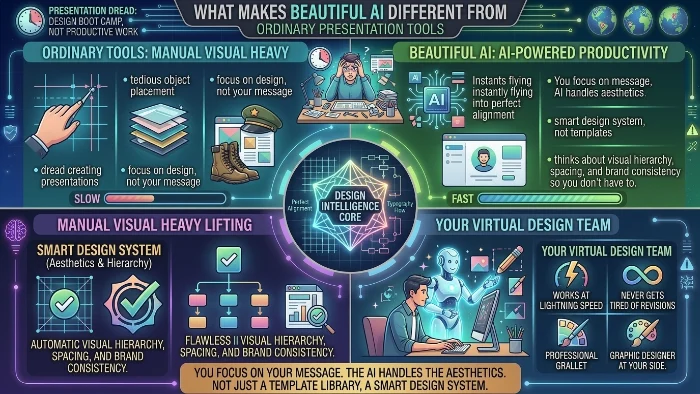
Let’s be honest. Most of us dread creating presentations. It feels like design boot camp rather than productive work.
Beautiful AI flips that entire experience upside down.
This platform uses artificial intelligence to handle the visual heavy lifting. You focus on your message. The AI handles the aesthetics. It’s not just another template library. It’s a smart design system that thinks about visual hierarchy, spacing, and brand consistency so you don’t have to.
Think of it like having a professional graphic designer sitting next to you. But this designer works at lightning speed and never gets tired of your endless revisions.
How Beautiful AI Actually Works
The technology behind Beautiful AI combines several sophisticated AI systems working together seamlessly.
| Component | Function | Benefit |
|---|---|---|
| Generative AI Models | Create layouts from text input | Instant slide generation |
| Natural Language Processing | Understands content context | Smarter content organization |
| Design Algorithms | Apply visual hierarchy rules | Professional aesthetics |
| Machine Learning | Learns user preferences | Personalized recommendations |
| Automation Engine | Handles formatting tasks | Eliminates manual work |
The process is surprisingly straightforward. You type your ideas. The AI suggests slide structures. You pick what works. The software automatically arranges elements with proper spacing, contrast, and visual flow.
Every decision follows established design principles. The AI understands typography rules. It knows when to use bold colors versus subtle tones. It comprehends visual storytelling techniques that most business professionals never learn.
This isn’t magic though. It’s applied design science packaged into an intuitive interface.
Key Features That Make Beautiful AI Stand Out
Smart Templates That Actually Adapt
Traditional templates force you into rigid structures. Beautiful AI offers intelligent templates that morph based on your content. Add a bullet list and the layout adjusts. Include a data chart and the design shifts to highlight numbers properly. Add an image and the AI reflows everything around it.
The system analyzes your content type and selects appropriate visual treatments automatically. No more wrestling with placeholder elements that never quite work.
Real-Time Design Intelligence
The AI watches your every move. Add a new slide and it suggests complementary layouts. Change a color scheme and it updates the entire deck consistently. The system maintains visual harmony across all slides without requiring manual intervention.
This real-time feedback loop makes the design process feel conversational rather than mechanical. You make choices. The AI responds. You refine. The AI adapts further.
Brand Kit Integration
Businesses love this feature. Upload your logo, select your brand colors, and choose your preferred fonts. The AI applies these elements consistently across every presentation. New hires create on-brand decks instantly. Contractors produce professional materials without extensive training.
Brand consistency becomes automatic rather than an ongoing struggle. Marketing teams appreciate this capability enormously.
Collaboration Capabilities
Modern work demands teamwork. Beautiful AI supports real-time collaboration with team members. Multiple people can work on the same deck simultaneously. Comments and suggestions flow naturally. Version history protects against unwanted changes.
The collaboration features match what you’d expect from modern productivity suites. But the AI augmentation adds a layer of intelligence that traditional tools lack.
Data Visualization That Actually Works
Presenting numbers effectively is notoriously difficult. Beautiful AI analyzes your data and recommends appropriate chart types. It handles bar charts, line graphs, pie charts, and more complex visualizations. The AI applies proper formatting, labels, and color coding automatically.
Bad data visualization undermines otherwise excellent presentations. This AI ensures your numbers tell a compelling story.
Beautiful AI Pricing and Plans
Beautiful AI offers several pricing tiers to accommodate different user needs.
| Plan | Monthly Cost | Annual Cost | Best For |
|---|---|---|---|
| Free | $0 | $0 | Individuals testing the platform |
| Pro | $12 | $144 | Professionals needing full features |
| Team | $40 | $480 | Small to medium teams |
| Enterprise | Custom | Custom | Large organizations |
The free version provides access to core features with some limitations. You can create basic presentations and explore the AI capabilities. Pro unlocks unlimited presentations, additional templates, and premium features. Team adds collaboration tools and admin controls. Enterprise includes custom security and dedicated support.
Most users find the Pro plan offers excellent value. The time savings alone justify the subscription cost.
Who Actually Uses Beautiful AI
The platform serves diverse professionals across multiple industries.
Marketing Teams create campaign decks, strategy presentations, and performance reports. The AI ensures consistent branding across all materials. Marketing managers save hours previously wasted on formatting.
Sales Professionals build pitch decks faster than ever. Quick turnaround matters in competitive sales environments. Beautiful AI enables rapid iteration based on client feedback.
Entrepreneurs craft investor presentations without hiring expensive designers. Startup founders can focus on their business story rather than slide aesthetics.
Educators develop engaging lecture materials. The AI helps teachers present complex information in visually accessible ways.
Corporate Executives produce board presentations and internal communications. Time-pressed leaders appreciate the efficiency.
The common thread? Professionals who value their time and understand that visual presentation quality matters.
Beautiful AI vs Traditional Presentation Tools
Let’s compare Beautiful AI against conventional options.
Beautiful AI vs PowerPoint
Microsoft PowerPoint remains the industry standard. But it demands significant design knowledge and manual effort. Users must know about alignment, spacing, color theory, and typography. Most people don’t possess these skills.
Beautiful AI brings design expertise to everyone. It democratizes professional presentation creation. Users without design backgrounds produce visually impressive results consistently.
PowerPoint’s strength lies in its massive user base and extensive feature set. But that complexity becomes a weakness for casual users. Beautiful AI abstracts away complexity without sacrificing quality.
Beautiful AI vs Canva
Canva offers powerful design capabilities with abundant templates. However, it requires manual layout decisions. Users still need to drag elements, adjust positions, and make countless micro-decisions. Canva is easier than PowerPoint but remains design-heavy.
Beautiful AI goes further by automating layout decisions. The AI makes smart choices about element placement automatically. This speed advantage matters when deadlines approach.
Both platforms offer value. Canva excels for detailed design control. Beautiful AI wins for rapid, automated presentation creation.
Beautiful AI vs Google Slides
Google Slides provides basic functionality with excellent collaboration. But the design capabilities remain limited. Users face the same formatting struggles as PowerPoint.
Beautiful AI integrates collaboration while adding AI-powered design intelligence. It combines the best of both worlds. Teams work together while the AI handles visual heavy lifting.
How to Create a Presentation with Beautiful AI
Getting started takes minutes rather than hours.
Step One: Sign up for an account. The free tier works perfectly for testing.
Step Two: Start a new presentation. Choose from several starting options or begin from scratch.
Step Three: Add your content. Type your ideas directly. The AI analyzes your text and suggests appropriate slides.
Step Four: Review the AI’s suggestions. Accept or reject proposed layouts. The system learns from your preferences.
Step Five: Customize as needed. Change colors, fonts, or images. The AI adapts to your adjustments.
Step Six: Add media elements. Upload images, embed videos, or integrate charts. The AI maintains visual consistency automatically.
Step Seven: Share your creation. Export to PDF, PowerPoint, or share directly through the platform.
The entire process flows naturally. Users describe the experience as intuitive and satisfying.
Beautiful AI’s Design Principles Explained
The AI applies established design principles automatically.
Visual Hierarchy ensures the most important elements get the most attention. Headlines stand out. Supporting details remain secondary. The AI understands how to guide viewer attention effectively.
Contrast helps differentiate between elements. Text remains readable against backgrounds. Colors complement rather than clash. The AI applies appropriate contrast ratios automatically.
Balance creates visual stability. Elements distribute evenly across slides. Nothing feels heavy or lopsided. The AI maintains equilibrium without manual adjustment.
White Space prevents visual clutter. Proper spacing improves readability and comprehension. The AI knows when to leave breathing room.
Consistency maintains visual cohesion across slides. Font choices, color palettes, and element styles remain uniform. The AI enforces consistency automatically.
These principles work together to create professional results. Users benefit from design expertise without studying design theory.
The Technology Behind Beautiful AI
Understanding the underlying technology helps appreciate the platform’s capabilities.
The AI models process user input through multiple stages. Natural language processing extracts meaning from text. Machine learning algorithms understand context and intent. Generative models create appropriate visual outputs.
The system trains on millions of presentations. It learns what constitutes effective design from analyzing professional decks. The AI understands patterns that human designers apply instinctively.
Continuous improvement occurs through user feedback. Every interaction helps refine the models. The system becomes smarter over time.
This isn’t static software. It evolves based on real-world usage patterns and design trends.
Common Questions About Beautiful AI
Is Beautiful AI completely free?
The platform offers a generous free tier with core functionality. Power users typically upgrade to Pro for unlimited access and premium features.
Does Beautiful AI work offline?
No, Beautiful AI requires internet connectivity. The AI processing happens on cloud servers. This enables sophisticated AI capabilities that wouldn’t work locally.
Can I export presentations to PowerPoint?
Yes, Beautiful AI supports PowerPoint export. You can share your work with colleagues who use traditional presentation tools.
Is my data secure?
Beautiful AI implements standard security practices. Enterprise customers receive additional protections. Always review privacy policies for complete information.
How much time does Beautiful AI save?
Most users report saving 50% to 75% of their normal presentation creation time. The AI handles tasks that typically consume hours.
Beautiful AI Alternatives Worth Considering
While Beautiful AI excels, other options exist for different needs.
Gamma AI emphasizes combining presentations with documents and web content. It offers strong integration capabilities for modern workflows.
Tome focuses on narrative-driven storytelling. It works well for creative presentations and marketing content.
SlidesAI integrates directly with Google Slides. It brings AI capabilities to the Google ecosystem.
Pitch combines presentation creation with team collaboration tools. It works well for startups and growing teams.
Canva offers broader design capabilities beyond presentations. It suits users who need comprehensive design tools.
Each alternative has strengths. Beautiful AI maintains advantages in design automation and visual quality.
The Future of AI-Powered Presentation Design
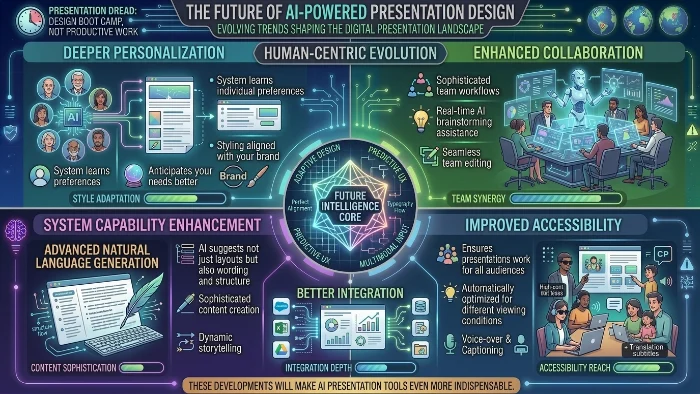
Presentation software continues evolving rapidly. Several trends will shape the future.
Deeper Personalization will make AI suggestions more aligned with individual preferences. The system will learn your style and anticipate your needs better.
Enhanced Collaboration will facilitate more sophisticated team workflows. Real-time AI assistance during team brainstorming sessions will emerge.
Better Integration with other business tools will streamline workflows. Presentations will connect more seamlessly with data sources and content libraries.
Advanced Natural Language Generation will enable more sophisticated content creation. The AI will suggest not just layouts but also wording and structure.
Improved Accessibility features will ensure presentations work for all audiences. AI will automatically optimize for different viewing conditions.
These developments will make AI presentation tools even more indispensable.
FAQs
What exactly is Beautiful AI and how does it work?
Beautiful AI is an AI-powered presentation platform that automates slide design through intelligent algorithms. Simply type your content and the artificial intelligence creates professional layouts instantly. The system analyzes your text, understands the context, and applies established design principles to generate visually stunning slides. Think of it as having a professional designer working alongside you but at machine speed.
Is Beautiful AI really free or are there hidden costs?
Beautiful AI offers a genuinely free tier with core functionality. You can create presentations, access basic templates, and explore AI capabilities without paying anything. However, power users typically upgrade to Pro for unlimited presentations, premium templates, advanced features, and team collaboration tools. The free version works perfectly for testing and light usage. No hidden fees or surprise charges exist.
Can Beautiful AI replace PowerPoint entirely?
Beautiful AI serves as a powerful PowerPoint alternative but doesn’t replicate every PowerPoint feature. The platform excels at rapid presentation creation with automated design. Traditional PowerPoint remains better for complex animations, deep customization, and offline work. Many professionals use both tools, creating decks in Beautiful AI and exporting to PowerPoint when needed. The export functionality bridges the gap effectively.
How does Beautiful AI compare to Canva for presentations?
Canva offers broader design capabilities beyond presentations, requiring manual layout decisions. Beautiful AI automates layout automatically, making it faster for presentation creation. Canva suits users wanting detailed design control across multiple formats. Beautiful AI wins when speed matters and you want professional results without design effort. Both platforms serve different needs effectively.
Is my data safe and secure with Beautiful AI?
Beautiful AI implements standard security practices including encryption and secure servers. Your presentations remain private unless you share them. Enterprise customers receive additional security features and dedicated support. However, always review the privacy policy for complete information about how the platform handles your data. For highly sensitive business information, consult your IT department before use.
Can I use Beautiful AI for team collaboration?
Yes, team collaboration works smoothly with Beautiful AI. Multiple team members can edit presentations simultaneously. Comments and suggestions flow naturally through the interface. Admin controls help manage team access. The collaboration features match what you’d expect from modern productivity suites, with the added benefit of AI-assisted design throughout the workflow.
What file formats does Beautiful AI support for export?
Beautiful AI exports presentations in multiple formats including PDF and PowerPoint. You can also share directly through the platform with shareable links. Future export options may include additional formats. The platform integrates with common business tools for seamless workflow integration. Exporting your work preserves design quality across different formats.
Conclusion
Beautiful AI represents a significant advancement in presentation creation. It eliminates technical barriers that prevent people from producing professional work. Anyone can create stunning presentations regardless of design background.
The platform saves precious time. It reduces frustration. It enables focus on what matters: your message.
The combination of sophisticated AI technology with thoughtful design principles delivers exceptional results. Business professionals, educators, and entrepreneurs all benefit from this intelligent approach.
Consider your own presentation needs. Evaluate how much time you spend formatting slides. Think about whether your current results match your aspirations. Beautiful AI might be exactly what you need.
The free tier offers a risk-free way to experience the difference. Give it a try. You might wonder why you ever struggled with traditional tools.

Justin Powell is a writer at GramBrix.com who focuses on grammar, clarity and effective communication, helping readers strengthen their language skills.