Last Updated on July 30, 2026
The Cricut vs Silhouette comparison explains the differences between two popular cutting machines used for crafting, design, and DIY projects. Cricut machines are known for beginner friendly software and cloud based design tools, while Silhouette machines offer more advanced customization and deeper manual control. Both are powerful tools for vinyl cutting, paper crafts, stickers, and business level creative production.
The debate of Cricut vs Silhouette is one of the most common topics in the crafting world today. If you are starting a small craft business or exploring DIY projects at home, you have likely heard both names many times. These machines help users cut paper, vinyl, fabric, and other materials with precision, turning creative ideas into real products.
Many beginners feel confused when choosing between them. Both machines look similar on the surface, and both promise professional results. But the way they work, the software they use, and the level of control they offer can be very different. This is where most of the confusion begins.
Choosing the wrong machine can slow down your creativity or make learning harder than it needs to be. That is why understanding Cricut vs Silhouette in detail is important before making a purchase. In this guide, you will learn everything in simple language, including features, advantages, disadvantages, real use cases, mistakes to avoid, and practical exercises.
By the end, you will clearly know which machine fits your needs best, whether you are a beginner crafter or planning to start a small business.
Quick Answer Overview of Cricut vs Silhouette
Both Cricut and Silhouette are digital cutting machines designed for creative projects, but they serve slightly different types of users.
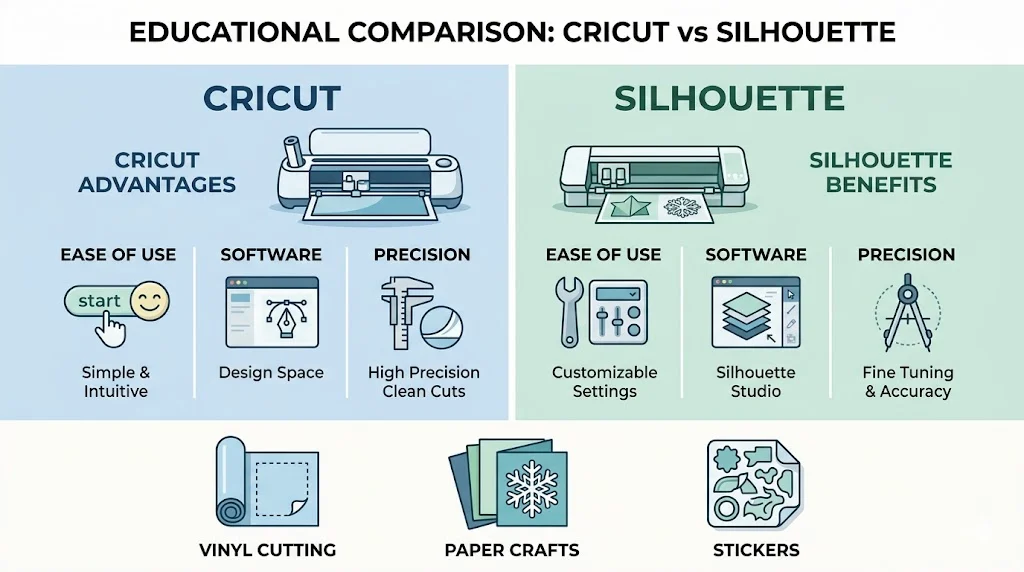
Cricut is ideal for beginners who want simple design tools and quick setup. It uses cloud based software and has a large library of ready made designs.
Silhouette is better for users who want more control over design and cutting. It offers advanced editing tools and more manual customization.
Simple Summary
- Cricut is easier and more beginner friendly
- Silhouette is more flexible and advanced
- Both can cut vinyl, paper, stickers, and fabric
- Both are widely used for personal and business crafting
What is Cricut vs Silhouette
What is Cricut
Cricut is a brand of smart cutting machines used for crafting, design, and DIY projects. It connects to a software called Design Space, where users create or download designs and send them to the machine for cutting.
Cricut machines are popular because they are simple to use. Even beginners can start creating stickers, greeting cards, home decor, and t shirt designs within a short time.
Key features of Cricut include:
- Cloud based design software
- Easy drag and drop interface
- Large design library
- Automatic material settings
What is Silhouette
Silhouette is another brand of digital cutting machines used for detailed crafting work. It connects to Silhouette Studio software, which offers powerful design tools.
Silhouette machines are often preferred by experienced users because they allow more detailed editing and manual control over designs.
Key features of Silhouette include:
- Advanced design software
- Offline editing capability
- More customization options
- High precision cutting control
Cricut vs Silhouette Key Differences
Software Comparison
Cricut Design Space:
- Cloud based
- Easy for beginners
- Limited advanced editing tools
Silhouette Studio:
- Can work offline
- Advanced design features
- Better for professionals
Ease of Use
Cricut is easier to learn. The interface is simple and clean.
Silhouette has a steeper learning curve but offers more freedom.
Material Compatibility
Both machines can cut:
- Vinyl
- Cardstock
- Paper
- Heat transfer material
- Sticker sheets
Silhouette generally supports slightly thicker and more varied materials depending on blade and settings.
Pricing Comparison
| Feature | Cricut | Silhouette |
| Beginner cost | Medium | Medium |
| Software cost | Subscription for premium designs | Mostly free base software |
| Learning curve | Easy | Moderate to advanced |
| Design control | Limited | High |
Advantages and Disadvantages of Cricut vs Silhouette
Advantages of Cricut
- Very easy for beginners
- Clean and simple interface
- Large online community
- Fast project setup
- Many ready made templates
Disadvantages of Cricut
- Requires internet for most functions
- Limited advanced design control
- Subscription needed for premium content
Advantages of Silhouette
- Powerful design software
- Works offline
- High customization
- Better for complex designs
- Strong control over cutting settings
Disadvantages of Silhouette
- Harder for beginners
- Interface feels technical
- Requires practice to master
Real World Examples of Cricut vs Silhouette Use
Home Crafting
A beginner using Cricut may create:
- Birthday cards
- Wall stickers
- Simple labels
A Silhouette user may create:
- Layered vinyl art
- Detailed paper cut designs
- Custom logos
Small Business Use
Cricut users often run:
- Personalized gift shops
- Sticker businesses
- T shirt printing shops
Silhouette users often handle:
- Professional sticker production
- Advanced design services
- Bulk custom orders
Education Use
Teachers use Cricut for:
- Classroom decorations
- Learning materials
Silhouette is used for:
- Advanced design training
- Art and design classes
Regional and Global Usage of Cricut vs Silhouette
Cricut is highly popular in North America and Europe due to its easy setup and strong marketing.
Silhouette has a strong presence among professional designers and craft businesses globally, especially in regions where advanced customization is preferred.
In many countries, Cricut is chosen by beginners, while Silhouette is preferred by experienced users and small business owners.
Common Mistakes in Cricut vs Silhouette Use
Mistake 1: Choosing based on popularity only
Many users buy Cricut just because it is popular, without checking their needs.
Mistake 2: Ignoring software differences
Users underestimate how important design software is for long term use.
Mistake 3: Not learning calibration
Improper blade and material settings can ruin projects.
Mistake 4: Overcomplicating designs as beginners
New users often try advanced designs too early.
Mistake 5: Not testing materials
Skipping test cuts leads to wasted materials.
Exercises for Better Understanding Cricut vs Silhouette
Exercise 1
Which machine is better for beginners?
Answer: Cricut is better for beginners due to its simple interface.
Exercise 2
Which software works offline?
Answer: Silhouette Studio works offline.
Exercise 3
Name two materials both machines can cut.
Answer: Vinyl and cardstock.
Exercise 4
Which machine offers more design control?
Answer: Silhouette offers more advanced design control.
Exercise 5
What is one common mistake new users make?
Answer: Skipping test cuts before starting a project.
Related Concepts and Comparisons
Cricut vs Silhouette vs Laser Cutting
Laser cutters are more industrial and can cut harder materials, while Cricut and Silhouette are for crafting.
Cricut vs Silhouette vs Manual Cutting
Manual cutting is slow and less precise, while both machines automate the process.
Design Software Importance
The main difference in Cricut vs Silhouette often comes down to software capability rather than hardware alone.
FAQs
What is the main difference between Cricut vs Silhouette?
Cricut is easier and more beginner friendly, while Silhouette offers advanced design control and customization.
Which is better for beginners Cricut or Silhouette?
Cricut is better for beginners because it has a simple interface and ready made templates.
Can Cricut and Silhouette cut the same materials?
Yes, both machines can cut vinyl, paper, cardstock, and heat transfer materials.
Is Silhouette more professional than Cricut?
Silhouette is often considered more professional due to its advanced editing tools and flexibility.
Do I need internet for Cricut vs Silhouette?
Cricut requires internet for most features, while Silhouette can work offline.
Which machine is better for small business use?
Both can be used for small businesses. Cricut is better for fast production, Silhouette is better for detailed custom work.
Is Cricut software free?
Basic Cricut Design Space is free, but premium designs require a subscription.
Can Silhouette be hard to learn?
Yes, Silhouette has a steeper learning curve due to its advanced tools.
Which machine gives better precision?
Both offer high precision, but Silhouette allows more manual control for detailed adjustments.
Cricut vs Silhouette which should I buy in 2026?
If you want simplicity, choose Cricut. If you want control and advanced design, choose Silhouette.
Conclusion
The Cricut vs Silhouette comparison shows that both machines are powerful tools for creative work, but they serve different types of users. Cricut is ideal for beginners who want quick and simple crafting experiences. It removes complexity and helps users start creating immediately.
Silhouette is better for users who want deep control over their designs and enjoy learning advanced tools. It is widely used by experienced crafters and small business owners who need precision and flexibility.
If you are just starting, Cricut may feel easier and more enjoyable. If you plan to grow into professional level design work, Silhouette may give you more long term value.
The best choice depends on your goals, experience level, and how much control you want over your creative process. Understanding these differences helps you invest in the right machine and build your crafting journey with confidence.

Kevin Brooks is a grammar specialist at GramBrix.com, dedicated to helping readers understand language rules with clarity and confidence. He simplifies complex grammar concepts through practical examples and easy explanations.