Last Updated on July 5, 2026
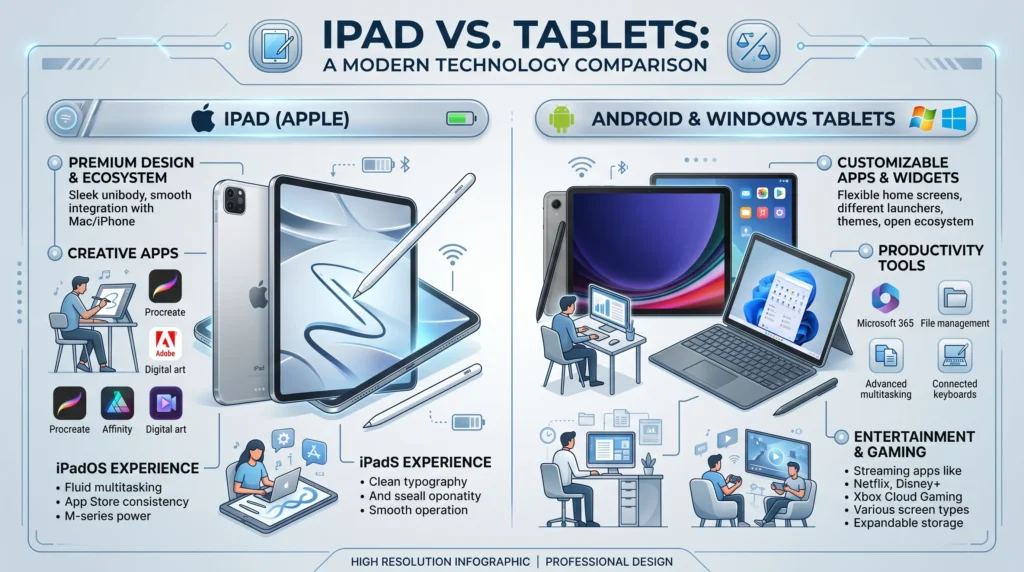
An iPad is a type of tablet made by Apple, while tablet is a general term for touchscreen portable devices from many brands. iPads are known for premium performance, long software support, and strong creative tools, while Android and Windows tablets offer wider price ranges and flexibility. The best choice depends on budget, productivity needs, gaming, education, and ecosystem preference.
Portable devices have changed the way people work, study, watch content, and create digital media. Today, many users compare “iPad or tablet” before buying a new device because tablets are now powerful enough for:
- Online learning
- Entertainment
- Graphic design
- Gaming
- Business work
- Remote communication
However, many people do not realize that an iPad is actually a tablet itself.
The difference is:
- iPad refers specifically to tablets made by Apple
- Tablet refers to all tablet devices in general
This means Android tablets, Windows tablets, and Amazon tablets all fall under the larger tablet category.
Choosing the right device matters because prices, software, apps, performance, and accessories can vary significantly.
Some people want:
- Affordable streaming devices
- Student-friendly note-taking tools
- Professional creative systems
- Gaming performance
- Laptop replacement features
In this guide, you will learn:
- Main differences between iPad and tablets
- Performance comparisons
- Advantages and disadvantages
- Real-world examples
- Best devices for students and professionals
- Common buying mistakes
The explanations are simple, modern, and beginner-friendly.
Quick Answer
| Feature | iPad | Other Tablets |
|---|---|---|
| Operating System | iPadOS | Android or Windows |
| Brand | Apple | Multiple companies |
| Price Range | Usually premium | Budget to premium |
| App Optimization | Excellent | Varies |
| Customization | Limited | More flexible |
| Software Updates | Long support | Depends on brand |
Simple Summary
- iPads offer premium performance and strong app quality.
- Other tablets provide more pricing options and flexibility.
What Is an iPad?
Definition
The iPad is a tablet series created by Apple.
It runs on:
- iPadOS
- Apple ecosystem services
- Apple-designed processors
Popular iPad Models
Common models include:
- iPad
- iPad Air
- iPad Pro
- iPad Mini
Main iPad Features
iPads are known for:
- Smooth performance
- High-quality displays
- Creative apps
- Long software support
What Is a Tablet?
Definition
A tablet is a portable touchscreen computer.
Tablet brands include:
- Samsung
- Lenovo
- Microsoft
- Amazon
Common Tablet Operating Systems
Most tablets use:
- Android
- Windows
- Fire OS
Tablet Categories
Tablet types include:
- Budget tablets
- Gaming tablets
- Productivity tablets
- Kids tablets
Main Difference Between iPad or Tablet
Ecosystem Difference
iPad
Works deeply with:
- iPhone
- MacBook
- Apple Watch
Other Tablets
Offer wider brand compatibility and customization.
Software Experience
iPad
Known for polished app optimization.
Android Tablets
Provide more flexibility and open customization.
Hardware Variety
iPad
Limited to Apple designs.
Tablets
Available in many sizes, prices, and styles.
Performance Comparison
| Feature | iPad | Android/Windows Tablets |
|---|---|---|
| Gaming Performance | Excellent | Varies |
| App Stability | Very strong | Depends on device |
| Multitasking | Strong | Strong on premium models |
| Battery Life | Excellent | Varies |
| Customization | Limited | High |
Best for Students
Why Students Choose iPads
Students often prefer iPads for:
- Note-taking
- Apple Pencil support
- Educational apps
Why Students Choose Tablets
Budget tablets may offer:
- Lower prices
- Expandable storage
- Flexible app systems
Best for Work and Productivity
iPad for Professionals
iPad Pro models support:
- Video editing
- Graphic design
- Digital illustration
Windows Tablets for Business
Windows tablets often provide:
- Full desktop software
- Better laptop replacement features
Gaming and Entertainment
iPad Gaming
iPads are highly popular for:
- Mobile gaming
- Streaming
- Creative media
Android Tablet Entertainment
Android tablets offer:
- Flexible media apps
- Different screen sizes
- Lower-cost entertainment options
Real World Examples
Student Example
A university student may use:
- iPad for notes and assignments
- Budget Android tablet for reading and streaming
Business Example
A remote worker may prefer:
- Windows tablet for office software
- iPad for presentations and meetings
Artist Example
Digital artists often choose iPads because of:
- Apple Pencil
- Creative apps like Procreate
Advantages of iPad
Long Software Support
Apple devices usually receive updates for many years.
Strong App Ecosystem
Many apps are optimized specifically for iPad screens.
Excellent Performance
Apple chips deliver strong speed and efficiency.
Premium Build Quality
iPads are known for durable and polished hardware.
Disadvantages of iPad
Higher Price
iPads are often expensive compared to budget tablets.
Limited Customization
Apple restricts many system modifications.
Accessory Costs
Apple accessories may cost significantly more.
Advantages of Other Tablets
More Affordable Options
Many tablets cost far less than iPads.
Greater Device Variety
Different brands offer:
- Foldable tablets
- Gaming tablets
- Rugged tablets
Expandable Storage
Some tablets support SD cards.
Better File Flexibility
Android and Windows devices may allow easier file management.
Disadvantages of Other Tablets
Software Support Varies
Some tablets receive fewer updates.
Inconsistent App Optimization
Certain apps may not work as smoothly.
Performance Differences
Budget tablets may feel slower over time.
iPad or Tablet for Different Users
| User Type | Better Choice |
|---|---|
| Digital Artist | iPad |
| Budget Buyer | Android Tablet |
| Office Professional | Windows Tablet |
| Casual Streaming | Budget Tablet |
| Apple Ecosystem User | iPad |
| Customization Lover | Android Tablet |
Common Mistakes Buyers Make
Buying Too Much Power
Many users do not need expensive premium models.
Ignoring Software Ecosystem
Compatibility matters more than hardware alone.
Forgetting Accessory Costs
Cases, keyboards, and styluses increase total price.
Choosing Only by Brand
The best device depends on actual needs.
Technology Trends in 2026
AI Features Growing
Modern tablets increasingly include:
- AI assistants
- Smart productivity tools
- AI image editing
Hybrid Laptop Tablets Expanding
More tablets now function like lightweight laptops.
Cloud Gaming Growth
Streaming-based gaming is becoming more common on tablets.
Related Technology Concepts
Stylus Support
Digital pens improve productivity and drawing experience.
Mobile Productivity
Tablets increasingly support remote work and multitasking.
Cross-Device Ecosystems
Modern devices now integrate across phones, tablets, and computers.
Exercises With Answers
Exercise 1
Is an iPad a type of tablet?
Answer: Yes
Exercise 2
Which company makes the iPad?
Answer: Apple
Exercise 3
Which tablets often allow more customization?
Answer: Android tablets
Exercise 4
Which device is popular among digital artists?
Answer: iPad
Exercise 5
Can tablets replace laptops for some users?
Answer: Yes
FAQs
What is the difference between iPad or tablet?
An iPad is a tablet made by Apple, while tablet is a general category that includes many brands.
Is an iPad better than an Android tablet?
It depends on your needs. iPads offer premium software experience, while Android tablets provide flexibility and lower prices.
Which is better for students?
Both can work well. iPads are popular for note-taking, while budget tablets may save money.
Can tablets replace laptops?
Some premium tablets can handle many laptop tasks.
Are iPads good for gaming?
Yes. iPads are known for strong gaming performance and app quality.
Do Android tablets support stylus pens?
Many premium Android tablets support stylus accessories.
Which is cheaper, iPad or tablet?
Most non-Apple tablets are cheaper than iPads.
Can I use Microsoft Office on tablets?
Yes. Many tablets support Office apps.
Which tablet is best for drawing?
Many artists prefer iPads because of Apple Pencil and creative apps.
Do tablets get software updates?
Yes, but update quality and duration vary by brand.
Conclusion
Choosing between iPad or tablet depends on your budget, lifestyle, and daily needs.
iPads are ideal for:
- Creative professionals
- Students
- Apple ecosystem users
- Premium performance seekers
Other tablets are often better for:
- Budget-conscious buyers
- Customization
- Flexible hardware choices
- Windows productivity environments
Neither option is universally better. The right device depends on:
- Software preferences
- Productivity goals
- Entertainment needs
- Accessory support
- Long-term value
As tablets continue evolving in 2026, both iPads and other tablet devices are becoming more powerful, portable, and capable of handling work, creativity, education, and entertainment in one compact device.

Victoria Lane is a grammar-focused writer at GramBrix.com, passionate about helping readers master the rules of language. She provides clear explanations and practical examples that make writing more accurate, polished and confident.