Last Updated on August 8, 2026
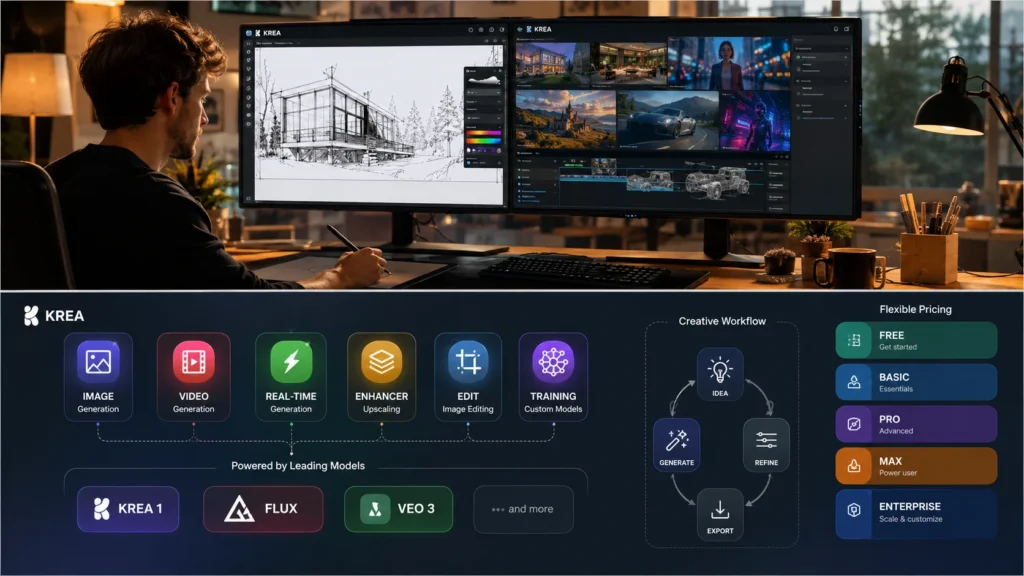
Krea AI is an all-in-one creative platform for generating and editing images and videos with over 30 AI models in a single interface. Key features include real-time generation, image upscaling to 22K resolution, LoRA training for consistent characters, and workflows for architects, designers, and marketers. Pricing starts at $0 with paid plans from $7/month. Krea AI compares favorably to Midjourney and Stable Diffusion for its integrated toolset and commercial licensing.
What Is Krea AI? The Creative Suite That Does It All
Imagine having access to over 30 different AI models in one place. That is Krea AI in a nutshell.
Krea AI is a creative platform that brings together image generation, video creation, real-time editing, and enhancement tools under one roof. Instead of jumping between Midjourney, Runway, and Photoshop, you get everything in a single workspace.
The platform has gained serious traction. Over 40 million users across 191 countries now rely on Krea AI for their creative projects. That number is growing fast, and for good reason.
Krea AI stands out because it does not force you into one model. You can experiment with Krea 1, Flux, Imagen 4, ChatGPT Image, or Runway Gen-4.5 all from the same interface. This flexibility is a game-changer for creative professionals.
Krea AI Core Features: What You Can Actually Do
Krea AI packs a surprising amount of functionality into its platform. Let us break down exactly what you get.
Krea AI Image Generation
Krea AI image generation is the platform’s bread and butter. You type a prompt, pick a model, and generate visuals in seconds.
The model selection is where things get interesting.
| Model | Images per Gen | Units Cost | Speed | Best For |
|---|---|---|---|---|
| Krea 1 | 4 | 8 | 6 sec | Photorealistic images with LoRA support |
| Flux 2 Klein | 4 | 5 | 4 sec | Fast iteration and drafts |
| ChatGPT Image | 2 | 183 | 60 sec | Complex prompts and text rendering |
| Nano Banana Pro | 2 | 114 | 45 sec | Strongest prompt adherence |
| Seedream 5 Lite | 2 | 8 | 15 sec | Fast with web search capabilities |
| Imagen 4 | 2 | 114 | 60 sec | Google’s latest image model |
Each model has different strengths. Krea 1 generates four images per prompt at up to 4096px resolution, making it ideal for final renders. Flux is cheaper and faster, perfect for exploring ideas.
The ChatGPT Image model deserves special mention. It handles complex prompts with unusual precision and renders text within images accurately. Many models struggle with typography, but this one excels at it.
Krea AI also supports style transfer and image prompts. Upload a reference photo and the AI will blend its style with your text prompt. This gives you far more control than typing alone.
Krea AI Video Generator
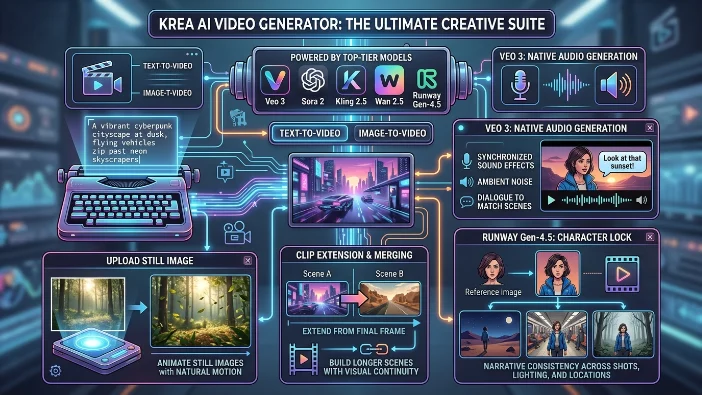
Krea AI video generation is another massive draw. The platform gives you access to top-tier video models like Veo 3, Sora 2, Kling 2.5, Wan 2.5, and Runway Gen-4.5.
You can generate videos from text prompts or start from an image. The image-to-video feature is particularly useful. Upload a still image and Krea animates it with natural motion.
Krea AI also supports clip extension and merging. You can build longer scenes by extending from the final frame of one clip into the next. This keeps visual continuity across your edit.
Veo 3 takes things further with native audio generation. It adds synchronized sound effects, ambient noise, and even dialogue to match your scenes. No more hunting for stock audio.
For filmmaking and advertising, Runway Gen-4.5’s character lock feature is a standout. Upload one reference image and your character keeps the same face, clothing, and colors across different shots, lighting, and locations. This is huge for narrative consistency.
Krea AI Real-Time Generation
Krea AI real-time generation is one of the platform’s most distinctive features. As you type a prompt, adjust a slider, or move shapes around the canvas, the image updates instantly.
This turns the creative process into a live conversation with the AI. No waiting for generations to finish. You see results as you work.
The Krea AI real-time canvas supports several input methods. You can use your webcam as a live input, mapping your gestures directly onto the output. Paint on the canvas and watch the AI refine your strokes into polished visuals.
Krea AI sketch to image exemplifies this workflow. Draw rough shapes, add a short prompt, and the AI renders a finished image in real time. This is the fastest way to explore visual ideas.
Krea AI Enhancer and Edit Tools
Krea AI enhancer is a powerful upscaling tool. It increases resolution, sharpens details, adjusts lighting, and cleans up noise. You can take images up to 22K resolution on paid plans.
The Krea AI editor is equally impressive. It is a canvas-based tool for modifying, blending, and expanding images. Add objects to scenes, remove unwanted elements, change camera angles, or adjust lighting.
The ChatGPT 1.5 model excels at targeted editing. Ask it to change one specific thing and it preserves facial likeness, lighting, composition, and color across the rest of the frame. This addresses a common frustration where small edits trigger complete image regeneration.
Krea AI Training and LoRAs
Krea AI training lets you upload your own images and train custom models for consistent outputs. This is achieved through LoRAs (Low-Rank Adaptations).
A LoRA captures a specific character, object, or style. Once trained, you use a “magic keyword” to generate on-brand images on demand. This ensures consistency across projects.
Krea AI allows LoRA training with up to 50 images on the Basic plan and 2,000 images on Max. Business plans push that to 20,000 files. This is serious capability for professional studios.
Who Is Krea AI For? Practical Use Cases
Krea AI serves a surprisingly broad audience. Here is who benefits most.
Architects and Designers
Krea AI for architecture has become a go-to workflow. Architecture teams use it to turn rough sketches and low-resolution renders into clear, presentation-quality visuals in seconds.
The platform supports output from Revit, SketchUp, 3ds Max, and Blender. You can explore material and atmosphere directions before committing to sample boards or full models.
The real-time iteration feature is especially valuable in client meetings. Make amendments live, explore directions, and agree on changes during the conversation. No more waiting for the next render.
Henning Larsen, a renowned architecture firm, has partnered with Krea to shape AI-assisted architectural visualization. That is a serious endorsement.
Krea AI also enhances walkthrough and flythrough footage into crisp video. Show how a space feels to move through early enough to inform the conversation rather than confirm a decision.
Marketing and Advertising
Krea AI is a powerful tool for marketing professionals. Generate product shots, lifestyle images, and mockups for campaigns quickly.
The commercial license on paid plans means you can use outputs in ads and client work without worry. This is essential for agencies and in-house teams.
The Krea AI video generator opens up new possibilities. Create social clips in vertical 9:16 format for TikTok, Reels, and YouTube. Generate product videos from text prompts or start from a product image.
Content Creators
YouTube creators, streamers, and social media managers can generate custom thumbnails, background art, and visual assets with Krea AI. The speed and variety of styles keep content fresh.
The character generator is perfect for storyboarding. Create original character concepts for videos, games, or visual development. Generate portraits, full-body designs, and style variants in minutes.
Graphic Designers and Illustrators
Krea AI is not a Photoshop replacement. It is an assistant. Generate base images and then edit them using Krea’s tools or export them for further work.
The ChatGPT 1.5 model handles diagrams and infographics particularly well. It renders accurate text and labels within images, something many AI models struggle with.
Krea AI is also excellent for logo concepts and brand identity work. Generate multiple directions quickly and iterate on the strongest candidates.
Game Developers and Filmmakers
Krea AI is used for storyboarding, concept art, and pre-visualization. It is a rapid way to communicate visual ideas before committing significant resources to production.
The character consistency features are valuable for game developers. Train a LoRA to keep a character looking the same across scenes. Use Runway Gen-4.5 to animate that character with consistent motion.
Krea AI Pricing: How Much Does It Cost?
Krea AI pricing is based on compute units. Different models and features cost different numbers of units. More advanced or faster models cost more to use.
| Plan | Price | Compute | Key Features |
|---|---|---|---|
| Free | $0 | 100 units/day | Full access to real-time models. Limited image, video, and LoRA training |
| Basic | $7/month | 5,000 units | Commercial license. Full image, 3D, and Lipsync models. LoRA training (50 images). Upscaling to 22K |
| Pro | $28/month | 20,000 units | All video models. Workflow automation with Nodes. Bulk unit discounts |
| Max | $48/month | 60,000 units | Unlimited LoRA training (2,000 files). Unlimited relaxed generations. Bulk discounts |
| Business | Custom | Custom | Up to 50 seats. Shared Node Apps. Custom roles. SSO |
| Enterprise | Custom | Custom | Krea 2 access. Priority support. Custom TOS. Slack connect |
Krea AI offers a generous free tier. One hundred compute units per day is enough to test the platform thoroughly. Basic image generation with Flux costs 5 units, so you can generate 20 images per day for free.
The Max plan offers the best value for heavy users. Unlimited relaxed generations” means after your compute units are spent, you keep generating with Krea AI’s in-house models at no extra cost. This makes the marginal cost per image effectively zero for high-volume projects.
Krea AI also offers bulk discounts on compute unit packs for Pro and Max subscribers. The annual discount is about 40%, which is among the deepest in the industry.
Krea AI vs Competitors
Krea AI positions itself differently from standalone tools like Midjourney or Stable Diffusion. Its main advantage is being a single platform for multiple workflows.
Krea AI vs Midjourney
| Factor | Krea AI | Midjourney |
|---|---|---|
| Interface | Clean, canvas-based UI with multiple tools | Discord-based or web interface |
| Image Models | 15+ models including Krea 1, Flux, Imagen 4, ChatGPT Image | Single proprietary model |
| Video Generation | Yes, with Veo 3, Sora 2, Runway, Kling | No |
| Real-time Generation | Yes | No |
| Editing | Full canvas-based editing tools | Limited |
| LoRA Training | Yes | No |
| Pricing | Free tier, paid from $7/month | Paid only, $10-$60/month |
Krea AI wins on functionality and control. Midjourney is simpler but has a single, strong default style. Krea AI offers more range and customization.
Krea AI vs Stable Diffusion
| Factor | Krea AI | Stable Diffusion |
|---|---|---|
| Setup | Cloud-based, ready to go | Requires local setup or cloud service |
| Ease of Use | Very easy | Steep learning curve |
| Model Access | 15+ curated models | Thousands of community models |
| Customization | Powerful but accessible | Maximum technical control |
| Cost | Free tier, paid from $7/month | Free (local), paid for cloud versions |
Stable Diffusion offers deeper technical customization for users who know what they are doing. Krea AI provides powerful results without the hassle.
Krea AI vs DALL·E / ChatGPT Image
Krea AI integrates ChatGPT Image as one of its models. You get OpenAI’s precision within Krea AI’s larger ecosystem.
Accessing ChatGPT Image through Krea AI means you also get all the other models and tools in one place. It is a better value proposition than a standalone OpenAI subscription for many users.
Krea AI vs Leonardo AI
| Factor | Krea AI | Leonardo AI |
|---|---|---|
| Models | 15+ including third-party | Leonardo models + community models |
| Video Generation | Yes | Limited |
| Real-time | Yes | Limited |
| Price | Free tier, $7-$48/month | Free tier, $12-$60/month |
Krea AI offers more comprehensive video capabilities and real-time features. Leonardo is strong for gaming assets but less versatile overall.
Krea AI Best Practices and Pro Tips
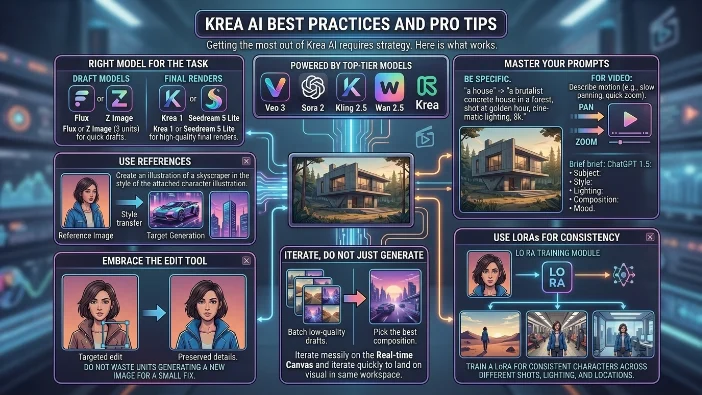
Getting the most out of Krea AI requires strategy. Here is what works.
Choose the Right Model for the Task
Do not use Krea 1 or ChatGPT Image for everything. For quick drafts, use Flux or Z Image (3 units). For final, high-quality renders, invest in Krea 1 or Seedream 5 Lite.
Master Your Prompts
Be specific. Instead of “a house,” try “a brutalist concrete house in a forest, shot at golden hour, cinematic lighting, 8k.”
For ChatGPT 1.5, write prompts the way you would give a detailed creative brief. Describe subject, style, lighting, composition, and mood explicitly.
For video generation, be specific about motion and camera movement. Describe the scene, lighting, and atmosphere. Mention timing like “slowly panning” or “quick zoom”.
Use References
The style transfer and image prompt features are your best friends. They are much more reliable than trying to describe a complex visual style in words alone.
For ChatGPT 1.5, upload images of characters or artwork styles and simply write a prompt that says “Create an illustration of a skyscraper in the style of the attached image”.
Iterate, Do Not Just Generate
Use Krea AI’s speed to your advantage. Generate a batch of low-quality drafts, pick the best composition, and then use it as an image prompt for a higher-quality model.
The real-time canvas is perfect for this. Start messy, iterate quickly, and land on a finished visual in the same workspace without switching tools.
Embrace the Edit Tool
Do not waste units generating a new image for a small fix. Use the Edit tool to change specific elements. The ChatGPT 1.5 model is particularly good at preserving everything else while making targeted changes.
Use LoRAs for Consistency
If you are working on a project with characters or a specific look, train a LoRA. It will save you time and frustration in the long run.
Krea AI supports LoRA training for consistent characters across different shots, lighting, and locations. This is essential for narratives and brand consistency.
Krea AI API: For Developers
Krea AI offers an API for developers. You can generate videos from text prompts via the API with Veo 3.1, Kling 2.5, Hailuo, and other models.
The API works similarly to the web interface. You make a POST request with your prompt and video parameters, and it returns a job ID. You then poll for results.
Video generation costs more than image generation through the API. Check the API Keys & Billing page for per-model pricing.
FAQs
Is Krea AI free to use?
Yes. Krea AI offers a free plan that gives you 100 compute units every single day. You get full access to real-time models and limited access to image, video, and LoRA training features. The free tier is generous enough to test the platform thoroughly before committing to a paid plan. For example, you can generate about 20 basic images per day with Flux at 5 units each.
How does Krea AI pricing actually work?
Krea AI pricing runs on a compute unit system. Different models and features cost different numbers of units. A Krea 1 image costs 8 units, while ChatGPT Image generation costs 183 units. Plans range from the free tier up to the Max plan at $48/month with 60,000 units. The Max plan also includes unlimited relaxed generations using Krea’s in-house models, which means you never run out of creative power.
Can I use Krea AI commercially?
Absolutely. All paid plans from Basic upward include a commercial license. This means you can use your generated images and videos in advertisements, client work, merchandise, and any other commercial project. The free plan is for personal use and experimentation only.
What AI models does Krea AI offer?
Krea AI gives you access to over 30 models from different providers. These include Krea 1, Flux, ChatGPT Image, Imagen 4, Seedream 5, Nano Banana Pro, and Z Image. For video, you get Veo 3, Sora 2, Kling 2.5, Wan 2.5, and Runway Gen-4.5. This variety is one of Krea’s biggest advantages over competitors.
How does Krea AI compare to Mid journey?
Krea AI offers more functionality and control than Midjourney. While Midjourney has a single proprietary model, Krea gives you 15+ image models plus video generation, real-time editing, LoRA training, and a full creative canvas. Midjourney is simpler to use for quick standalone art, but Krea AI wins for complex projects, teams, and anyone who needs consistency across multiple outputs.
What is the Krea AI real-time generation feature?
The Krea AI real-time feature is a canvas where images update instantly as you type, draw, or move objects. You can use your webcam as live input, paint rough shapes, and watch the AI refine them into finished visuals. It turns creation into a responsive conversation with the AI rather than a wait-and-see experience.
Can I train my own models on Krea AI?
Yes. Krea AI supports LoRA (Low-Rank Adaptation) training. Upload your own images and train a custom model that captures a specific character, object, or style. Once trained, you use a magic keyword to generate on-brand outputs consistently. This is essential for characters, product lines, and brand identity work.
Does Krea AI do video generation?
Yes. Krea AI video generation is a core feature. You get access to top-tier models including Veo 3, Sora 2, Kling 2.5, Wan 2.5, and Runway Gen-4.5. Generate videos from text prompts or animate still images. Veo 3 even includes native audio generation with synchronized sound effects and dialogue. This makes Krea a true all-in-one creative platform.
What is the Krea AI enhancer tool?
The Krea AI enhancer is an upscaling tool that increases resolution, sharpens details, adjusts lighting, and cleans up noise. On paid plans, you can upscale images up to 22K resolution. This is incredibly useful for architects who need presentation-quality renders or designers preparing high-resolution print assets.
Can Krea AI edit existing images?
Yes. The Krea AI editor is a canvas-based tool for modifying, blending, and expanding images. You can add objects, remove unwanted elements, change camera angles, or adjust lighting. The ChatGPT 1.5 model is especially good at targeted edits, preserving facial likeness, lighting, and composition while changing only what you specify.
Conclusion
Krea AI is more than just another image generator. It is a comprehensive creative ecosystem designed for speed, control, and professional results.
The strength lies in bringing a vast array of powerful tools into a single, user-friendly interface. Whether you are visualizing a new building, mocking up a product, or creating a character for a story, Krea provides the tools you need.
The integration of multiple AI models is what sets Krea AI apart. You are not locked into one company’s vision of what AI art should look like. You can experiment with different models and choose what works best for each project.
The real-time features are genuinely innovative. Sketch, draw, or move objects on a canvas and watch the AI transform simple shapes into anything you can imagine. This is where AI creativity is heading.
Krea AI also scores highly on value. The free tier is generous enough for serious testing. The Max plan with unlimited relaxed generations is a steal for power users. And the commercial license on paid plans makes it suitable for professional work.
For architects, the platform has become an essential tool. For marketers, it is a rapid prototyping machine. For creators, it is an endless source of inspiration.
The only real downside is the compute unit system. It takes some getting used to. But once you understand which models to use for which tasks, you can stretch your budget significantly.
Krea AI is a powerful, versatile, and continuously evolving platform. If you are serious about AI-powered creativity, it deserves a spot in your toolkit.

Justin Powell is a writer at GramBrix.com who focuses on grammar, clarity and effective communication, helping readers strengthen their language skills.