Last Updated on August 8, 2026
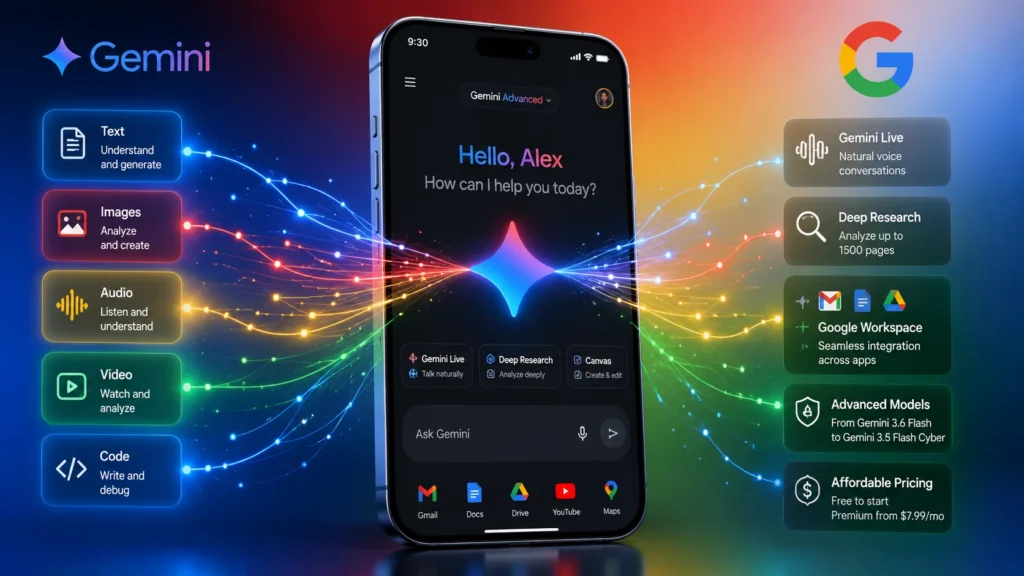
Google Gemini AI is Google’s most advanced multimodal AI assistant, built by Google DeepMind to understand and process text, images, audio, video, and code simultaneously. In 2026, Gemini powers everything from natural voice conversations through Gemini Live to deep research capabilities that analyze up to 1,500 pages of documents. Unlike standard chatbots, Gemini integrates directly with Gmail, Google Docs, Google Drive, Maps, YouTube, and Search, making it the most deeply connected AI assistant available. The model family includes Gemini 3.6 Flash for everyday tasks, Gemini 3.5 Flash Lite for lightning fast responses up to 350 tokens per second, and Gemini Pro for complex reasoning. Pricing starts free, with premium plans from $7.99 per month, and smart users can unlock Gemini AI Pro features for just $9.99 through Google One storage bundles. While ChatGPT excels at writing and third-party integrations, Gemini dominates in research, multimodal analysis, and Google ecosystem productivity.
Google didn’t just build another chatbot. It built an AI that lives and breathes inside its entire ecosystem. That’s the real story behind Google Gemini AI.
When you open the Gemini app on your phone or fire up the Gemini AI chat on your desktop, you’re not just talking to a language model. You’re talking to an assistant that can read your emails, analyze your documents, and even help you plan your next vacation. It pulls from Gmail, Google Docs, Google Drive, Maps, YouTube, and Search. No other AI has this kind of access.
But here’s the thing. Having access doesn’t automatically mean it’s the best tool for you. That’s why this guide exists.
I’ve tested Gemini extensively. I’ve compared it against ChatGPT, analyzed its pricing structure, and dug into its developer tools. In this comprehensive guide, I’ll show you exactly what Gemini AI can do, where it falls short, and whether it deserves a spot in your daily workflow.
Let’s dive in.
What Is Google Gemini AI?
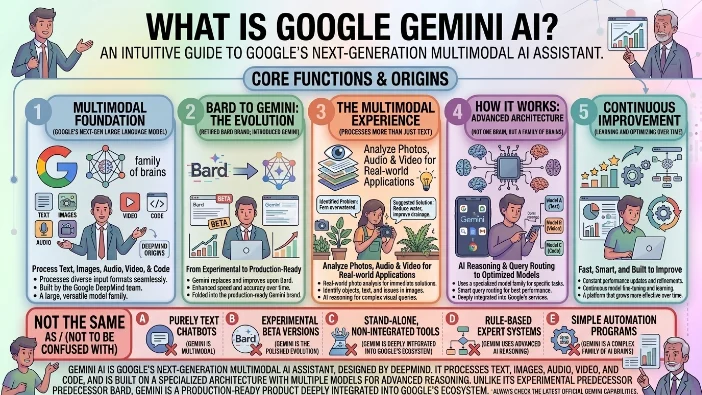
At its core, Gemini AI is Google’s next-generation large language model and AI assistant. But calling it just a language model undersells it. This is a multimodal AI that processes text, images, audio, video, and code. It’s built by Google DeepMind, the same team behind AlphaGo and some of the most advanced AI research on the planet.
The Evolution from Bard
You might remember Google Bard. That was the early version, the beta test. Gemini is the polished, production-ready evolution. Google essentially retired the Bard name and folded everything into the Gemini brand. Today, when you hear someone mention Google Bard, they’re probably talking about the older version or confusing it with the current Gemini chatbot.
The upgrade is substantial. Bard felt experimental. Gemini AI feels like a real product. It’s faster, more accurate, and deeply integrated into Google’s services.
The Multimodal Difference
Most chatbots are text-only. You type, they type back. Gemini AI breaks that mold. This multimodal AI capability makes it incredibly versatile.
Imagine you’re at a plant nursery. You snap a photo of a sick-looking fern and ask “What’s wrong with this plant?” Google Gemini can analyze the image, identify the problem, and suggest solutions. That’s the power of truly multimodal AI.
Built on Advanced Architecture
Under the hood, Gemini runs on multiple specialized models. It’s not one brain but a family of brains, each optimized for different tasks. This is a key part of its AI reasoning capability. The system decides which model to route your query to, ensuring you get the best possible response.
You’ll hear terms like “transformer architecture” and “neural networks” thrown around. What matters is this: the technology works well. It’s fast, it’s smart, and it’s constantly improving.
The Gemini Model Family
Here’s where things get interesting. Google doesn’t offer just one Gemini language model. It offers a whole family. Each model has different strengths, speeds, and price points.
Understanding the Lineup
| Model | Best For | Key Specs |
|---|---|---|
| Gemini 3.6 Flash | General conversation, efficiency | Strong coding, multimodal, lower output tokens |
| Gemini 3.5 Flash-Lite | Speed, cost-sensitive apps | Up to 350 tokens/second, very fast |
| Gemini 3.5 Flash Cyber | Cybersecurity, vulnerability detection | Identified 55 confirmed V8 vulnerabilities |
| Gemini Pro | Complex reasoning, math, science | Ideal for research and analysis |
| Nano Banana | Image generation and editing | Realistic image creation |
Gemini 3.6 Flash: Your Everyday Assistant
This is the model most people will use. It’s fast, efficient, and handles most tasks well. If you’re using the free Gemini app, you’re probably interacting with this model. It’s great for writing emails, summarizing articles, and answering questions. It’s not the smartest model in the family, but it’s the most practical for everyday use.
Gemini 3.5 Flash-Lite: Speed Demon
When speed matters, this is your model. It processes up to 350 tokens per second. That’s blazing fast. It’s ideal for high-volume tasks where you need quick responses. For developers building apps with the Gemini API, this model is a cost-effective choice for simple queries.
Gemini 3.5 Flash Cyber: The Security Specialist
This is fascinating. Google trained this model specifically for cybersecurity. In testing, it identified 55 confirmed V8 vulnerabilities. That’s not just academic—it’s practical. Companies can use this model to scan their codebases for security flaws. It’s a niche use case, but it demonstrates the versatility of the Gemini AI tools.
Gemini Pro: The Powerhouse
When you need deep reasoning and complex analysis, you turn to Gemini Pro. This model excels at math, science, and logical reasoning. It’s the closest thing Google has to a “thinking” model. Researchers and analysts will find this model invaluable for tackling tough problems.
Nano Banana: Image Generation
The name is quirky, but the results are impressive. Nano Banana powers Gemini AI image generator capabilities. It produces realistic images that rival Midjourney and DALL-E. In some tests, it even outperformed DALL-E for photorealism. However, it struggles with color accuracy and can produce blurry results after editing.
Gemini AI Features Deep Dive
The features are what make Gemini AI stand out. Let’s explore each one in detail.
Everyday Productivity
Gemini AI handles all the standard tasks you’d expect from an AI assistant. It writes emails, drafts blog posts, and generates social media captions. But it also excels at editing and rewriting. Need to make your email more professional? Just ask. Want to make your blog post more conversational? Gemini can do that.
The Gemini AI writing assistant feature is particularly useful. It doesn’t just generate text—it helps you refine it. You can upload a document and ask for specific improvements. It will suggest rewrites, point out redundancies, and offer alternative phrasings.
Document Analysis
Google Gemini can analyze it all. This is where the multimodal AI capabilities really shine.
You can upload up to 1500 pages and ask Gemini to summarize everything. That’s the “Deep Research” feature. It’s a game-changer for students, researchers, and professionals who deal with large volumes of information.
Gemini Live: Voice Conversations
This is one of the most impressive features. Gemini Live lets you have natural voice conversations with the AI. You can interrupt it mid-sentence. You can change topics abruptly. It adapts to your conversational style.
The use cases are endless. Brainstorm business ideas out loud. Practice for an important interview. Discuss a complex topic while you’re walking or driving. It feels remarkably natural, almost like talking to a human.
Screen Sharing
Gemini AI can see what’s on your screen. This is a powerful capability. You can share your screen and ask questions about what you’re looking at.
Example: “Help me plan this trip based on the map I’m looking at.” Gemini can analyze the map, suggest routes, and recommend attractions. It turns your screen into a shared workspace.
Image Generation and Editing
The Gemini AI image generator is powered by Imagen 3. It produces realistic results, often more realistic than DALL-E. You can ask it to create images from text descriptions. But the real power is in editing.
Upload an image and ask Gemini to modify it. “Remove the person in the background.” “Change the sky to sunset.” “Make the colors more vibrant.” It handles these edits surprisingly well, though it sometimes struggles with fine details.
Gemini Notebook
Previously known as NotebookLM, this is a research and productivity workspace. You combine documents, photos, voice recordings, and web pages into one notebook. Gemini then generates summaries, quizzes, presentations, and study guides from your sources.
It’s pre-installed on Samsung Galaxy Z Fold8 and Z Flip8, making it accessible to millions of users.
Task Automation
This is the killer feature. Gemini AI can now interact with over 40 apps to complete tasks. You give a natural language command, and Gemini navigates the app to do the work.
Book a restaurant reservation. Purchase event tickets. Order food delivery. Arrange travel. You can monitor progress and approve final actions. It’s like having a personal assistant that works across your apps.
Gemini AI vs ChatGPT: The Honest Comparison
The internet is full of vague comparisons. Let’s get specific. I’ve tested both extensively, and here’s the real breakdown.
Accuracy and Length Study (NIH Data)
A 2025 scoping review from the National Institutes of Health compared ChatGPT and Gemini in medical applications. The results are revealing.
| Metric | ChatGPT | Gemini |
|---|---|---|
| Accuracy in Radiology | 87.43% | 71% |
| Average Response Length | 907 characters | 1,428 characters |
| Accuracy in Emergency Scenarios | 77% | 87% |
| Accuracy in Renal Diet | 60% | 79% |
Key Takeaway: ChatGPT gives shorter, more accurate answers in most medical contexts. Gemini gives longer, more verbose responses. However, Gemini outperformed in emergency medicine and renal diet recommendations.
Tone and Personality
Here’s where I notice a big difference. Gemini AI still feels stiff. It sounds like a robot writing a corporate memo. ChatGPT feels more conversational, more human.
Try this test yourself. Ask both to write an email to your manager asking for one more day to complete a project. Gemini produces a formal, robotic response. ChatGPT gives a shorter, more direct, and more human-sounding email.
Real-Time News
This is a weakness for Gemini. On the free tier, it doesn’t have access to real-time information. Ask about breaking news, and it will tell you its knowledge cutoff date.
ChatGPT Plus handles real-time information much better. It provides live updates with source links. If you need current events, ChatGPT Plus is the better choice.
App Ecosystem
This is Gemini’s biggest Achilles’ heel. ChatGPT connects to Spotify, Apple Music, Expedia, DoorDash, and countless third-party services. Gemini is effectively limited to YouTube Music and Google’s own suite.
If you rely on third-party app integrations, ChatGPT is the clear winner. Gemini AI is locked into Google’s world.
Quick Verdict Table
| Question | Better Pick | Why |
|---|---|---|
| Best default for most paid users | ChatGPT | Better general-purpose workflow |
| Best for research and citations | Gemini | Tighter Google Search integration |
| Best for writing and drafting | ChatGPT | More polished iteration workflow |
| Best for multimodal work | Gemini | Stronger for video, audio, and long-context |
| Best free value option | Gemini | More generous free tier and storage |
| Best if you live in Google apps | Gemini | Native Gmail, Docs, Drive integration |
Gemini AI Pricing and Plans
The pricing structure is surprisingly good—but only if you use Google services. Let me explain.
Official Pricing Tiers
| Tier | Price | Key Features |
|---|---|---|
| Free | $0 | Gemini 3.6 Flash, Gemini Live, limited Deep Research, 15GB Drive storage |
| AI Plus | $7.99/month | Higher limits, Chrome and Workspace integrations, 200GB Drive storage |
| AI Pro | $19.99/month | Even higher limits, 2TB Drive storage, Deep Search in AI Mode |
| AI Ultra | $249.99/month | Max usage, 30TB Drive storage, Deep Think mode, Gemini Agent |
The Smart Upgrade Trick
Don’t buy AI Plus directly. Subscribe to Google One with 2TB of storage for $9.99/month. You get the same AI Plus features but with 2TB of storage instead of 200GB. For just $2 more per month, you get 10 times the storage. It’s effectively the AI Pro plan for half the price.
Value Comparison
ChatGPT Plus costs $20/month with no storage bundling. Gemini AI Plus via the Google One trick costs $9.99/month and includes 2TB of storage. For Google ecosystem users, Gemini is significantly better value.
Free Tier Analysis
The free tier is surprisingly generous. You get Gemini 3.6 Flash, Gemini Live, and limited Deep Research. That’s more than most free AI tools offer. ChatGPT’s free tier is more limited, with tighter usage caps.
For casual users, the free Gemini AI tier is perfectly adequate. You can do a lot without spending a dime.
Gemini AI for Developers
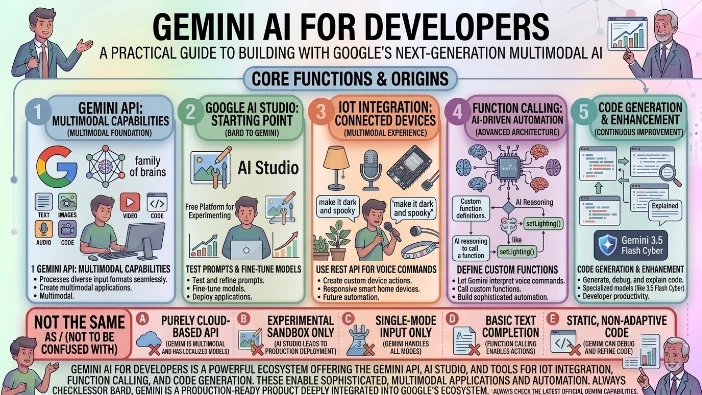
The developer story is compelling. Google offers robust tools for building with Gemini AI.
Gemini API
The Gemini API lets you build applications that understand the world. You can create apps that process images, analyze audio, and generate text. The API supports function calling, structured output, and streaming responses.
AI Studio
Google AI Studio is your starting point. It’s a free platform for experimenting with Gemini AI. You can test prompts, fine-tune models, and deploy applications. It’s surprisingly powerful and accessible.
IoT Integration
This is where things get interesting. You can use the Gemini REST API to create IoT devices that respond to custom voice commands.
Example: An ESP32 microcontroller with a microphone, connected to the Gemini API. You say “make it dark and spooky in here,” and the device changes the lighting. This is the future of smart home automation.
Function Calling
Define custom functions and let Gemini interpret voice commands to call them. This enables sophisticated automation without writing complex code.
Code Generation
The Gemini AI coding capabilities are solid. It can generate, debug, and explain code. For cybersecurity, the specialized Gemini 3.5 Flash Cyber model offers unique advantages.
Gemini AI for Students
Students will find immense value in Gemini AI. Here’s why.
Research Assistant
Upload a 500-page textbook and ask Gemini to summarize key concepts. It can identify the most important information and present it clearly. This is a massive time-saver.
Study Guide Creation
Gemini Notebook lets you create comprehensive study guides from your course materials. Combine lecture notes, readings, and practice problems into one organized resource.
Essay Help
Need help structuring an essay? Gemini AI can outline arguments, suggest thesis statements, and provide examples. It’s a writing assistant that helps you become a better writer.
Language Learning
The Gemini AI translation capabilities are excellent. Practice conversations in another language, get grammar corrections, and learn vocabulary in context.
Math and Science Help
Gemini Pro excels at mathematical reasoning and scientific analysis. It can solve complex equations, explain scientific concepts, and help with homework.
Gemini AI for Business
Businesses can leverage Gemini AI to boost productivity and automate workflows.
Meeting Summaries
Record meetings and let Gemini summarize key decisions and action items. No more taking notes during meetings—just record and ask for a summary.
Document Processing
Upload contracts, reports, and proposals. Gemini can extract key information, flag potential issues, and suggest improvements.
Customer Service
The Google Agentspace platform integrates Gemini with internal company data for customer service and workflow automation. It can handle routine inquiries, freeing up human agents for more complex issues.
Email Management
Gemini can sort through your Gmail inbox, prioritize important messages, and draft responses. It’s a powerful AI for productivity.
Data Analysis
Upload spreadsheets and ask Gemini to identify trends, generate insights, and create visualizations. It transforms raw data into actionable information.
Gemini AI Weaknesses and Limitations
Let’s be honest about the shortcomings.
Stiff and Formal Tone
Gemini AI still sounds like a robot. ChatGPT is much better at natural conversation. For writing and communication, ChatGPT has a clear edge.
Struggles with Complex Prompts
Gemini ignores important instructions when given long, complex prompts. This is a known issue in Gemini Notebook and the main chat interface. Scheduled tasks sometimes stop working for weeks at a time.
No Real Personality
You can’t personalize Gemini like you can with ChatGPT. ChatGPT allows custom instructions and custom GPTs for specific personas. Gemini is one-size-fits-all.
Ecosystem Jail
It’s locked into Google’s world. Third-party app support is practically non-existent compared to ChatGPT’s extensibility.
Hallucinations
Like all LLMs, Gemini gets things wrong. Always double-check critical information.
Real-Time Search Limitations
The free tier lacks real-time search. ChatGPT Plus handles current events much better.
Image Generation Issues
Images often come out blurry or overexposed after editing. Color accuracy is inconsistent.
Who Should Use Gemini AI?
Not everyone needs Gemini. Here’s who benefits most.
Buy Gemini If
You live in Google’s ecosystem. Gmail, Docs, Drive, Calendar, and Android are your daily drivers.
You need deep research. Summarizing 1500 pages is a game-changer.
You want the best value. The Google One storage and AI bundle is unbeatable.
You do multimodal work. Video, audio, and image analysis are your jam.
You’re an IoT developer. The Gemini API unlocks voice commands for devices.
Skip Gemini If
You write for a living. ChatGPT’s iterative writing workflow is simply better.
You need third-party integrations. ChatGPT has Expedia, Spotify, DoorDash. Gemini doesn’t.
You’re a power coder. ChatGPT’s coding ecosystem is more mature.
You want personalization. Custom GPTs are still a ChatGPT specialty.
How to Get Started with Gemini AI
Let’s make this practical.
The One-Hour Experiment
Download the Gemini app on Android or iOS. Connect Google Apps. Link Gmail, Docs, Photos, and Calendar. Go to Settings and enable Extensions.
Try Gemini Live. Press the waveform icon and talk naturally for 10 minutes.
Test a research task. Upload a PDF and ask for a 10-bullet summary.
Ask “What’s on my screen?” Share your screen and ask for help reading a complex image.
For Developers: API Quickstart
Go to Google AI Studio—it’s free to start. Use the Gemini REST API with audio input. Try function calling. Define a custom function and let Gemini interpret voice commands to call it.
Free vs Paid
Start with free. See if it meets your needs. If you need more storage or higher limits, upgrade via the Google One trick for $9.99/month.
FAQs
Is Google Gemini AI free to use?
Yes, Google Gemini AI offers a generous free tier. You get access to Gemini 3.6 Flash for text generation, Gemini Live for voice conversations, limited Deep Research capabilities, and 15GB of Google Drive storage. The free version works well for casual users, students, and anyone wanting to test the platform before committing to a paid plan. For heavier usage, higher limits, and more storage, you can upgrade to AI Plus at $7.99 per month or AI Pro at $19.99 per month.
What makes Gemini AI different from ChatGPT?
The biggest difference is ecosystem integration. Gemini AI connects directly to Gmail, Google Docs, Google Drive, Maps, YouTube, and Search. It can read your emails, analyze your documents, and even help plan trips using Google Maps. ChatGPT has superior writing capabilities, a more conversational tone, and connects to third-party services like Spotify, Expedia, and DoorDash. Gemini excels at multimodal tasks—processing images, audio, and video—while ChatGPT remains the better choice for drafting content and general conversation.
Can Gemini AI generate images?
Yes, Gemini AI generates images through its Nano Banana model, which uses Imagen 3 technology. It produces realistic images, often more photorealistic than DALL-E. You can create images from text descriptions and edit existing images by asking Gemini to remove objects, change backgrounds, or adjust colors. However, some users report occasional issues with color accuracy and blurriness after editing.
Is Gemini AI better than ChatGPT for research?
Yes, Gemini AI excels at research tasks. Its Deep Research feature analyzes up to 1,500 pages of documents in a single prompt. It pulls information from Google Search and Scholar, providing well-cited responses. A 2025 NIH study showed Gemini outperformed ChatGPT in emergency medicine scenarios (87% accuracy versus 77%) and renal diet recommendations (79% versus 60%). For students, academics, and professionals dealing with large volumes of information, Gemini is the stronger choice.
What apps does Gemini AI integrate with?
Gemini AI integrates with Google’s ecosystem: Gmail, Google Docs, Google Sheets, Google Slides, Google Drive, Google Maps, YouTube, and Google Calendar. Through task automation, it can also interact with over 40 third-party apps to book restaurant reservations, purchase event tickets, order food delivery, and arrange travel. However, it lacks native integrations with popular services like Spotify, Apple Music, Expedia, and DoorDash areas where ChatGPT excels.
How do I get Gemini AI Pro for the best price?
Don’t subscribe to AI Pro directly at $19.99 per month. Instead, subscribe to Google One with 2TB of storage for $9.99 per month. This bundle includes all AI Pro features plus 2TB of storage instead of just 200GB. You get double the storage at half the price. It’s one of the best deals in AI right now and effectively gives you the premium Gemini experience for just $10 per month.
Does Gemini AI work on iPhone and Android?
Yes, Gemini AI works on both platforms. You can download the Gemini app from the Apple App Store for iPhone or Google Play Store for Android. The app includes Gemini Live for voice conversations, screen sharing, and all core features. On newer Samsung Galaxy devices like the Z Fold8 and Z Flip8, Gemini comes pre-installed with native integration. The web version works through any browser, and Chrome offers additional extensions for deeper Google Workspace integration.
What are Gemini AI’s biggest limitations?
Gemini AI has several notable weaknesses. It sounds stiff and robotic compared to ChatGPT’s conversational tone. It struggles with complex, multi-step prompts and sometimes ignores important instructions. The free tier lacks real-time search, meaning it cannot access current news or events. Third-party app integrations are minimal compared to ChatGPT’s extensive ecosystem. Image generation can produce blurry or overexposed results. And unlike ChatGPT, Gemini doesn’t support custom instructions or personalized “GPT” creations.
Can developers build apps with Gemini AI?
Absolutely. Google offers the Gemini API, Google AI Studio, and Vertex AI for developers. You can build applications that process images, analyze audio, and generate text. The API supports function calling, structured output, and streaming responses. A particularly exciting use case is IoT integration—you can connect microcontrollers like ESP32 to the Gemini REST API for voice-controlled devices. The cybersecurity-focused Gemini 3.5 Flash Cyber model helps developers identify vulnerabilities in code.
Which Gemini model should I choose?
Choose based on your needs. Gemini 3.6 Flash works best for everyday conversations and general tasks. Gemini 3.5 Flash-Lite suits high-volume, cost-sensitive applications needing speed up to 350 tokens per second. Nano Banana powers image generation. For most casual users, the free tier’s 3.6 Flash model is more than sufficient.
Conclusion
Gemini is the best AI for Google users and researchers. But ChatGPT is still the better all-rounder.
Gemini AI is an ecosystem play. Its value comes from the data it can access Gmail, Docs, Search and the apps it can automate. ChatGPT is a generalist. It’s better at conversation, writing, and third-party integrations.
For Google power users and researchers, Gemini AI Pro via the Google One trick is a no-brainer.
For developers, the Gemini API is genuinely exciting, especially for IoT and long-context analysis.
Download the free Gemini app today and see for yourself. And if you find value in it, the $9.99/month upgrade is one of the best deals in AI right now.

Kevin Brooks is a grammar specialist at GramBrix.com, dedicated to helping readers understand language rules with clarity and confidence. He simplifies complex grammar concepts through practical examples and easy explanations.